
Could your cloud migration succeed technically yet still leave your organization with unpredictable costs, avoidable downtime, or compliance gaps? That’s why cloud migration risks and mitigation must be considered before workloads move, not treated as a cleanup exercise afterward. The greatest risks often stem from decisions about architecture, dependencies, security, and governance that shape the entire journey.
If you’re concerned about service disruption, rising cloud bills, or maintaining compliance across multiple platforms, those concerns are well founded. A migration can introduce complexity when teams move applications without understanding how they depend on data, networks, and operational processes. With a clear strategy, however, these challenges can be anticipated and managed.
This guide identifies common threats to a cloud migration and explains practical ways to reduce them. You’ll learn how assessment, workload planning, security and compliance controls, cost governance, and ongoing monitoring can support a more predictable transition. The result is a stronger roadmap for protecting critical operations while building a secure, cost-conscious cloud environment.
Key Takeaways
- Use a readiness assessment to uncover technical dependencies and organizational gaps before migration planning turns into execution.
- Address cloud migration risks and mitigation through deliberate data-integrity controls and a clear understanding of shared security responsibilities.
- Evaluate whether rehosting preserves legacy inefficiencies, and choose a migration approach that supports long-term performance and cost control.
- Establish cloud governance, including a Center of Excellence, to guide decisions across complex environments.
- Combine strategic cloud adoption with optimization and ongoing support to surface hidden risks and manage them beyond migration day.
The Landscape of Cloud Migration Risks in 2026
Cloud migration promises greater agility, resilience, and room to innovate. The risk lies in the distance between those expected gains and the operational reality after workloads move. Migration risk is the potential for architectural or operational misalignment to disrupt business continuity.
That gap can emerge when teams underestimate dependencies, overlook governance, or move applications without adapting them to their new environment. AI workloads bring additional demands for data quality, access controls, and infrastructure planning, while hybrid and multi-cloud architectures spread responsibilities across platforms. A decision that works for one application may create latency, security, or cost issues elsewhere. The Cloud Computing Overview and Migration Challenges provides broader context on cloud migration and security considerations.
The consequences extend beyond a delayed project. Downtime can interrupt customer-facing services and internal operations; a data breach can expose sensitive information; and both can weaken customer confidence and damage reputation. Effective cloud migration risks and mitigation planning therefore considers business continuity and expected value alongside technical execution.
Categorizing the Critical Failure Points
Risk becomes easier to manage when teams group it by where it originates. One issue can also trigger another: an overlooked dependency may cause latency, delay a launch, and increase cloud consumption while teams troubleshoot.
- Technical: Network latency can slow application response, while transfer errors threaten data integrity. Legacy systems may also depend on software versions, configurations, or connections that don’t function as expected in a cloud environment.
- Operational: Skills gaps can leave teams unprepared to manage new services, and unclear governance can lead to inconsistent access, monitoring, and change decisions.
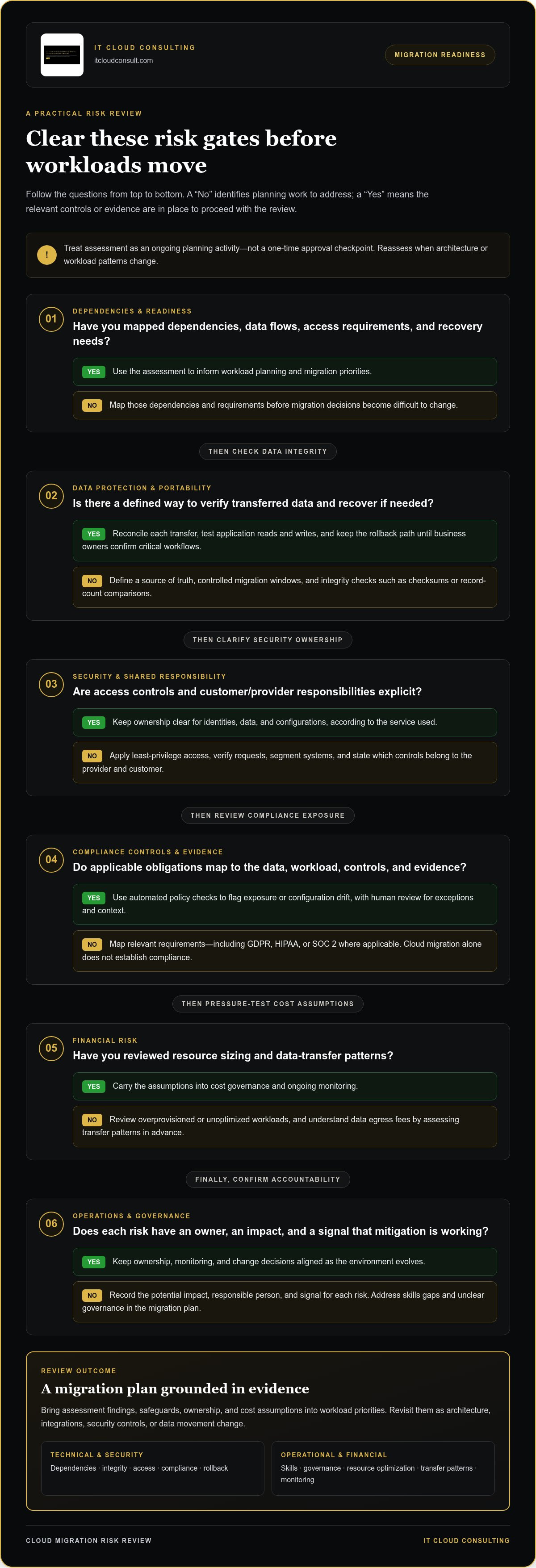
- Financial: Cloud bill shock can follow from overprovisioned resources or workloads that aren’t optimized. Data egress fees, charged when data moves out of a provider’s environment, may also complicate budgets if transfer patterns aren’t understood in advance.
These categories connect technical choices to service availability, security, and financial outcomes. They also help teams assign ownership before migration begins. For each risk, record its potential impact, the person responsible for addressing it, and the signal that will show whether mitigation is working.
Why Traditional Risk Assessments Fall Short
A static risk log can become outdated as architecture, workloads, and provider services change. A plan created 12 months ago may no longer reflect current AI use, integrations, security controls, or data movement. Treat assessment as an ongoing planning activity, not a one-time approval checkpoint.
Start by mapping application dependencies, data flows, access requirements, and recovery needs, then review them as the environment evolves. Integrating a cloud security assessment checklist into initial planning helps teams surface exposure and control gaps before migration decisions become difficult to change. Reassess when architecture or workload patterns change, and use the findings to update ownership, controls, and migration priorities.
Deep Dive: Technical and Security Risk Mitigation
A migration can preserve data and still introduce risk if access controls, application behavior, or operational ownership change in unexpected ways. Strong mitigation connects technical safeguards to the people responsible for running them. Teams unfamiliar with cloud identity, networking, or observability may miss configuration errors or struggle to respond when performance changes. Build knowledge transfer and clear ownership into the migration plan, rather than treating them as post-launch tasks.
Architecting for Security and Compliance
Start with a secure-by-design foundation. Apply Zero Trust principles by granting least-privilege access, verifying requests, and segmenting systems so a compromised account or workload has limited reach. The shared responsibility model also needs explicit ownership: providers secure parts of the underlying service, while customers retain responsibility for areas such as identities, data, and configurations, depending on the service used. The Cloud Security Alliance Top Threats to Cloud Computing can inform a structured review of exposure.
For environments involving GDPR, HIPAA, or SOC 2 requirements, map each applicable obligation to the data, workload, control, and evidence it affects. Don’t assume that moving to a cloud platform automatically satisfies compliance. Automated policy checks can flag exposed storage, overly broad permissions, or configuration drift, while human review validates exceptions and interprets context. Cloud infrastructure consulting can help align architecture and controls before workloads move.
Protecting Data and Portability
Reduce transfer errors with a defined source of truth, controlled migration windows, and integrity checks such as checksums or record-count comparisons. Reconcile data after each transfer, test application reads and writes, and maintain a rollback path until business owners confirm that critical workflows behave as expected.
Vendor lock-in is another architectural risk. Favor portable interfaces and widely supported data formats where they fit the workload, document provider-specific dependencies, and separate application logic from infrastructure settings where practical. Portability doesn’t mean every workload should run unchanged everywhere; it means understanding the effort and constraints involved in moving or integrating it later.
Performance and Latency Challenges
Map application calls and dependencies before relocation. A “chatty” application that makes frequent requests between services may slow sharply if those components end up far apart or communicate across high-latency links. Co-locate tightly coupled components when appropriate, and consider edge computing when processing closer to users or devices can reduce distance-related delays.
Validate assumptions with a pilot that reflects real workloads. Measure response times, error rates, and throughput using synthetic monitoring, then compare results with service objectives. Test recovery procedures against defined recovery time objectives (RTO) and recovery point objectives (RPO), which describe acceptable restoration time and data loss. These checks expose weak spots while changes are still manageable.
Strategic cloud adoption pairs these controls with ongoing optimization and monitoring, helping teams address risks as architecture evolves. Explore IT Cloud Consulting’s cloud adoption and optimization support as part of a plan for safer operations beyond migration.
Myth vs. Reality: Why 'Lift and Shift' is the Riskiest Strategy
Myth: Moving existing virtual machines (VMs) to the cloud unchanged is automatically the safest and fastest route. Rehosting can simplify the initial move because it limits application changes, but it doesn’t remove the design assumptions built into legacy systems. If an application was oversized, tightly coupled, or difficult to maintain before migration, moving it as-is can carry those weaknesses into a new environment.
Reality: A successful transfer isn’t the same as a successful migration. Cloud infrastructure makes resources easier to provision, but that convenience can amplify inefficiency: oversized instances, idle capacity, and unnecessary storage may continue consuming resources until teams identify and correct them. Costs can compound as usage expands, while technical debt makes future changes slower and riskier. Cloud migration risks and mitigation planning should assess workload suitability, not just the mechanics of moving it.
The Financial Risk of Cloud Inefficiency
Before migration, review utilization patterns, workload peaks, storage needs, licensing constraints, and dependencies. Right-sizing resources to observed demand helps avoid paying for capacity a workload rarely uses. Cloud optimization consulting can help teams assess these choices as part of a broader adoption strategy, then track usage after workloads move.
Consider an illustrative case: a company rehosts an oversized application with its existing database and batch-processing setup. It launches quickly, but idle capacity and repeated data transfers keep adding avoidable consumption. Another team first refactors a frequently used component and adjusts resource allocation to match demand. The second approach takes more planning, yet can improve efficiency over time. Actual results depend on workload behavior, architecture, and operating requirements, so compare scenarios using your own usage data rather than assuming one approach always costs less.
Choosing a Lower-Risk Migration Path
Refactoring changes application code or structure to better use cloud capabilities; replatforming makes targeted changes while preserving much of the application. Neither is necessary for every workload. Select an approach based on business value, technical condition, dependencies, and the level of change the team can operate confidently.
A practical decision can start with three questions: Does the workload need modernization to meet performance goals? Can the team support the revised architecture? Will the expected benefits justify the effort and introduce manageable operational change? Workloads with stable performance and limited strategic importance may be suitable for rehosting, while critical or costly systems can merit deeper evaluation.
Operational Fragility in Rehosted Environments
Legacy monitoring tools may lack visibility into cloud-native services, distributed components, and changing resource use. This makes it harder to trace an incident from a user-facing symptom to its cause. “Black box” applications present another challenge: if the team lacks current documentation or operational knowledge, routine updates and recovery can become uncertain.
Reduce that fragility by documenting dependencies, owners, and escalation paths; updating monitoring to cover application health and resource behavior; and rehearsing routine operational tasks. A modernization plan that includes knowledge transfer and ongoing optimization turns migration into a manageable evolution, rather than a one-time move that leaves yesterday’s complexity in place.
A Proactive Framework for Risk Mitigation
Migration risk management works best as a continuous operating discipline, not a checklist completed before launch. A strong framework links technical decisions to business priorities, assigns clear ownership, and gives teams a way to adjust as workloads and requirements change. Use these four steps to create that structure.
- Assess readiness across technology and people. Inventory workloads, dependencies, data, security controls, and operational requirements. Also assess team skills, decision-making processes, and capacity for change. This reveals where training, architectural work, or additional expertise will be needed before the migration schedule is set.
- Establish a Cloud Center of Excellence. Create a cross-functional governance group that brings together IT, security, finance, and business stakeholders. Define how teams approve architecture, manage access, control cloud spending, and document exceptions. Consistent guidance helps individual projects move forward without creating conflicting standards.
- Migrate in phases through a pilot. Choose a representative workload with manageable dependencies, then test the migration process, operational handoffs, security controls, and recovery procedures. Use the findings to refine plans before moving higher-impact systems. Phased delivery creates decision points where teams can address issues rather than allowing small problems to scale across the program.
- Monitor cost and security continuously. Track resource use, configuration changes, access, and service performance after workloads move. Use FinOps practices to review consumption against budgets and business value, then adjust capacity or architecture when patterns shift. Monitoring should support action, with named owners and a defined process for investigating alerts.
The Role of Strategic Planning
Build an enterprise cloud transformation roadmap that connects migration decisions to business KPIs, such as service availability, customer experience, or the ability to deliver new capabilities. This alignment gives executives a clear basis for prioritization and helps teams explain why a workload is moving, changing, or staying put. Set timelines that include testing, validation, and stakeholder review, rather than treating the transfer date as the only milestone.
Operational Readiness and Managed Support
Prepare internal teams to operate the environment through role-based training, clear runbooks, and practice with routine changes and incidents. Cloud consulting can complement internal expertise during assessment and implementation, while ongoing managed support helps maintain visibility as workloads evolve. Monitoring and operational guidance are most useful when responsibilities, alert thresholds, and response steps are clear.
Resilience also requires tested recovery. Automate disaster recovery and failover where appropriate, document decision authority, and rehearse recovery scenarios so teams know whether systems and data can be restored as intended. Cloud migration risks and mitigation become an ongoing cycle: assess, implement, monitor, test, and refine. Build a more resilient cloud strategy with IT Cloud Consulting.
Partnering for Success: How IT Cloud Consulting Mitigates Your Risk
A resilient cloud journey takes more than moving workloads. IT Cloud Consulting provides cloud consulting, implementation support, and ongoing management to connect strategic decisions with the technical work required to put them into practice. This approach helps organizations plan a cloud environment around operational needs, security priorities, and business objectives.
Before workloads move, a structured assessment can uncover risks that a basic inventory may miss. Reviewing application dependencies, data flows, access patterns, current utilization, recovery needs, and team readiness helps reveal where a migration could create disruption or unexpected operating demands. These findings shape the migration sequence and identify where teams need additional planning or expertise.
That groundwork supports a more informed path forward:
- Surface dependencies early: Identify integrations and operational assumptions that could affect workload sequencing.
- Connect architecture to outcomes: Evaluate designs against performance, security, continuity, and cost priorities.
- Plan for life after launch: Define how teams will monitor, optimize, and support workloads once they are running in the cloud.
Strategic Advisory and Roadmap Development
Strategic cloud adoption begins with a roadmap tailored to an organization’s workloads, business priorities, and operational requirements. IT Cloud Consulting provides strategic planning and roadmap development to help leaders weigh migration pace against stability and readiness.
Rather than treating every application the same, the roadmap can account for dependencies, modernization needs, and the team’s capacity to manage change. Linking technical milestones to business KPIs also helps stakeholders understand the purpose behind each decision. The result is an architecture and migration plan designed to evolve as needs change, not just meet an initial move date.
Continuous Managed Cloud Evolution
Risk doesn’t end when workloads are live. Ongoing managed cloud support helps teams maintain visibility into resource use, performance, and emerging operational issues. Regular optimization can identify inefficient capacity and guide adjustments as demand changes, supporting greater cost predictability and a stronger return on cloud investment.
Ongoing support also gives internal teams technical assistance as their cloud environment grows. Clear operational guidance, monitoring practices, and review cycles help teams respond to change without losing sight of security and service needs. This continuing support turns migration planning into an evolving discipline, rather than a one-time project.
Effective cloud migration risks and mitigation depend on a connected lifecycle: assess the environment, make deliberate architectural choices, execute with clear ownership, and keep improving after deployment. With strategic advisory and ongoing optimization, organizations can build a more resilient cloud foundation and scale with greater confidence.
Turn Migration Decisions Into Lasting Advantage
Cloud migration risks and mitigation are best approached as an ongoing leadership priority, not a hurdle that ends when systems go live. Identify which business outcome matters most, define how you’ll measure it, and make that goal the anchor for future cloud decisions. That focus helps teams distinguish meaningful progress from change for its own sake.
A clear path forward also gives decision-makers room to adapt. As workloads, security needs, and business priorities evolve, revisit assumptions and use operational insight to guide the next improvement. With the right expertise, uncertainty can become a foundation for a more resilient and capable cloud environment.
IT Cloud Consulting provides strategic cloud adoption, cloud optimization, and ongoing managed cloud support to help organizations plan and operate their cloud environments. Explore cloud consulting and managed services with IT Cloud Consulting.
Move forward with a plan shaped around your organization’s goals, and turn cloud investment into a platform for lasting progress.
Frequently Asked Questions
What are the most common security risks during a cloud migration?
The most common security risks include excessive permissions, exposed data stores, unprotected transfer channels, and unclear ownership of security controls. For example, a temporary migration account may retain broad access after the transfer unless teams revoke it deliberately. Before moving sensitive workloads, map who can access data, how credentials are protected, and which controls your organization must manage. Review access and configuration again after cutover, when temporary settings and accounts can otherwise be overlooked.
How can we prevent cost overruns during the migration process?
Prevent overruns by forecasting migration and operating costs separately, then comparing actual usage with those forecasts as workloads move. Include data transfer, storage growth, software licensing, and temporary parallel environments in the estimate. Assign owners to review spending, apply budget alerts, and tag resources so teams can see which project or workload drives consumption. Regular reviews let you adjust capacity or migration sequencing before unexpected usage becomes an established operating pattern.
What is the biggest mistake companies make when moving to the cloud?
A common mistake is treating migration as a relocation project rather than a business and operating-model change. A technically successful move can still disappoint if teams haven’t defined what success means or prepared to manage the new environment. For example, moving an application without clarifying its owner, support process, and performance requirements can leave incidents difficult to resolve. Set measurable outcomes and operational responsibilities before approving the migration plan.
How do we ensure data integrity while transferring massive datasets?
Protect data integrity by validating each transfer batch instead of waiting until the full dataset arrives. Create a manifest of expected files or records, compare counts and checksums at the source and destination, and investigate discrepancies before continuing. For large transfers, test the process on a representative subset and plan for interrupted transfers with resumable jobs and controlled retries. Preserve a source copy until business owners confirm the destination supports required queries and workflows.
Can a hybrid cloud strategy help mitigate migration risks?
Yes, a hybrid strategy can reduce the pressure to move every workload at once by keeping selected systems in their existing environment while cloud workloads are validated. It can also support a phased transition when applications have dependencies that are difficult to move together. The trade-off is added complexity: teams must manage identity, connectivity, monitoring, and data movement across environments. Define which workloads stay hybrid, who owns each, and what conditions will trigger a later change.
How long does a typical enterprise cloud migration take to complete safely?
There is no single safe timeline for an enterprise migration. The schedule depends on workload count, dependencies, testing needs, and organizational readiness. Build time into the plan for discovery, pilots, remediation, and validation. A schedule with decision points can reveal issues earlier than one focused only on completing workload transfers.
What is the role of a cloud readiness assessment in risk mitigation?
A readiness assessment establishes whether workloads, teams, and operating processes are prepared for the proposed migration. It can identify unsupported dependencies, unclear data ownership, gaps in staff expertise, and applications that need a different migration approach. The useful output is a prioritized action plan, not just an inventory: what must be resolved first, what can move in a pilot, and which risks require an owner. This makes investment and sequencing decisions more grounded.
Is 'Lift and Shift' ever a safe option for enterprise migrations?
Yes, rehosting can be a reasonable option when an application is stable, its dependencies are understood, and the organization needs to move it with limited change. It may also serve as an interim step when a later modernization is planned and funded. Before proceeding, confirm that the workload’s resource needs, licensing, recovery approach, and support requirements fit the destination. Set a review date so a temporary rehost doesn’t become a permanent, inefficient design by default.


