

Cloud computing for the healthcare industry connects clinical data and applications through internet-accessible systems, helping authorized teams access information and collaborate across locations. Healthcare organizations must protect sensitive patient data under HIPAA, and according to the U.S. Department of Health and Human Services, cloud service providers that maintain electronically protected health information must sign Business Associate Agreements.
Moving healthcare information to the cloud is more than changing where data is stored. It can make records, imaging, and other clinical information easier to access across care settings, supporting more connected experiences for patients and professionals.
This guide explains cloud computing for the healthcare industry, including how it enables remote access and collaboration, and how deployment models shape the use of cloud services. It also covers security, compliance, and practical planning, so you can weigh the potential benefits against the considerations involved in creating a more connected care environment.
Key Takeaways
- Understand how healthcare organizations use cloud services to manage data, support recovery, and improve interoperability while addressing security and compliance.
- See how connected records and virtual care tools can help patients access information and care teams coordinate across settings.
- Compare private, public, hybrid, and multicloud models to understand how each approach shapes control, flexibility, and collaboration.
- Learn how remote access can help authorized professionals work with timely patient information across locations.
- Identify how strategic adoption, cloud optimization, and ongoing support can help align cloud decisions with healthcare goals.
What is Cloud Computing in Healthcare?
Cloud computing gives healthcare organizations internet-based platforms to store, manage, and access electronic information. Electronic health records and medical images are examples of data these platforms can support.
Healthcare Cloud Benefits
Healthcare cloud benefits include flexible capacity, shared access to information, and recovery options that reduce reliance on local servers. Compared with maintaining physical data servers, cloud computing can reduce operational expenses. Shared platforms can also help authorized teams access clinical information across departments.
Compare AWS, Microsoft Azure, and Google Cloud based on healthcare workloads, Business Associate Agreement coverage, security controls, interoperability, recovery design, and operating costs. The right fit depends on how your organization needs to use and manage its systems. For medical imaging, cloud storage can include data redundancy and backups to help protect images from loss or corruption.
These benefits matter when organizations need to expand access without building every capability into local infrastructure. For example, a hospital can assess whether its existing record systems exchange data with cloud platforms before planning a migration. A phased approach can help maintain daily operations while teams prioritize critical data and workflows.
Healthcare Data Security and Compliance
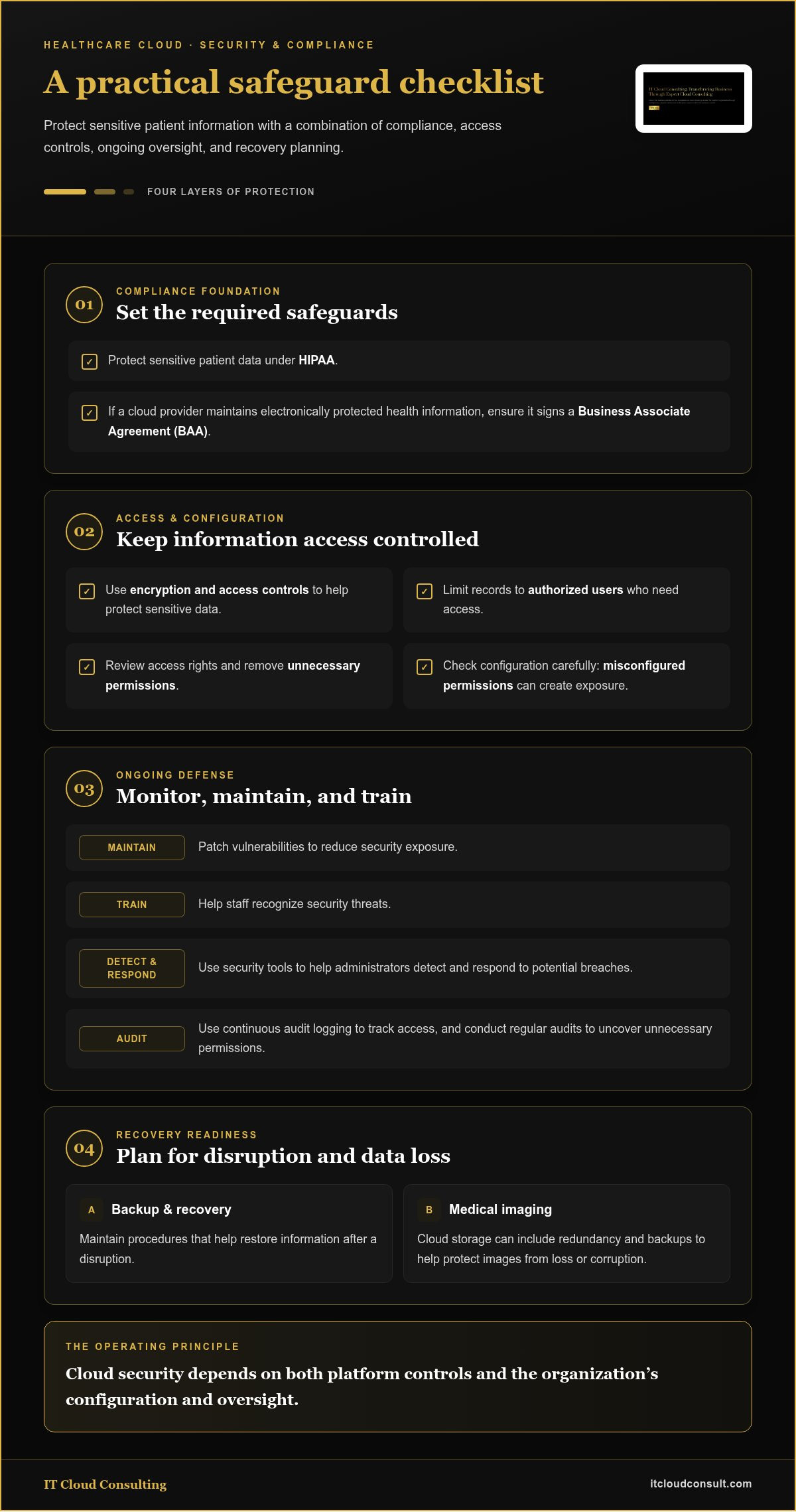
Healthcare data security combines technical controls, staff practices, and compliance processes to protect sensitive information. According to the U.S. Department of Health and Human Services, healthcare organizations must protect patient data under regulations such as HIPAA, and cloud providers maintaining electronically protected health information must sign HIPAA Business Associate Agreements.
Encryption and access controls help protect sensitive data, but cloud adoption also brings risks such as misconfigured permissions, vulnerabilities, and unauthorized access. Organizations can reduce exposure by limiting records to authorized users, reviewing access rights, patching vulnerabilities, and training staff to recognize security threats. Security tools can help administrators detect and respond to potential breaches.
Privacy also depends on operational decisions. Continuous audit logging, for example, can help teams track access to shared clinical information, while regular audits can uncover unnecessary permissions. Backup and recovery procedures provide another layer of protection by helping organizations restore information after a disruption. These safeguards matter because cloud security depends on both platform controls and the organization’s configuration and oversight.
Healthcare Cloud Uses
Healthcare cloud applications include storing electronic records and medical images, supporting telemedicine, processing clinical research data, and enabling remote monitoring. Cloud-connected heart monitors, infusion pumps, and wearable sensors can collect information for analysis. Clinical research systems can process large datasets to help evaluate trial results.
What are the main uses of cloud computing in healthcare? Organizations use it to host records and applications, share clinical information, support virtual care, and analyze data. A telehealth platform, for example, can support virtual appointments, while remote monitoring can transmit device readings for care teams to review. Advanced clinical solutions such as MayaMD also rely on cloud architecture to deploy clinical AI that supports patients managing chronic conditions.
These uses matter when information needs to move across care settings. Cloud platforms can help authorized professionals access records remotely and share data among departments or organizations. Before adoption, teams should identify priority workloads, determine who needs access, and plan recovery procedures. These steps connect technical choices to practical needs, such as finding a patient’s imaging history during a consultation.
Cloud-supported patient experiences and care coordination
Cloud platforms can connect patient records, clinical applications, and remote care tools across healthcare settings. Patients may be able to view test results and care instructions through a digital portal. Care teams can work from shared information rather than separate files or delayed handoffs.
Cloud computing supports electronic health records by making them available to authorized users across locations. It supports telehealth by hosting virtual appointment tools and storing related patient information. For medical imaging, cloud storage can help clinicians access images remotely, while redundancy and backup features can help protect files from loss or corruption.
Access to records can make patient participation more practical. A patient who reviews a test result before an appointment can prepare questions, while a clinician can consider relevant notes and results together. Access to medical records may also help patients avoid repeated tests and reports when providers can share the information needed for care.
Unstructured information adds another layer. Images, scanned documents, and clinical notes may sit outside standard electronic record fields, making them harder to find during care. A reported 65% of health systems lack medical images and other unstructured patient information at the point of care. Content services can organize those materials and make them searchable for authorized users.
Coordination improves when care teams work from current information. For example, a primary care physician and specialist could review the same record before discussing a treatment plan. Health information exchange platforms can support that connection, helping teams reduce duplicate tests and avoid errors caused by incomplete records.
Patient data ownership also calls for clear governance. Organizations should define who can view, share, correct, and retain records, then explain those processes through patient-facing policies. Cloud access can support digital engagement, but portal design matters: clear test-result views, appointment details, and messaging options make information easier to use. Deloitte’s 2025 survey identified virtual health, digital tools, and connected care delivery as emerging trends for 88% of respondents.
Cost and interoperability decisions shape the patient experience, too. Teams can map how records move between clinics, imaging systems, and telehealth platforms, then identify where data remains disconnected. A focused cloud plan can align those workflows with patient needs; connected-care cloud planning can help organizations structure that transition.
Healthcare cloud computing definition and remote data access
Healthcare cloud computing uses internet-accessible infrastructure and applications to store, process, and share health information. For a hospital, this can connect clinical systems without requiring every user to work from local servers. Cloud computing for the healthcare industry can also make information available across locations, subject to secure access policies.
Remote Health Data Access
Remote health data access lets authorized users retrieve clinical information through connected systems outside a hospital’s local network. For example, a clinician at a follow-up appointment can review a patient’s history from another care location instead of relying on a locally stored file.
Access depends on identity controls, permissions, and reliable connections to relevant applications. Organizations should map which roles need each record type, then configure access accordingly. This approach can make useful information available across locations while limiting access to people involved in care.
Health Data Sharing and Insights
Cloud-based sharing brings information from different visits and care settings together, supporting a more complete view of a patient’s history. A care team, for example, can review previous notes, results, and treatment information instead of treating each encounter as an isolated event.
Longitudinal data insights help organizations examine patterns over time and use them to inform care delivery. Cloud solutions can manage large volumes of healthcare data for this analysis. Sharing information across providers can also help avoid repeated reports and prevent report damage, improving the continuity of records used in decisions.
Cloud Data Management and Interoperability
Cloud data management organizes information from clinical applications so teams can store, retrieve, and share it consistently. Interoperability describes how different systems exchange and use that information. For instance, a hospital can map how a lab result moves from a testing application into the patient record clinicians consult.
Effective management starts by identifying data sources, owners, and permitted uses. Organizations can then define common workflows for updating records and resolving duplicates. These practices make shared information easier to interpret across departments and help teams understand where data originates and how it should be maintained. A cloud computing for the healthcare industry strategy should account for these workflows alongside infrastructure choices.
Encryption and Access Controls
Encryption helps protect health information by making data unreadable without the appropriate key. Access controls determine which users can view or manage it. Together, these safeguards help protect sensitive information as it moves between applications or remains stored in cloud infrastructure.
Organizations should assign permissions by role and review them when responsibilities change. A clinician, for example, may need access to a patient’s records, while an administrative role may require different information. Logging access and reviewing unusual activity can help teams identify misuse and maintain oversight of shared clinical data.
Healthcare cloud deployment models: private, public, hybrid, and multicloud
Healthcare organizations can choose how cloud infrastructure is deployed and distributed across providers and locations. The right model depends on workload requirements, data sources, integration needs, and how teams manage storage, access, and backup.
Private and public cloud
A private cloud is dedicated to one organization, while a public cloud uses services shared across customers. A hospital might choose private infrastructure for a workload requiring greater control over its environment, or public cloud storage for applications that need flexible capacity. In either model, healthcare organizations remain responsible for aligning configurations and access policies with operational needs.
These models differ in how infrastructure is provided and managed, not simply where data sits. A public cloud service can support an electronic records application, for example, while a private environment may host a separate system with distinct management requirements. Map each workload and its data sources before assigning it to an environment.
Hybrid and multicloud
A hybrid cloud combines private infrastructure with public cloud services, allowing workloads or data to remain in different environments. For example, a hospital could retain a system in its private environment while using public cloud storage for another workload. Integration between environments matters: teams need clear rules for data movement, permissions, and backup.
Multicloud means using services from multiple cloud providers. A healthcare organization might rely on one provider for an application and another for a separate workload. This can diversify infrastructure choices, but teams must coordinate identity controls, monitoring, data formats, and recovery plans across providers. Hybrid describes a mix of private and public environments; multicloud describes the use of multiple providers.
Cloud service models
Deployment models describe where cloud services run and how environments are distributed. Service models describe what the provider supplies. With Infrastructure as a Service, or IaaS, the provider supplies computing infrastructure while the organization manages more of its software stack. Platform as a Service, or PaaS, provides a platform for deploying applications.
Software as a Service, or SaaS, delivers a complete application, such as a cloud-based clinical system. In specialized clinical domains, platforms like Helpful.vet demonstrate this approach by offering interactive workflow tools and clinic benchmarks for daily operations. These models shape operational responsibilities. With SaaS, the organization uses the application; with IaaS, it manages more components. A hospital can compare models by identifying which team will maintain each application, manage data, and configure access.
Choosing a deployment approach
Start by matching each workload to its requirements. A records application, imaging archive, and analytics platform may need different storage, integration, and recovery arrangements. Then assess how systems exchange information and where backup copies belong. This workload-based approach helps avoid choosing one model for every use case.
Document which environment stores each dataset, which applications depend on it, and who can access it. For a hybrid setup, map how information moves between private and public systems. For multicloud, document provider-specific controls and recovery responsibilities. These steps give healthcare organizations a clearer basis for evaluating deployment and service models together.
Cloud-based collaboration among healthcare professionals
Cloud technology makes collaboration a shared workflow, not simply a way to store patient data. A primary care physician, specialist, and radiologist can work from connected records, subject to role-based permissions. For example, a referring clinician can share relevant history and imaging with a specialist before a consultation, giving both professionals context for their discussion.
That coordination matters in the United States, where hospitals and health systems generate more than 33.9 million MRIs and 80 million CT scans annually. A cloud-supported imaging workflow can help authorized clinicians access the same study and associated notes from different locations. The practical value depends on linking images to the correct patient record and making the latest version easy to identify.
Shared access can improve handoffs between care teams. When a patient moves from a hospital department to an outpatient clinic, a shared record can carry forward relevant notes, results, and care instructions. Health information exchange platforms can help providers coordinate care, reducing duplicate tests and errors. Teams still need clear ownership for updating records so collaborators can distinguish current information from outdated entries.
Effective collaboration requires more than granting access. Organizations should define which roles can view, edit, or share each category of information. A care coordinator, for example, may need referral details, while a specialist may need imaging and clinical notes. Audit logs can record access and changes, helping teams trace how shared information moved through a workflow.
Cloud collaboration also supports asynchronous work. A clinician can add a note or referral for another professional to review later, without requiring both to be available at the same time. To make this process reliable, healthcare providers should agree on where updates belong, how urgent information is flagged, and how teams confirm a handoff was received.
Interoperability shapes whether collaboration works across different applications and organizations. Before connecting systems, map the referral, consultation, and follow-up journey. Identify where patient data is created, who needs it next, and which system holds the authoritative record. This map can reveal gaps, such as a test result reaching one team but not the next.
For a practical starting point, select one cross-team workflow, such as specialist referrals, then define access, update, and handoff rules before expanding. Plan cloud collaboration across care teams to align shared workflows with your organization’s cloud environment.
IT Cloud Consulting: Strategic Cloud Adoption
IT Cloud Consulting provides Strategic Cloud Adoption to help organizations plan cloud transitions around their operational goals and technology needs. For healthcare teams, this means aligning deployment choices with priorities such as secure access, system interoperability, and care-team collaboration.
Turn to Strategic Cloud Adoption when assessing workloads, planning migration phases, or deciding how private, public, hybrid, or multicloud environments fit together. After implementation, Cloud Optimization can help refine cloud use, while Ongoing Cloud Support provides continued management as needs evolve.
A practical starting point is to define the outcomes your organization needs, map the systems and data involved, and identify the decisions that will shape the transition. Contact IT Cloud Consulting to discuss your cloud strategy.
Shape a More Connected Care Future
Moving forward with cloud computing for the healthcare industry starts with a clear view of what your organization wants to achieve. Set priorities around patient and workforce needs, then align technology decisions with those goals. A focused plan helps teams make deliberate choices as systems and care models evolve.
IT Cloud Consulting offers Strategic Cloud Adoption to guide cloud planning, Cloud Optimization to refine existing environments, and Ongoing Cloud Support for continued cloud management. These services support different stages of the cloud journey, from setting a direction to improving operations over time.
Choose a next step that matches your organization’s priorities and current cloud environment. Contact IT Cloud Consulting to discuss a thoughtful path forward and build on your organization’s potential for connected care.
Frequently Asked Questions
What benefits does cloud computing offer healthcare providers and patients?
Cloud services can help providers extend digital workflows and give patients more convenient ways to engage with care. A patient portal, for example, can bring appointment instructions and follow-up materials into one accessible place. For providers, scalable computing resources can support changing workloads without tying every capacity increase to new physical infrastructure. The value depends on how well cloud systems fit existing clinical processes and patient needs.
What are the risks and challenges of cloud computing in healthcare?
Key challenges include misconfigured permissions, service disruption, migration complexity, unpredictable resource use, and dependence on cloud platforms. A permission error could expose records to people who do not need them, while an incomplete migration could interrupt access to an application. Organizations can reduce these risks by assigning clear system ownership, testing recovery procedures, monitoring usage, and training staff. A transition plan should also account for daily clinical operations.
How does HIPAA apply to cloud services used by healthcare organizations?
HIPAA applies to protecting electronic protected health information handled through cloud services. According to the U.S. Department of Health and Human Services, a cloud service provider that maintains this information must sign a Business Associate Agreement with the covered entity. The agreement should define how the provider handles protected information. Healthcare organizations must also manage their own access, configuration, and workforce practices to safeguard patient data.
What security and privacy controls should healthcare cloud providers offer?
Look for encryption, access controls, audit logging, and security monitoring to support oversight of sensitive information. A provider’s environment should also support backup and recovery procedures, while the healthcare organization maintains regular vulnerability patch testing and staff security-awareness training. For example, role-based access can restrict billing staff to relevant records, while audit logs help administrators review access and investigate unusual activity.
How much does cloud computing cost for hospitals and medical practices?
Cloud project pricing depends on the case and is provided after a quote request; cost factors include migration scope, data storage, computing capacity, licensing, backup retention, and ongoing support. Consumption patterns matter too: a medical imaging workload may require different storage and transfer capacity than a scheduling application. Hospitals and practices can model expected usage, identify peak demand, and review actual consumption regularly to inform budget decisions.
How can a healthcare organization migrate data and applications to the cloud?
Begin by documenting applications, data sources, dependencies, and compliance needs, then prioritize workloads by clinical importance. Plan migration in phases to limit disruption to daily operations. Before moving each workload, define ownership, access requirements, and recovery procedures. Train affected staff on the new workflows. After migration, assess efficiency, security controls, and cloud usage so teams can identify issues and refine the environment.
What cloud deployment models are used in healthcare: public, private, or hybrid?
Healthcare organizations use public, private, and hybrid models, as well as multicloud arrangements. Compare them based on workload requirements, desired control, existing system connections, and the effort needed to coordinate operations. For example, assess whether a clinical application has specific environment or integration needs before selecting its deployment approach. The decision should also account for how the organization will manage access, backups, and recovery across environments.
What U.S. regulations and standards apply to healthcare cloud computing?
HIPAA is a central U.S. regulation for protecting health information. The U.S. Department of Health and Human Services says cloud providers maintaining electronically protected health information must sign Business Associate Agreements. Organizations may also use frameworks and controls such as HITRUST and NIST 800-53 to inform security programs. SOC 2 Type II can provide information about provider controls, but it doesn’t replace an organization’s HIPAA responsibilities.


