
IaaS, PaaS, and SaaS require different cloud ROI calculations because each model shifts costs and management responsibilities in different ways. A cloud computing ROI calculator can compare your current monthly IT costs with estimated cloud expenses, then account for benefits such as reduced maintenance, faster deployment, and improved productivity. The core ROI formula is net benefits minus costs, divided by costs, multiplied by 100%. Monthly savings are the difference between comparable monthly costs, not the ROI percentage itself.
It’s reasonable to expect one calculation to cover every cloud option, but the inputs need to reflect what your organization will actually manage and pay for. This guide explains how to estimate monthly savings across IaaS, PaaS, and SaaS, make a like-for-like comparison with on-premises costs, and include direct and indirect benefits without confusing savings with broader business value. You’ll also learn how to interpret the result and refine assumptions so the estimate supports a practical cloud decision.
Key Takeaways
- Separate direct savings from indirect gains so your estimate reflects both budget impact and wider business value.
- Match the calculation to IaaS, PaaS, or SaaS, since each model allocates costs and management responsibilities differently.
- Compare equivalent monthly costs, including cloud usage and the on-premises expenses that would actually change.
- Use clear assumptions for workloads, growth, and productivity benefits, then adjust them as your business needs evolve.
- Identify where cloud adoption or optimization can improve the estimate, and structure the next steps around those opportunities.
Direct and indirect benefits of cloud adoption
Build the benefits side of your analysis alongside total cost. Separate cash savings from operational gains, and track each benefit against a measurable business outcome.
-
Identify Migration Savings and Benefits
List costs that migration may reduce, such as hardware maintenance and electricity, then record new cloud service fees separately. Treat these as example inputs, not guaranteed outcomes. Compare each expected benefit with its cost, and identify the workload or process that generates it.
Also capture benefits that affect performance rather than an immediate bill. Faster application deployment, improved disaster recovery, and reduced downtime can strengthen the business case. Link each benefit to a specific service or workload to avoid counting it twice.
-
Separate Direct and Indirect Benefits
Classify direct benefits as measurable financial changes, such as lower maintenance expenses or reduced energy use. Record indirect benefits separately, including developer time saved, faster responses to customer needs, or revenue opportunities from quicker time-to-market. For example, measure productivity by comparing application deployment time before and after migration. Translate saved time into value only when you can connect it to a business result.
This distinction matters: a cost reduction can appear directly in monthly spending, while improved agility may influence revenue over time. The 2024 State of Cloud Report says 51% of respondents optimized cloud costs and evaluated ROI for cloud projects. It also reports that 20% weren’t measuring cloud benefits. Assign an owner and a measurement method to each benefit.
-
Account for Intangible Benefits
Include benefits that are valuable but harder to express as immediate savings, such as employee satisfaction with new tools, improved responsiveness, and reduced risk of data loss. Give each benefit a practical indicator. For example, track employee feedback alongside application performance, or assess whether faster deployment supports a planned product launch. Avoid assigning a monetary value without a clear link to business impact.
Use this as an illustration of how a business might estimate broader value, not as a standard result. Document the assumptions behind each estimate so decision-makers can see how it affects projected return.
-
Monitor Benefits After Migration
Set a recurring review for cloud spending, usage, and business outcomes after migration. Compare actual results with the original analysis, then revise assumptions when workloads or business priorities change. A report by HFS states that 25% of organizations adopting cloud computing can demonstrate tangible ROI, underscoring why measurement should continue beyond launch.
Use a cloud computing ROI calculator as a working model, not a one-time verdict. Review whether projected savings materialized, whether indirect gains have measurable evidence, and whether cloud services remain aligned with demand. This ongoing comparison distinguishes realized benefits from estimates and guides future optimization.
Cloud ROI formula and example calculation
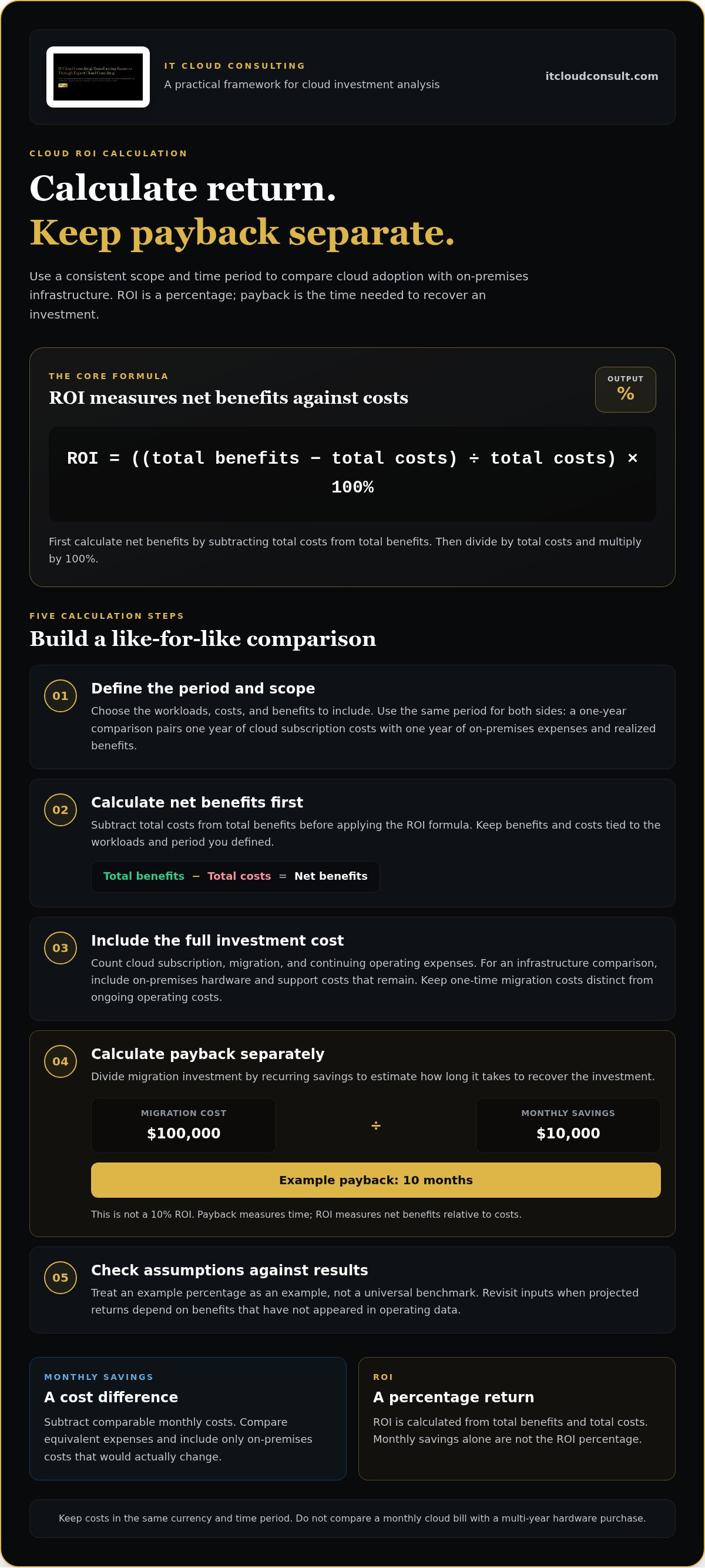
Use one formula and a consistent time period to compare cloud adoption with on-premises infrastructure. The result expresses return as a percentage, while payback indicates how long savings take to recover the investment.
- Define the calculation period and scope. Choose the workloads, costs, and benefits to include, then use the same period for each side. A one-year comparison should pair one year of cloud subscription costs with one year of on-premises expenses and realized benefits. Separate migration costs from ongoing operating costs so a one-time transition expense doesn’t distort the recurring view.
- Calculate net benefits before the percentage. Subtract total costs from total benefits, divide the result by total costs, then multiply by 100%. In formula form: ROI = ((total benefits − total costs) ÷ total costs) × 100%.
- Include the full investment cost. Add cloud subscription and migration expenses, along with continuing costs needed to operate the environment. For an infrastructure comparison, account for hardware and support costs that remain on premises rather than treating cloud charges as the only factor. Keep costs in the same currency and time period, and don’t compare a monthly cloud bill with a multi-year hardware purchase.
- Calculate payback separately from ROI. Divide the migration investment by recurring savings to estimate how long recovery takes. A $100,000 migration cost and $10,000 in monthly savings produce a 10-month payback period. This is not a 10% ROI: payback measures time, while ROI measures net benefits relative to costs.
- Check the example against the result. Treat that percentage as the example’s result, not a universal benchmark. Revisit the inputs if projected returns depend on benefits that haven’t appeared in operating data.
Monthly cloud savings
Estimate monthly savings by subtracting comparable cloud costs from current operating costs, then include measurable reductions from scaling, automation, and maintenance. Scaling savings depend on matching resources to demand, while maintenance savings depend on costs and staff effort actually removed.
-
Estimate Scaling Savings
Compare cloud resource use with the capacity your workloads need during each operating period. Identify resources that can scale down during lower demand, then estimate the cost difference between actual usage and unnecessary capacity. Around 35% of average cloud spending remains unutilized, so review usage carefully rather than assuming every idle resource can be eliminated.
Monitor scaling after deployment. Over-scaling can increase cloud costs, while under-scaling can cause performance problems. Link the expected monthly reduction to specific workloads and compare it with subsequent bills. This makes scaling savings a trackable estimate, not a blanket percentage applied across your infrastructure.
-
Estimate Automation and Maintenance Savings
List repetitive tasks that automation could reduce, such as provisioning resources or managing routine operations. Estimate savings from the staff time those tasks currently consume, using actual time records and identifying which tasks automation will change. Don’t count the same hours as both labor savings and productivity benefits.
Next, identify maintenance expenses that will end or decrease after migration. Compare them with continuing cloud charges and any on-premises work that remains. Include only maintenance removed by the transition; costs tied to retained systems still belong in the monthly comparison.
- Compare equivalent monthly bills. Add cloud subscription and usage charges for the services being evaluated, then compare them with current monthly costs for equivalent workloads. Use it to illustrate a possible result, not as an assumption for another organization. Differences in workload demand, resource sizing, and retained systems change the calculation.
When both on-premises and Azure costs are monthly, the return appears on the next bill if the transition is immediate. Separate recurring savings from one-time migration expenses, as they affect monthly savings differently. This distinction also keeps the monthly result separate from overall return on investment.
- Track realized savings and service impact. Record the expected reduction by category, such as scaling, automation, or maintenance, then compare each estimate with actual monthly bills and operating records. Include downtime only when you can link a reduction to measurable costs or revenue. This separates indirect value from direct savings and prevents counting a benefit twice.
Review the comparison as usage changes. If cloud costs rise while demand remains stable, examine resource allocation and scaling behavior. If maintenance savings fall short, identify which systems or tasks remain. These checks explain the difference between projected and realized savings and give the next monthly estimate a more accurate basis.
Calculator inputs and estimate accuracy
Build the estimate from workload-level data, then align assumptions with the service model. IaaS, PaaS, and SaaS differ in cost structure, management responsibilities, and service scope.
- Choose the service model for each workload. Label every workload as IaaS, PaaS, or SaaS before entering costs. An IaaS estimate should reflect infrastructure usage and the management work your organization retains. For PaaS, account for the platform services used and responsibilities that shift. For SaaS, focus on subscription scope and user requirements.
Don’t apply one model’s assumptions to every workload. A business moving an application to IaaS may retain more infrastructure management than it would with SaaS. This distinction changes which existing costs can be removed and which continue after adoption.
- Gather current infrastructure costs. Assemble the operating costs tied to the workloads under review, including hardware, maintenance, energy, and IT employee time. Use consistent billing periods and identify costs shared across multiple systems. If a server supports several workloads, allocate its costs using a clear method rather than assigning the full amount to each migration.
Record expected cloud usage for the same workloads and period. Include the services each application needs, such as compute, storage, and data transfer. These inputs shape the estimate, so usage projections should reflect how the workload operates rather than rely on a broad company-wide average.
- Test the calculator’s defaults. Calculator defaults are based on typical spending patterns for small to mid-sized businesses. Compare each default with your own usage and operating assumptions before accepting it. For example, a compute-spending percentage may not suit a workload dominated by storage or data transfer.
One calculator displays 40% as the monthly cloud spend on compute percentage. Treat that as a calculator input, not a standard for every organization. Replace defaults with workload-specific information where available, and note which assumptions remain estimates.
- Model growth and automation separately. Include business-growth projections because additional users, transactions, or data can change cloud usage. Then assess automation gains separately from direct cost savings. For example, reduced deployment effort may free staff time without immediately reducing payroll or monthly spending.
Keep every assumption visible. If expected growth increases usage, show how it changes the cloud estimate. If automation changes a process, identify the task and related time or expense. This structure helps decision-makers understand what drives the result.
- Refresh inputs as conditions change. Review the estimate at least annually or after substantial business or technology changes. Revisit usage, workload scope, and growth projections when systems change, as outdated assumptions can distort the comparison.
Cloud provider ROI calculators commonly require current infrastructure costs, expected cloud usage, and business-growth projections. Treat the result as an estimate based on those inputs, then compare it with actual operating data. This ongoing measure helps organizations refine cost-saving assumptions and identify where further analysis is useful.
What on-premises costs should be included in a cloud ROI comparison?
Build the baseline from costs tied to workloads moving to the cloud, including expenses that disappear and those that remain. Compare them with cloud subscription and data-transfer costs over the same period.
- Inventory server hardware and replacement costs. Record the hardware supporting each workload, then allocate shared equipment costs consistently. Include the relevant replacement cycle in your comparison rather than treating the purchase as a monthly operating expense.
Separate equipment migration will retire from hardware that will continue supporting other systems. For example, if a server runs both migrating and retained workloads, assign only the appropriate share to the comparison. This prevents overstating the costs cloud adoption removes.
- Add power and cooling expenses. Include the energy required to run and cool the servers in scope. Use the number of servers associated with the workloads being assessed, and distinguish them from equipment that remains in operation.
Apply the same monthly period to cloud charges. This comparison shows whether energy expenses actually leave the operating baseline or continue because facilities and retained infrastructure still require power and cooling.
- Include support, maintenance, and staff time. Account for IT employee time spent maintaining on-premises infrastructure. Identify the work migration removes, reduces, or leaves unchanged; don’t count retained responsibilities as savings.
For shared support teams, allocate time to the workloads under review using a consistent method. This gives the analysis a clearer view of migration-related costs rather than assigning the entire team’s effort to one system.
- Compare the same services and include transition-related expenses. When assessing existing services, compare the cost of running those same services in a public cloud with their on-premises cost. Include cloud subscription and data-transfer costs alongside current hardware maintenance, energy use, and employee time. Keep scope and time periods aligned for a meaningful comparison.
Also compare the value of cloud-provider security with the cost of implementing and maintaining robust security measures in-house. Include only measures relevant to the workloads being evaluated, and keep this analysis separate from direct bill reductions.
- Document what changes after migration. Mark each cost as removed, reduced, or retained, then use those categories to refine the total cost comparison. To align workload scope and operating assumptions, review your cloud cost comparison as you plan adoption.
IT Cloud Consulting: Strategic Cloud Adoption
IT Cloud Consulting helps businesses turn cloud ROI analysis into a practical adoption path through Strategic Cloud Adoption. This is useful when your comparison identifies workloads to migrate, but decisions about sequencing, service models, and business priorities still need alignment. Strategic guidance connects those choices to your organization’s goals.
After migration, Cloud Optimization can help refine cloud use as workloads and spending patterns evolve. Ongoing Cloud Support helps maintain progress as business needs change, allowing the original estimate to guide continuous improvement rather than remain a one-time calculation.
To discuss how these offerings can support your cloud plans, contact IT Cloud Consulting.
Turn Your Estimate Into a Practical Cloud Roadmap
A cloud computing ROI calculator is most valuable when its results shape decisions, not just spreadsheets. Use the estimate to identify which workloads merit attention, which outcomes matter to your teams, and how you’ll evaluate progress as priorities change. That turns financial analysis into a practical guide for cloud decisions.
IT Cloud Consulting can support this next stage through Strategic Cloud Adoption, Cloud Optimization, and Ongoing Cloud Support. These services connect adoption planning with ongoing refinement, keeping cloud decisions aligned with operational needs and business direction. Bring your priorities and assumptions to a focused discussion about your cloud roadmap.
Contact IT Cloud Consulting to discuss your cloud plans. A clear direction today can create room for stronger decisions as your organization evolves.
Frequently Asked Questions
Do calculations in ROI vary among IaaS, PaaS and SaaS models?
Yes. Each model changes which costs remain with your organization and which are included in the service. For example, an IaaS comparison should account for infrastructure administration your team still performs, while a SaaS comparison can focus more on subscription scope and user needs. Assess each workload separately, especially in a mixed environment, so costs and benefits aren’t assigned to the wrong model.
Do tools exist specifically for calculating cloud ROI?
Yes. Cloud service providers offer ROI calculators that use current infrastructure costs, expected cloud usage, and business-growth projections. Some tools compare cloud and on-premises IT costs over five years, which can help reveal longer-term cost patterns. Treat the output as a structured estimate: review the assumptions behind it and compare its scope with the workloads and services your organization is considering.
How frequently should a company review its ROI on cloud computing?
Review cloud ROI at least annually, and revisit it when substantial business or technology changes occur. A new application, a major shift in demand, or a change in how teams work can alter the costs and benefits in the original analysis. Record assumptions at each review so decision-makers can see what changed and why projected value moved.
How soon will I see ROI?
A typical cloud migration payback period is 6 to 18 months, while some businesses realize their largest cloud benefits in two to three years. These measures describe different outcomes: payback tracks when savings recover an investment, while broader benefits can emerge later. For planning, map anticipated costs and benefits over time instead of relying on a single milestone to judge the initiative.
What else should I consider besides cost savings?
Consider whether cloud adoption improves employee satisfaction with tools, responsiveness to market changes, security, compliance, or the risk of data loss. For example, assess whether teams can launch changes more effectively or whether stronger security practices support customer requirements. Tie each benefit to an observable business outcome, such as employee feedback or delivery progress, so these considerations inform decisions rather than remain abstract claims.
What is the most challenging element of calculating cloud ROI?
Often, the hardest part is measuring indirect benefits without overstating their financial value. Faster deployment may support a new opportunity, but the analysis needs to distinguish that impact from revenue growth caused by other factors. Assign an owner and measurement method to each benefit, and document assumptions so reviewers can understand how the estimate was formed.
What is a cloud computing ROI calculator and how does it work?
A cloud computing ROI calculator is a planning tool that compares projected cloud investment costs with expected benefits. It uses assumptions, such as operating costs and anticipated usage, to estimate financial return over a chosen period. Use the result to compare scenarios, not as a substitute for examining workload requirements. The estimate is more useful when its scope matches the decision under consideration.
What inputs are needed to calculate cloud computing ROI?
Start with current infrastructure costs, expected cloud usage, and business-growth projections. Add migration and operating costs relevant to the scenario, then identify benefits your organization can measure. For example, a seasonal workload needs usage assumptions that reflect its demand pattern, while a growing service needs projections that account for additional users. Keep inputs tied to the same workloads and comparison period.


