
A lower cloud bill isn’t automatically better cloud cost optimization. Optimization means matching cloud resources to actual workload needs, reducing waste without compromising performance. Management is the ongoing work of tracking, allocating, and governing spend. Effective cloud cost management best practices bring both together, making costs visible while helping teams use cloud resources more effectively.
It’s easy to focus on the invoice, but a more useful question is what the spending enables and whether that value justifies the cost. Clear visibility into usage, ownership, and workload needs gives teams a stronger basis for decisions than cost-cutting alone.
This article explains how FinOps collaboration supports cost accountability, which expenses to track across compute, storage, data transfer, and support, and how commitment-based discounts and Spot Instances fit into a broader strategy. It also explains how optimization differs from cost management, helping you connect day-to-day actions with longer-term cloud goals.
Key Takeaways
- Distinguish optimization from ongoing cost management so resource changes support both efficiency and business value.
- Make cloud spending easier to act on by assigning ownership and building cost visibility across teams.
- Review compute, storage, data transfer, and support charges together to identify where usage patterns create unnecessary spend.
- Match discount options to workload needs: interruption-tolerant tasks may suit Spot Instances, while stable usage may support commitments.
- Build a regular cycle of measurement, adjustment, and review to keep cloud resources aligned with changing demand.
1. What is cloud cost optimization?
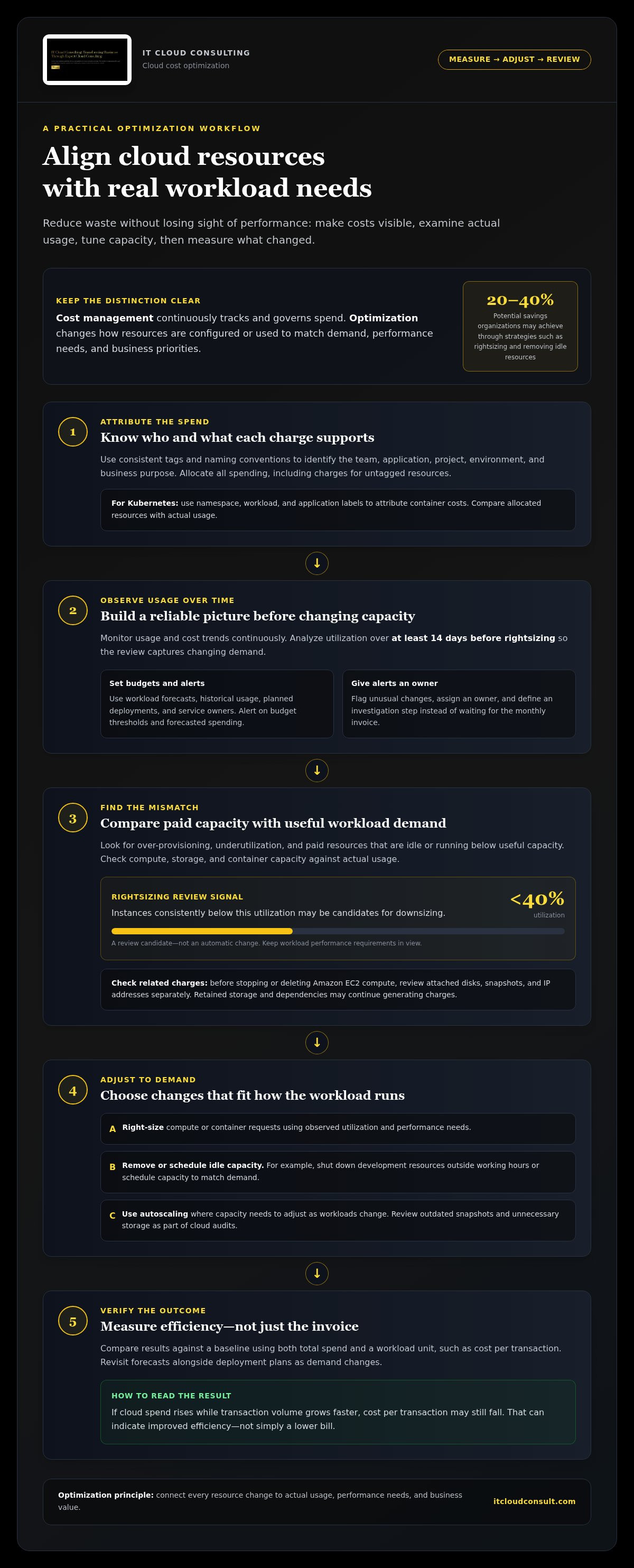
Cloud cost optimization aligns resources with actual demand, performance needs, and business priorities. It reduces waste by reviewing resource sizing, removing unused capacity, and improving spending visibility. Cost management continuously tracks and governs spending; optimization changes how resources are configured or used. For example, a team can review a virtual machine’s utilization before deciding whether to downsize it.
Over-provisioning occurs when teams allocate more compute, storage, or container capacity than workloads need. Underutilization leaves paid resources idle or running below their useful capacity. Analyze utilization over at least 14 days before rightsizing, so the review captures changing demand. Instances that consistently run below 40% utilization are candidates for downsizing, subject to workload performance requirements.
Set cloud budgets using workload forecasts, historical usage, planned deployments, and the owners responsible for each service. Configure alerts for budget thresholds and forecasted spending so teams can investigate increases before the bill arrives. Review forecast changes alongside deployment plans, since a new environment or traffic increase can change expected usage.
Resource visibility starts with knowing which team, application, or project generates each charge. Apply consistent tags and naming conventions when deploying resources, then allocate all spending, including charges for untagged resources. For Kubernetes, use namespace, workload, and application labels to attribute container costs. Compare allocated resources with actual usage to identify over-provisioning.
Removing an idle virtual machine does not necessarily remove every related charge. Before deleting or stopping Amazon EC2 compute, review attached disks, snapshots, and IP addresses separately. Stopping compute and deleting it have different billing consequences, while retained storage and dependencies may continue generating charges. Cloud audits can also identify outdated snapshots and unnecessary storage for review.
Monitor usage and cost trends continuously rather than waiting for a monthly invoice. Use analytics or cloud cost tools to flag unusual changes, then assign each alert an owner and an investigation step. Scheduling can reduce non-production waste: teams can shut down development resources outside working hours or schedule capacity to match demand. Autoscaling can adjust capacity as workloads change.
Organizations may save 20-40% through optimization strategies such as rightsizing and eliminating idle resources. Measure results against a baseline using both total spend and a workload unit, such as cost per transaction. If cloud spend rises while transaction volume grows faster, unit cost may still fall, showing improved efficiency rather than simple budget reduction.
For Kubernetes, track costs by namespace, workload, and team, then compare requested CPU and memory with observed usage. Right-size container requests, remove idle workloads, and use autoscaling or schedules where demand varies. These steps connect cluster spending to the applications it supports, helping teams choose changes without losing sight of performance needs.
2. FinOps collaboration across finance, IT, and business
FinOps makes cloud spending a shared operational responsibility, not just a finance review. Finance brings budget context, IT explains infrastructure choices, and business teams clarify workload priorities. Together, they can assess whether cloud usage supports intended outcomes and decide where to adjust capacity, timing, or investment.
Define each team’s role. Finance can set budget expectations and review forecasts. Engineering teams can explain usage changes and implement technical adjustments. Product or business owners can connect spending to customer demand, delivery priorities, and service performance. For example, a product team planning a feature launch should share expected demand with engineering and finance before capacity expands.
Governance turns these conversations into repeatable decisions. Establish approval workflows for new resources, with clear ownership of requests and exceptions. Set naming conventions and tagging standards that identify the team, application, environment, and business purpose. Allocate costs to the responsible groups, including shared infrastructure through an agreed method. Consistent attribution helps teams distinguish direct workload costs from platform costs.
Use a fixed 30-minute weekly FinOps review to examine spending changes, forecasts, and anomalies. Keep the meeting focused: identify a cost movement, assign an owner, agree on an investigation, and record the next action. Analytics tools can highlight unusual usage or emerging trends, while engineering teams explain whether a change reflects planned demand or an unexpected configuration. Escalate material findings through established approval paths, rather than leaving alerts without an accountable responder.
FinOps also needs to account for commitments. Finance can track the financial terms of savings plans, while infrastructure teams assess whether workloads can use the committed capacity. Business owners can flag upcoming changes that may affect demand. This coordination helps teams weigh projected savings against flexibility, rather than assuming a discount is valuable regardless of actual usage.
Maturity develops through practice, not a single tool purchase. Only 14.2% of organizations have reached the “Run” stage of FinOps maturity. Teams can build capability by improving shared definitions, assigning cost owners, and reviewing whether agreed actions changed usage or efficiency. A cost-aware culture means teams consider spending when designing workloads, not only after deployment. It also means treating optimization as a continuous cycle, with decisions informed by service needs and business value.
For organizations formalizing these roles and governance, cloud operating model guidance can help connect financial accountability with technical decisions.
3. Cloud compute, storage, data transfer, and support costs
Cloud spending includes more than virtual machines. A useful cost review separates compute, storage, data transfer, and support charges, then connects each category to its workload and owner. This allocation helps teams see whether budgets reflect active demand, retained data, network movement, or the support services their environment uses.
Compute costs depend on instance type, capacity, and runtime. Compare actual workload patterns with provisioned capacity, then adjust instance size to match performance requirements. Rightsizing cloud instances based on actual usage can reduce compute costs by 30-50% without affecting performance. Review CPU and memory together, since reducing one resource while the other remains constrained can undermine application performance.
Storage needs its own review. Classify data by access frequency and retention requirements, then assign it to an appropriate tier. Keep frequently accessed product data in hot storage for 0-30 days; transition less active data when access patterns support a lower-cost tier. Object-storage lifecycle rules can automatically transition or expire data, helping teams apply retention policies consistently.
Retention decisions should account for backups, snapshots, and compliance needs. Review backup age and access requirements before deleting or archiving data. The guidance in this article recommends deleting backups older than 90 days unless they are flagged for retention. Analytics logs can move to infrequent-access storage after 7 days when access needs allow, while frequently queried logs may need faster retrieval.
Data transfer charges can arise when information moves into, out of, or between cloud services and regions. Map application traffic and data flows to identify avoidable transfers caused by the architecture. When reviewing provider contracts, include egress fees and storage pricing structures alongside compute rates. Repeatedly moving data between regions can affect budgets even when compute usage stays stable.
Include support charges as a separate line in cost reviews. Identify the support plan or service charges on the cloud bill, assign an owner, and compare them with operational requirements. This helps finance distinguish infrastructure usage from support spending and gives IT useful planning context. Assess these charges against service needs rather than treating them as compute or storage consumption.
Make reviews actionable: compare usage patterns, cost allocation, and performance before changing infrastructure. For variable workloads, autoscaling can adjust capacity as demand changes; for storage, lifecycle policies can automate transitions. Reserved instances can suit predictable compute needs, while flexible workloads may call for another approach. The goal is a considered mix of capacity, storage tiers, and data movement that supports performance and spending discipline.
4. Spot Instances and commitment-based discounts
Cloud providers offer lower rates through commitments and unused-capacity pricing, but each model suits different workloads. Reserved instances and savings plans can offer up to 72% off on-demand pricing in exchange for usage commitments. The savings depend on matching the commitment to stable, eligible usage, so assess demand before buying discounted capacity.
Reserved instances and savings plans typically require a commitment to cloud usage for one or three years. Savings plans may also require a multi-year commitment to purchase resources from the provider. These terms can reduce costs for a predictable baseline, such as a production service that runs consistently. They can also limit flexibility if architecture or demand changes during the commitment period.
Start with visibility into historical usage and identify the portion of cloud spending that remains steady across normal operating cycles. A recommended commitment coverage is 70 to 85% of steady-state eligible spend, with active commitments targeted to reach at least 95% utilization. Treat these figures as planning targets: committing beyond dependable demand can leave capacity unused, while low utilization weakens the value of the discount.
Before purchasing, map existing commitments to workloads, regions, and resource types. Compare projected usage with current commitments, then model how planned migrations, seasonal demand, or application changes could affect consumption. Use a staggered expiry schedule rather than allowing the entire portfolio to renew together. The recommended expiry laddering limits any single month to no more than 20% of the commitment portfolio, helping preserve opportunities to reassess as requirements evolve.
Spot Instances use a provider’s unused cloud capacity and can offer discounts of up to 90% for fault-tolerant batch processing. They may be interrupted or reclaimed at any time, so they suit short-term, high-load tasks that can pause, retry, or resume. Batch analysis and other restartable work can fit this model; workloads requiring uninterrupted capacity should use more dependable provisioning.
Set policies before moving workloads to Spot capacity. Define which jobs can tolerate interruption, how they save progress, and what happens when capacity is reclaimed. Monitor completion rates and fallback behavior alongside spending: a low instance rate alone doesn’t show whether a workload meets its service needs. Keep interruption-tolerant tasks separate from critical workloads so teams can adjust placement without disrupting essential operations.
Use commitment-based discounts for a measured baseline and Spot Instances for flexible work, rather than treating either as a universal solution. Regularly review coverage, utilization, expiry dates, and workload changes. This makes discounts a deliberate part of cloud cost management, aligned with demand and operational policies rather than a purchase driven only by the advertised reduction.
5. Cloud cost optimization versus cloud cost management
Cloud cost management is the operating discipline; optimization is one set of actions within it. Management establishes visibility, ownership, budgets, and review processes across cloud environments. Optimization uses that information to change capacity, architecture, or pricing choices. For example, tracking reveals a workload’s recurring cost, while optimization tests whether its resources can be configured more efficiently.
The distinction matters because a lower invoice doesn’t always mean better performance. Compare spending with the output an application delivers, such as successful transactions or completed jobs.
Management provides the context for interpreting results. Finance can set budget expectations, engineering can explain infrastructure changes, and business owners can assess whether additional capacity supports customer demand. A cost increase may reflect growth, a new application, or waste. Tracking costs alongside a relevant business measure helps teams distinguish between these causes before changing resources.
Optimization is dynamic because workload demand and application requirements change. Teams can adjust sizing, automate schedules for non-production environments, or revise storage policies as usage patterns evolve. They can also establish guardrails through infrastructure as code or CI/CD pipelines, ensuring deployments follow approved resource configurations. These controls make cost considerations part of delivery instead of a retrospective invoice review.
Management also establishes the feedback cycle. Assign an owner to each major cost category, compare forecasts with actual usage, and investigate material deviations. Record the decision, responsible team, and result after implementation. If a change reduces spending but harms application performance, revise it. If usage grows efficiently, update budgets to reflect the business outcome.
Use both disciplines together: management identifies where spending occurs and who is accountable, while optimization changes how resources are used. A practical sequence is to establish a baseline, select a workload, test a targeted change, and compare cost and performance afterward. This avoids treating every increase as waste or every reduction as success.
Automation supports repeatable controls, but teams still need to review whether policies match current demand. Scheduled shutdowns may suit development environments, while production applications may need elastic capacity. Continuous tracking shows whether the chosen configuration supports service requirements and budget goals, keeping optimization connected to operational decisions.
To strengthen the connection between cloud decisions and business outcomes, explore cloud optimization support.
IT Cloud Consulting: Strategic Cloud Adoption
IT Cloud Consulting helps organizations align cloud decisions with business priorities through Strategic Cloud Adoption. When spending is difficult to attribute, workloads are changing, or optimization needs ongoing attention, its Cloud Optimization and Ongoing Cloud Support can help teams structure their cloud operations. These services are a practical next step when internal teams need strategic guidance, implementation support, or continued management to put cost insights into practice.
Whether you’re planning a cloud transformation or refining an existing environment, IT Cloud Consulting can help you move forward with a focused approach. Contact IT Cloud Consulting to discuss your cloud priorities.
Make cloud decisions a source of momentum
Cloud spending can support more than operational control. Treat each cost decision as an opportunity to strengthen the connection between technology investment and business priorities. Build cloud cost management best practices into planning and delivery so teams can respond to changing needs intentionally, rather than reacting only after costs shift.
IT Cloud Consulting offers Strategic Cloud Adoption, Cloud Optimization, and Ongoing Cloud Support to help organizations advance their cloud approach. Whether you’re shaping an adoption strategy or refining an established environment, start by identifying the outcomes your cloud investments need to support, then align decisions around them.
Contact IT Cloud Consulting to discuss your cloud priorities. With a focused plan and sustained attention, your cloud environment can evolve alongside your organization’s ambitions.
Frequently Asked Questions
What is cloud cost optimization?
Cloud cost optimization improves how resources support workloads, balancing spending with performance and business outcomes. For example, a team might assess whether a customer-facing application needs the same capacity overnight as during peak activity. The right decision considers service requirements, workload behavior, and business value, not just the invoice total. Tracking a metric such as cost per completed task can show whether a change improves efficiency.
Do cloud budgets automatically stop spending?
No. A budget typically tracks planned spending and can trigger alerts, but it doesn’t automatically shut down resources unless a separate action or policy is configured. Treat an alert as a signal to investigate, not as a spending limit. Assign an owner to each budget notification and define what to review, such as a new deployment, unexpected usage, or a forecast that exceeds the team’s plan.
If I have multiple teams, how should I organize my subscriptions and resource groups?
Organize cloud accounts around ownership, operational boundaries, and access needs. For example, separate production from development environments, then group related resources by application or team within those boundaries. Keep the structure consistent across platforms so reporting and permissions remain clear. Avoid groups without a clear owner or purpose; establish naming conventions and document who approves changes, monitors usage, and maintains each group.
Is multi-cloud cheaper than using one provider?
Not automatically. Multi-cloud can support specific technical or business needs, but managing multiple platforms can add complexity across architecture, skills, billing, and data movement. Compare the full operating model, not just headline pricing. For each application, consider performance requirements, dependencies, transfer patterns, and management effort. Multi-cloud makes sense when its specific benefits justify the added coordination and resulting cost structure.
What are the core cloud cost management best practices?
Establish accountable owners, connect cloud usage to business outcomes, and review actual spending against forecasts. Give teams a process for investigating anomalies and approving material changes. Include cross-team costs, such as shared platforms, in reporting rules. Then measure infrastructure changes against both service performance and business output. These practices make cost decisions part of everyday operations, not an isolated finance exercise.
How do cloud tagging and cost allocation improve cost visibility?
Tags attach useful context to resources, such as the application, environment, owner, or project. Cost allocation uses that context to assign charges to the responsible teams or services. For shared databases or networking, define a consistent allocation method so teams understand their share. Review reports for untagged resources and resolve ownership gaps during deployment, rather than leaving unidentified charges outside team budgets.
How can teams right-size cloud resources and eliminate idle or unused resources?
Start with usage and performance data, then identify resources that are consistently underused or no longer linked to an active workload. Before downsizing, assess peak demand and memory needs, not just average CPU usage. For example, a service with low average activity may still need capacity during scheduled processing. Confirm ownership and dependencies before removing resources, then monitor application performance after changes to catch unintended effects.
When should organizations use reserved instances, savings plans, or spot instances?
Use reserved instances or savings plans for a dependable baseline of eligible usage that is likely to continue through the commitment term. Choose Spot Instances for work that can tolerate interruptions, such as restartable batch processing. Before committing, compare expected demand with existing commitments and planned changes. For Spot workloads, design jobs to save progress or retry, and keep interruption-sensitive applications on more predictable capacity.


