
The most flexible cloud for ecommerce platform isn’t always the best foundation for growth. A highly customizable architecture can support distinctive customer experiences, but it can also add integration work and operational demands your team may not be equipped to sustain.
It’s worth weighing flexibility against simplicity. SaaS, PaaS, headless, and composable approaches offer different levels of control and responsibility. The right fit depends on your business model, technical capacity, integration needs, and plans for growth.
This guide compares those approaches and provides a practical framework for assessing your requirements, from security and data access to implementation effort and long-term ownership. It also looks beyond the commerce software itself. Cloud infrastructure, operating processes, and ongoing optimization all affect how well your ecommerce environment can adapt as the business evolves. With a clear cloud strategy, you can align platform decisions with current needs and future priorities.
Key Takeaways
- Separate the ecommerce application from its hosting, integrations, data, and day-to-day operational responsibilities.
- Compare SaaS, PaaS, headless, and composable approaches by the control they offer and the complexity they require.
- Assess how a cloud for ecommerce platform will support your integrations, security needs, data access, and business growth.
- Prioritize essential business and technical requirements before shortlisting platforms to avoid paying for complexity you don’t need.
- Connect platform decisions to a broader cloud strategy, with a roadmap for implementation, optimization, and ongoing operations.
What Does Cloud for an Ecommerce Platform Actually Mean?
A cloud ecommerce platform is commerce software delivered or operated through cloud services. It gives a business tools to run online sales without treating the store as a single application installed on locally managed servers. The phrase “cloud for ecommerce platform” can describe different arrangements, so distinguish what the commerce software does from where it runs and who operates each part.
Cloud computing is defined as the on-demand delivery of computing services over the internet. In ecommerce, those services can include the application, computing capacity, storage, databases, and other supporting tools. A cloud deployment is not the same as choosing an ecommerce product or purchasing a hosting plan. The platform provides commerce capabilities, while the underlying cloud infrastructure supplies resources those capabilities may rely on.
This distinction helps you estimate the work behind a launch or expansion. A platform may manage storefront functions, while a separate cloud environment, connected applications, and internal or external teams handle other responsibilities. The division depends on the platform model, configuration, and operating arrangements.
What Does a Cloud Ecommerce Platform Manage?
The commerce application typically supports customer-facing and transactional functions, such as displaying a storefront and product catalogue, processing checkout, recording orders, and managing customer accounts. Connected services can link those activities with inventory records, customer data, payment processing, analytics, and business workflows.
These functions don’t necessarily sit in one system. For example, the commerce platform may manage the storefront and order workflow, while a separate business system supplies inventory information through an integration. Cloud infrastructure, including compute, storage, and networking, supports applications but does not itself provide the catalogue or checkout experience.
How Does Cloud Commerce Differ from On-Premises Ecommerce?
With an on-premises arrangement, the organization maintains the infrastructure it operates, plans capacity, and coordinates platform updates. In a cloud model, some of that work may shift to a cloud or platform provider, reducing the need to manage every underlying component directly. The work doesn’t disappear; responsibility is divided differently.
Cloud models also vary in how much they manage for you. A managed service may take on more infrastructure maintenance, while a configurable environment can leave your business responsible for deployments, integrations, security settings, and performance decisions. Before selecting an approach, map who owns each responsibility, including:
- Infrastructure capacity, maintenance, and recovery planning.
- Platform configuration, updates, and release coordination.
- Integration health, data movement, access controls, and monitoring.
This responsibility map turns “cloud” from a broad label into an operating decision. It also helps your team compare flexibility with the work required to manage the environment over time.
Which Cloud Ecommerce Platform Models Should You Compare?
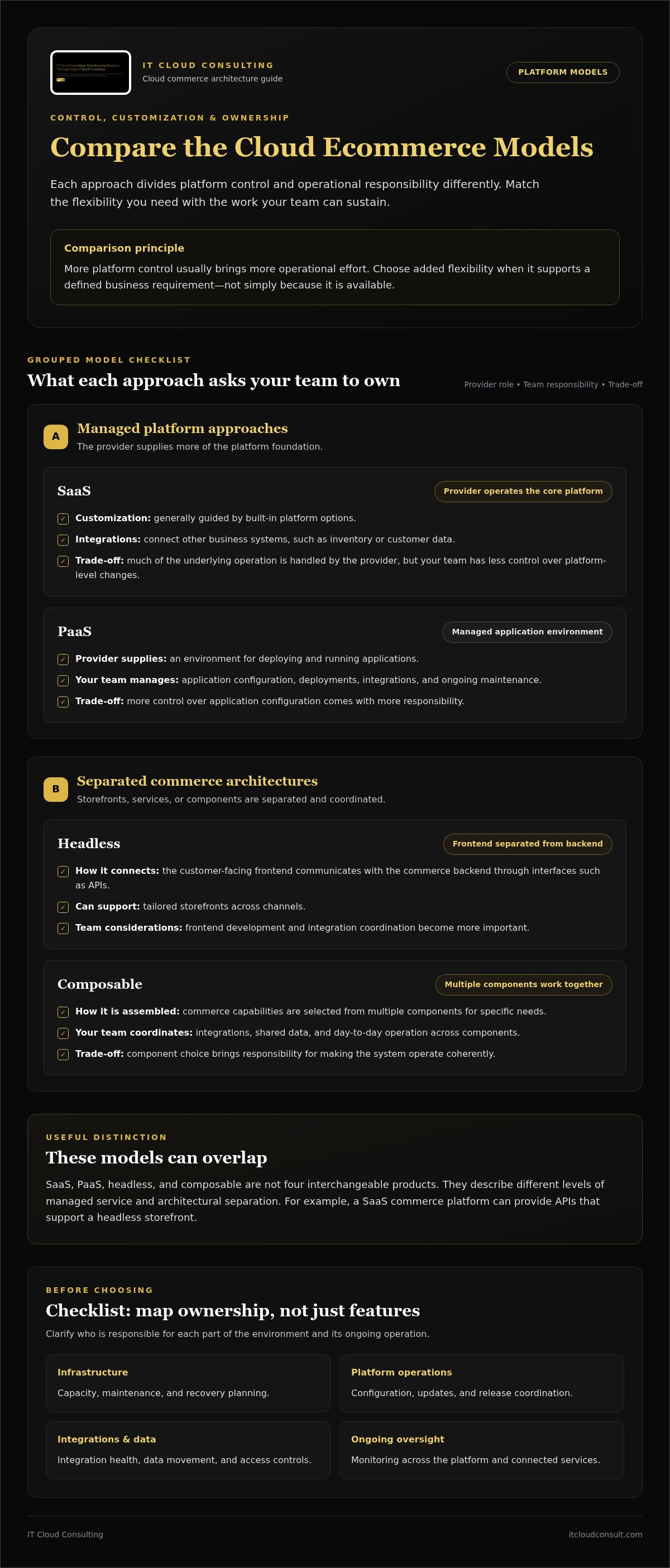
Cloud commerce models divide platform control and operating responsibility in different ways. SaaS, PaaS, headless, and composable approaches aren’t four interchangeable products. They describe different levels of managed service and architectural separation, and some can overlap. For example, a SaaS commerce platform can provide APIs that support a headless storefront.
Use the comparison below to see where each model places customization, integration work, and day-to-day ownership. The best cloud for ecommerce platform decisions balance the capabilities you need with the operational capacity your team can sustain.
SaaS: The provider operates the core platform. Customization is generally guided by the platform’s built-in options, and integrations connect other business systems. The provider handles much of the underlying operation, which can simplify adoption, though your team has less control over platform-level changes.
PaaS: The provider supplies a managed environment for deploying and running applications. Your team can exercise more control over application configuration, but takes on more responsibility for deployments, integrations, and ongoing maintenance.
Headless: The customer-facing frontend is separated from the commerce backend and communicates with it through interfaces such as APIs. This can support tailored storefronts across channels, while making frontend development and integration coordination more important.
Composable: Commerce capabilities are assembled from multiple components that work together. Your team can select services for specific needs, but must manage how those components integrate, share data, and operate as a coherent system.
Comparison principle: More platform control usually brings more operational effort. Choose added flexibility when it supports a defined business requirement, not simply because it is available.
When Does SaaS Fit an Ecommerce Business?
SaaS can suit teams that value a managed commerce foundation and established workflows over deep control of the underlying platform. It may reduce infrastructure and update responsibilities, giving the business more room to focus on merchandising and operations. Before deciding, compare required customizations and integrations, such as inventory or customer data connections, with the platform’s supported options. Convenience is less valuable if essential workflows depend on difficult workarounds.
When Are Headless or Composable Architectures Worth Considering?
Headless or composable approaches may fit businesses with specialized customer journeys, multiple digital channels, or commerce capabilities that need to evolve independently. They can provide room to shape distinct experiences, but require more coordination. Teams need the capacity to manage frontend and backend components, integration dependencies, releases, and ongoing service ownership. If those demands exceed available skills, the architecture may add complexity without delivering meaningful differentiation.
Use business requirements to justify the architecture, not flexibility alone. A cloud adoption strategy can help align platform choices with operating capacity and longer-term priorities.
How Do You Evaluate Cloud Ecommerce Platforms Beyond the Feature List?
A feature checklist shows what a platform can do, but not whether your organization can operate it effectively. Evaluate each option against actual business processes, integration dependencies, security responsibilities, and the people who will support the environment. Ask not just “Does it have this feature?” but “Can we use and manage it reliably as the business changes?”
For a useful comparison, assess every candidate against the same requirements. Record evidence, gaps, dependencies, and ownership instead of relying on broad claims about scalability or ease of use. Platform selection is also an architecture decision, so this cloud infrastructure consulting guide can help frame how the surrounding environment supports the application.
Which Integrations and Data Requirements Matter Most?
Start with the systems that must exchange information with commerce, such as ERP, payment processing, inventory, analytics, and customer systems. For each connection, map the business process it supports, what data moves, when it moves, and which team owns the flow. For example, an order may pass from checkout into order management, while inventory updates must flow back to the storefront.
Then examine how each platform supports those connections. Consider API access, available integration patterns, data portability, and what happens when an interface or connected service changes. Include these questions in your evaluation:
- Can the platform exchange the required data in the format and timing the workflow needs?
- Who monitors integrations, handles failures, and coordinates updates?
- Can the business retrieve important data if it changes platforms or expands into new channels?
- Which systems create dependencies that could make future changes more difficult?
These details reveal the ongoing work behind an integration. A connection that looks straightforward during selection may still require monitoring, troubleshooting, and coordination throughout its lifecycle.
How Should You Assess Security and Operational Fit?
Clarify responsibility across the platform provider, cloud environment, connected services, and your organization. Identify who manages user access, security settings, updates, monitoring, and incident response. Responsibilities vary by model and configuration, so document them for the specific architecture under consideration rather than assuming “cloud” means the provider handles every task.
Compare governance and compliance needs with the platform’s capabilities and the way your organization manages data. Requirements depend on the business and the information it handles, so identify which obligations apply. Also assess whether your team has the capacity to operate integrations, investigate alerts, approve changes, and coordinate releases. A technically capable platform can still be a poor fit if no one clearly owns critical operational work.
Finally, compare total ownership costs, not just the subscription or license. Include implementation, integration work, internal staffing, cloud resources where relevant, maintenance, monitoring, and future changes. Separate initial effort from recurring responsibilities, then identify uncertain costs or workloads. This gives decision-makers a more realistic basis for comparing options and planning support as the environment evolves.
How Can You Match a Cloud Ecommerce Platform to Your Business?
Choose a platform by starting with business outcomes, then test whether the architecture and operating model can support them. This keeps the decision grounded in what the business needs to achieve, rather than the length of a vendor’s feature list. For a sound cloud for ecommerce platform decision, distinguish essential requirements from desirable features before building a shortlist.
How Do You Turn Business Goals into Platform Requirements?
Describe the customer journeys you need to support, the channels you sell through, the complexity of your products and orders, and the growth you’re planning for. Translate each goal into an assessable requirement, such as supporting a particular order workflow, connecting inventory data, or giving staff clear ownership of routine platform changes.
- Set business objectives. Identify the outcomes the platform should enable, such as entering a new sales channel, improving a customer journey, or supporting more complex orders.
- Map the operating context. Document current systems, data flows, team capacity, and processes the platform must work with.
- Define and rank requirements. Separate must-haves from desirable features, then rank each by business impact, urgency, and dependency. A required inventory connection may take priority over a storefront feature that can wait.
- Build a focused shortlist. Compare models and platforms against the same requirements. Record where each option meets a need, relies on an integration, or requires additional operational effort.
- Validate and plan. Test the leading options against realistic scenarios, capture assumptions and risks, and turn the preferred approach into a phased implementation roadmap.
How Should You Validate a Platform Shortlist?
Walk through representative customer and staff workflows instead of relying on demonstrations of ideal conditions. Trace a standard purchase from product selection through payment, order handling, and inventory updates. Then test exceptions, such as a failed payment, a changed order, or an unavailable item. Include expected traffic patterns and connected systems, and identify who would diagnose and resolve problems at each stage.
Validation should also reveal the work behind adoption. Review migration dependencies, implementation effort, internal skills, integration maintenance, and responsibility for platform changes. Write down what each option assumes about your systems and team, where uncertainty remains, and which criteria will determine the final decision. This makes trade-offs visible before they become delivery risks.
Once a preferred approach emerges, sequence the roadmap around dependencies. Prepare data and integrations, assign operational owners, plan implementation, then review performance and support needs as the environment evolves. Explore cloud adoption planning to connect platform selection with a broader modernization path.
A structured evaluation can turn that roadmap into action. Plan your cloud adoption approach around your business priorities, technical requirements, and operating capacity.
How Can Cloud Consulting Support Your Ecommerce Platform Decision?
Choosing a platform is only one part of building an ecommerce environment that can support business growth. Cloud consulting connects that decision to the architecture around the platform, your team’s operating capacity, and the outcomes the business needs to achieve. That perspective helps turn a cloud for ecommerce platform decision into a practical plan, rather than leaving the organization with a technology choice and no clear way to operate it.
Cloud consulting can start with an assessment of existing infrastructure, business requirements, integration dependencies, and operational responsibilities. Strategic planning can then shape a roadmap, while implementation support helps move from decisions to execution. After launch, optimization and ongoing technical assistance help teams respond as systems and business needs change.
What Should a Cloud Ecommerce Roadmap Include?
A useful roadmap links architecture decisions to business priorities and defines what needs to happen, in what order, and who owns each activity. It accounts for implementation sequencing and operational readiness, not just the target design. Measures matter too: without them, teams can’t tell whether the environment is meeting its objectives or where it needs refinement.
- Priorities and architecture: Document intended business outcomes, the selected approach, and the reasoning behind key decisions.
- Dependencies and sequence: Map integrations, data movement, migration needs, and milestones so that critical work happens in a workable order.
- Owners and readiness: Assign responsibility for implementation, access, monitoring, support, and change coordination.
- Measures and review: Define how the team will assess performance, reliability, cost-efficiency, and business outcomes, then schedule reviews against those measures.
Cloud adoption planning can clarify these steps by setting a direction that accounts for existing systems as well as future needs. Keep the roadmap actionable: identify near-term priorities while allowing later decisions to evolve as the business learns from implementation.
How Does Ongoing Cloud Support Help the Platform Evolve?
Launch is a milestone, not the end of operational planning. Monitoring and ongoing technical support can help teams identify issues, understand changes in the environment, and maintain continuity as integrations and workloads evolve. Regular optimization also gives the business a way to review cloud resource use and operating practices as traffic patterns or priorities shift.
This work connects platform decisions to long-term performance, cost-efficiency, and governance. An assessment can surface opportunities to improve existing cloud infrastructure, while continued management can keep responsibilities visible as the architecture changes. For more on this work, read the cloud optimization consulting guidance.
To explore how cloud strategy can support an ecommerce environment, review your cloud strategy in light of your goals, technical environment, and operational capacity.
Build a Cloud Foundation That Can Evolve
A platform decision isn’t a finish line. It sets the direction for how your commerce environment can adapt as customer expectations, business priorities, and operational demands change. Treat the cloud for ecommerce platform as part of an evolving operating strategy, with clear ownership and regular opportunities to review decisions as your needs develop.
Strategic cloud planning connects that direction to a practical roadmap. Cloud assessment, implementation support, optimization, and ongoing management can translate priorities into action and keep the environment aligned over time. The aim isn’t to add complexity for its own sake. It’s to build a foundation that supports your goals while keeping future improvements manageable.
Ready to shape the next stage of your ecommerce environment? Align your cloud roadmap with your ecommerce goals with IT Cloud Consulting. A considered plan can help your business move forward with greater clarity and confidence.
Frequently Asked Questions
What Is a Cloud Ecommerce Platform?
A cloud ecommerce platform delivers commerce software through cloud services instead of requiring a business to run every component on local infrastructure. The phrase cloud for ecommerce platform can describe different arrangements, from a provider-managed application to an environment the business configures more extensively. Clarify, for example, whether the provider operates the commerce application while your team remains responsible for connecting it to inventory or customer records.
Is SaaS or Headless Better for an Ecommerce Platform?
Neither is universally better. The right fit depends on how much control your team needs and can support. SaaS may suit a business that wants established workflows and less infrastructure management. Headless may work better when the customer-facing experience needs to change independently of commerce functions. If your team can manage separate frontend releases and their dependencies, headless may offer useful flexibility.
Can a Cloud Ecommerce Platform Integrate with ERP and Inventory Systems?
Yes, cloud commerce environments can connect with ERP, inventory, payment, analytics, and customer systems, often through APIs or integration services. Compatibility depends on the systems and the specific data exchanges required. Map how an order reaches the ERP and how updated stock information returns to the storefront. Test those flows with representative data, including failed or delayed updates, to expose gaps before implementation.
How Do I Choose a Cloud Platform for Ecommerce?
Start with the business outcomes the platform must support, then compare candidates against a short list of ranked requirements. A practical scorecard can rate each option on customer experience, integration fit, operational ownership, security responsibilities, and ability to accommodate planned changes. Mark requirements as essential or optional, and record evidence for each score. This makes trade-offs easier to explain and reduces the risk of choosing features the business won’t use.
What Should I Consider When Moving an Ecommerce Platform to the Cloud?
Review the current application, data quality, connected systems, traffic patterns, security responsibilities, and available operational skills before setting a migration sequence. Identify which information needs cleansing or transformation and which integrations must be ready before the new environment can support orders. Plan testing around real workflows, assign owners for cutover decisions, and define how the team will monitor the new setup and address issues after launch.
Does a Cloud Ecommerce Platform Automatically Reduce Costs?
No. Cloud deployment changes how technology is provided, but it doesn’t guarantee lower total spending. Costs can involve platform licensing, cloud usage, integration work, implementation, internal staffing, and ongoing management. For instance, a subscription may appear predictable while additional services or support work vary with usage. Review spending across the full operating lifecycle, assign owners to monitor it, and compare actual resource use with business needs.
Is a Composable Ecommerce Platform Suitable for Every Business?
No. Composable architecture is most relevant when a business has distinct needs that justify selecting and coordinating separate commerce components. A company with specialized customer experiences or systems may value that control, provided it can manage integration and operational dependencies. If the priority is a more consolidated operating model, a unified platform may be a better match. Base the decision on real requirements and team capacity, not flexibility alone.
What Does Cloud Consulting Contribute to an Ecommerce Platform Decision?
Cloud consulting connects ecommerce goals to architecture choices and the work required to operate them. IT Cloud Consulting assesses existing cloud environments, develops strategic adoption plans and roadmaps, supports implementation, optimizes infrastructure, and provides ongoing cloud management. For example, an assessment can identify dependencies that affect a proposed platform transition. This planning helps organizations make decisions grounded in their systems, priorities, and operating capacity.


