
The largest cloud platform isn’t automatically the right one for analyzing large, fast-growing datasets. The best fit depends on your workloads: how quickly data arrives, how it needs to be processed, and who needs to use the results. Choosing cloud for big data analytics starts with those requirements, not a platform label.
Architecture choices affect performance, governance, security, operating costs, and the skills your team needs. Before adding services, map the decisions analytics should support to the data and workflows required. This helps reveal whether a proposed design solves a real need or adds complexity without improving the results.
This guide explains the core components of cloud-based big data analytics and compares common architecture approaches against different workloads and organizational needs. You’ll also learn how to plan for cost control, governance, and ongoing optimization. The goal is to connect analytics priorities with a practical cloud plan that can evolve as your data and business requirements change.
Key Takeaways
- Match your cloud analytics architecture to the data types, workloads, and decisions it needs to support, rather than choosing by platform label alone.
- Trace the path from collection and ingestion through storage, processing, analysis, and delivery to identify where your data flow needs attention.
- Compare data lakes, warehouses, and lakehouses by how they handle your analytical use cases, governance needs, and operational trade-offs.
- Evaluate cloud for big data analytics against business outcomes, data sources, latency, scale, user needs, and governance requirements.
- Build a practical strategy in phases, from defining outcomes and assessing your environment to implementation and ongoing optimization.
What Cloud for Big Data Analytics Means for Business
Cloud for big data analytics uses cloud-based storage and computing to collect, process, and interpret large or complex datasets, so organizations can produce analysis for business decisions. Rather than simply keeping files online or producing conventional reports from a limited set of records, it connects data from different sources and processes it to answer specific questions. The Cloud computing model provides access to computing resources and storage over a network, while analytics workflows determine how those resources turn data into useful outputs.
The distinction matters. A file store preserves information; analytics organizes, combines, and examines it. A report might summarize last month’s sales, while a broader workflow could bring sales, inventory, and customer activity together to help teams investigate patterns or plan for demand. The value comes from the relevance and reliability of the insight, not from moving data to the cloud by itself.
What makes data a big data analytics challenge?
“Big data” describes the demands a dataset places on collection, storage, and analysis, not a universal size threshold. Three characteristics help explain those demands: volume, velocity, and variety. A retailer may accumulate years of transaction records, receive frequent inventory updates, and also work with customer comments and product images. Each characteristic influences how data should be stored, processed, and made useful.
- Volume: Large or growing records may require distributed storage and processing rather than a single machine or a conventional reporting setup.
- Velocity: Data arriving continuously, such as equipment readings or online orders, may call for timely ingestion and analysis. A monthly batch may suit other decisions.
- Variety: Structured tables, application logs, documents, images, and sensor readings differ in format. Combining them often requires preparation and clear rules for interpreting fields.
These needs shape architecture. A team reviewing historical performance has different timing and processing requirements from one monitoring operational events as they arrive. Design around the workload, data quality, and intended decisions rather than an arbitrary definition of “large.”
What cloud analytics can help organizations achieve
Cloud analytics can support recurring reporting, forecasting, operational visibility, and better-informed decisions by bringing relevant data into analytical workflows. For example, a logistics team might combine delivery records with current order information to identify where delays are occurring. The result depends on accessible, reliable data and analysis aligned with the business question. Infrastructure alone doesn’t create a sound forecast or decision.
Cloud resources can also be provisioned or adjusted for workloads that change over time. An organization may need more computing capacity for a periodic analysis and less for routine activity. That flexibility can help align resources with demand, but it doesn’t automatically reduce costs. Resource selection, usage, data movement, and ongoing management still matter. A practical cloud plan connects analytical outcomes with the technical capacity and operating approach needed to support them.
How Cloud Big Data Analytics Moves Data from Source to Insight
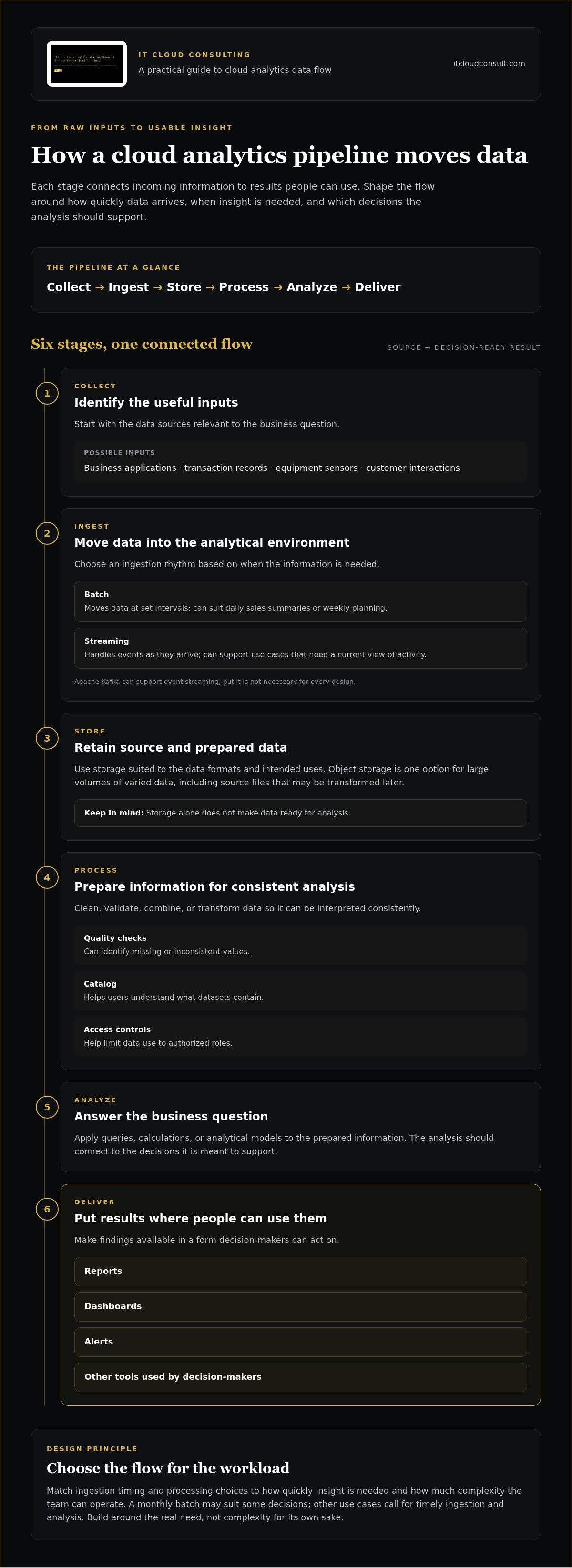
A data pipeline connects raw inputs to usable insights by collecting data, moving it into managed storage, preparing it for analysis, and delivering results in a form people can act on. Each stage should reflect how quickly information is needed, how it arrives, and which decisions it should support. In cloud for big data analytics, designing this flow around the workload helps teams avoid complexity that doesn’t serve a clear purpose.
- Collect: Identify relevant inputs, such as business applications, transaction records, equipment sensors, or customer interactions.
- Ingest: Move data into the analytical environment, either on a schedule or as events arrive.
- Store: Retain source data and prepared datasets in storage suited to their formats and intended use.
- Process: Clean, validate, combine, or transform information so it can be analyzed consistently.
- Analyze: Apply queries, calculations, or analytical models to answer business questions.
- Deliver: Make results available through reports, dashboards, alerts, or other tools used by decision-makers.
How data ingestion and storage shape the pipeline
Batch ingestion moves data at set intervals, making it suitable for tasks such as daily sales summaries or weekly planning. Streaming ingestion handles events as they arrive, which can support use cases where teams need a current view of activity. Apache Kafka can support event streaming, but it isn’t necessary for every design. Choose based on how quickly insights are needed and how much complexity the team can operate.
Object storage is one possible foundation for retaining large volumes of varied data, including source files that may be transformed later. Storage alone doesn’t make data ready for analysis. Quality checks can identify missing or inconsistent values; a catalog helps users understand what datasets contain; and access controls help limit use to authorized roles. Together, these practices make information easier to interpret and manage responsibly.
How processing and analytics deliver usable results
Scheduled processing runs tasks at planned intervals, while continuous processing evaluates incoming data on an ongoing basis. Apache Spark is a processing framework that can support large-scale data transformations and analysis, but it isn’t required in every architecture. Simpler workloads may be served by other processing options. Match the approach to latency, data volume, and analytical needs.
After processing, dashboards and reports can present trends or operational measures, while analytical models can support tasks such as forecasting. Pipeline ownership extends beyond development: someone must monitor data quality, manage access, maintain workflows, and respond when inputs or business needs change. An cloud analytics plan can help align those responsibilities and design decisions with organizational priorities.
Cloud Analytics Architectures Compared: Lakes, Warehouses, and Lakehouses
Architecture should reflect the decisions your organization needs to make, the data available, and the work your team can operate. A data lake, warehouse, or lakehouse describes a pattern, not a guaranteed outcome. Governance, data preparation, access controls, and workload design all affect whether the architecture delivers reliable analysis.
| Pattern | Typical data and uses | Governance and operational trade-offs |
|---|---|---|
| Data lake | Stores varied source data, including structured tables and less structured files. Useful for retaining original data and enabling flexible exploration. | Supports broad data retention, but teams need clear cataloging, quality practices, and access controls so users can find and interpret data consistently. |
| Data warehouse | Organizes structured, prepared data for analytical queries, standardized metrics, and recurring business reports. | Consistent models can support governed reporting. Data preparation and schema decisions require planning, and changes to analytical needs may require updates to those models. |
| Data lakehouse | Combines selected characteristics of lakes and warehouses, aiming to support varied data alongside structured analytical use. | Can bring different analytical needs into a shared environment, but still requires decisions about data quality, governance, workloads, and operational ownership. |
When a data lake, warehouse, or lakehouse may fit
A lake may suit teams that need to retain diverse source data and explore new questions over time. A warehouse often fits established reporting needs, where departments rely on consistent definitions for measures such as revenue or order volume. A lakehouse may be relevant when an organization wants some of a lake’s flexibility alongside structured querying and reporting. No single pattern suits every analytics requirement. A practical cloud for big data analytics architecture may use one pattern or combine them for distinct workloads.
Start with the decisions and users, then identify the data formats, freshness, consistency, and controls each use case requires. This avoids choosing an architecture for its label alone. For example, a business with trusted recurring reports and exploratory analysis may need both standardized datasets and access to varied source data.
Managed services or more hands-on architecture?
Managed services can reduce the amount of underlying infrastructure a team operates, while still requiring decisions about configuration, access, data quality, monitoring, and cost. A more self-managed design can offer greater control over components and customization, but adds operational work and may call for deeper platform and engineering skills. Neither approach removes the need for clear ownership.
Portability also deserves deliberate consideration. Using common data formats and documenting dependencies can make future changes easier to assess, while provider-specific capabilities may support particular requirements. These are design trade-offs, not proof that lock-in is inevitable. Broader cloud infrastructure consulting guide considerations can help connect analytics choices with an organization’s wider architecture, priorities, and operational capabilities.
How to Evaluate Cloud Big Data Analytics for Your Organization
A useful evaluation starts with business decisions, not a platform shortlist. Define what teams need to know, how quickly they need to know it, and what data can support that outcome. Then assess whether your architecture, governance practices, cost visibility, and operating skills can support the work as it grows. This turns cloud for big data analytics into a planning exercise rather than a technology selection made in isolation.
Match architecture to data and analytical requirements
Document current sources and intended use before comparing designs. Include business applications, operational systems, files, and event streams, along with formats, data owners, retention needs, and expected growth. Separate established reporting from exploratory analysis, since each may call for different preparation, access, and resource patterns.
- Business outcome: Name the decision or process the analysis should inform, such as tracking service demand or improving inventory planning.
- Latency and availability: Set expectations by use case. A periodic management report may tolerate scheduled updates, while operational monitoring may require fresher data. Define acceptable interruptions based on business impact.
- Scale and retention: Estimate current volumes and likely growth, and determine how long data must remain available for analysis.
- Users and access: Identify who will consume results, their technical skills, and whether they need dashboards, governed reports, or analytical workspaces.
These criteria help distinguish business-critical workloads from intermittent or experimental ones. A critical process may need defined monitoring and recovery responsibilities; an occasional analysis may not justify the same operating effort. Record these differences so capacity and support expectations reflect business importance.
Plan for governance, cost visibility, and team readiness
Set clear ownership for datasets and establish how teams request access, correct quality issues, and document changes. Access policies should reflect data sensitivity and user responsibilities. Consider privacy, auditability, and the obligations applicable to your organization and the information it handles. Requirements can depend on context, so include them in architecture planning rather than treating them as a final review.
Cost control also requires visibility. Track resource consumption by workload or team where practical, monitor changes in usage, and review whether ongoing resource use still supports the intended business value. Capacity planning should account for scheduled peaks, growth, and exploratory demand. Elastic resources can accommodate variation, but monitoring and review are needed to understand their effect on spend. A cloud optimization consulting guide can help frame efficiency reviews around usage and operational priorities.
Finally, identify the skills required to develop, secure, monitor, and maintain the environment. Compare those needs with your team’s current capabilities and clarify who owns routine operations. For a structured assessment of your cloud environment and priorities, plan your cloud optimization strategy with expert support.
Build and Improve a Cloud Analytics Strategy with Expert Support
A durable analytics environment develops through deliberate stages, not a one-time deployment. Each decision, from the first use case to ongoing operations, should connect business priorities with data realities, technical constraints, and the team’s capacity to manage change. A clear roadmap helps organizations move forward in practical steps while keeping their cloud for big data analytics strategy aligned with evolving needs.
From analytics use case to implementation roadmap
Begin with a focused use case that has clear business relevance. For example, a team might want a more complete view of service demand or a reliable basis for planning inventory. Define the decision the analysis should inform, who will use the result, and what would make the work valuable. Then map the data sources, dependencies, risks, and operating requirements that could shape delivery.
A phased roadmap can translate that discovery into action:
- Define outcomes: Agree on the business question, intended users, and practical measures of progress.
- Assess the environment: Review existing cloud infrastructure, data flows, constraints, and team capabilities.
- Design the approach: Align architecture, governance, security, and operating responsibilities with validated needs.
- Implement in stages: Sequence work so dependencies and readiness inform what happens next.
- Optimize: Monitor the environment and refine it as workloads, data, and organizational priorities change.
This sequence helps prevent premature platform decisions. If a source system has inconsistent data or unclear ownership, for example, account for that dependency before building around it. Strategic cloud adoption planning can also connect an analytics roadmap to wider modernization priorities.
How consulting and ongoing support sustain progress
Cloud advisory work can translate business goals and analytical requirements into a practical architecture and roadmap. An assessment of the existing environment can surface constraints and opportunities; implementation support can help carry approved design decisions into practice. The aim is to align technology choices with the outcomes, governance needs, and operational capabilities the organization has identified.
Progress continues after implementation. Monitoring helps teams understand how workloads behave, while ongoing technical assistance and management support the environment as data sources, analytical demands, and internal responsibilities evolve. Regular reviews can identify where resource use, architecture, or operating processes no longer fit current needs, creating a basis for measured optimization rather than assumptions about automatic savings.
A practical first step is a focused assessment of one analytics use case, its data dependencies, and the capabilities required to operate it. If you’re ready to clarify priorities and identify a suitable next step, discuss your cloud strategy with IT Cloud Consulting.
Make Your Analytics Strategy Ready to Evolve
The next step doesn’t need to be a sweeping transformation. Choose one upcoming business decision and use it to test whether your data environment can provide the evidence teams need. Then set a regular point to revisit the assumptions behind that work. New data sources, changing priorities, or shifts in who uses the results can all signal that the design needs attention.
This creates a strategy that can adapt without losing direction. Keep the business outcome visible as technical choices evolve, and treat each adjustment as an opportunity to strengthen how cloud for big data analytics supports the organization. The most effective path is one your teams can understand, operate, and refine over time.
IT Cloud Consulting provides strategic planning, cloud infrastructure assessment, optimization, implementation support, and ongoing management for evolving cloud environments. Explore a practical next step for your analytics strategy and move ahead with a clearer plan.
Frequently Asked Questions
Is cloud always the best choice for big data analytics?
No. Cloud may be a strong fit when workloads change, teams need shared access, or existing cloud systems already hold relevant data. Other environments may suit organizations with strict data-location constraints, specialized latency requirements, or stable workloads already well served by current infrastructure. Compare the full operating model, including data movement, skills, governance, and ongoing resource management, before deciding where each workload should run.
Can cloud analytics process data in real time?
Yes, cloud analytics can process incoming events continuously when the chosen services and pipeline are designed for that purpose. The practical question is how quickly a result must be available. An alert that supports an immediate operational response has different needs from a dashboard refreshed periodically. Define acceptable delay across the entire path, including source systems and data preparation, so “real time” reflects a useful business requirement.
How much data do you need before using cloud analytics?
There’s no minimum volume that automatically makes cloud analytics worthwhile. A modest dataset can still justify it if several teams need access or analysis is difficult with existing tools; a larger dataset may not require a new platform if current processes meet the need. Start by estimating the effort, constraints, and decisions involved. A small pilot using representative data can reveal whether a broader investment is justified.
What happens to existing data when an organization moves analytics to the cloud?
Existing data doesn’t have to move all at once, or all in the same way. Teams can prioritize datasets needed for an initial use case, then decide whether to transfer, replicate, retain, or leave other data in its current location. Before switching over, compare sample records and totals between the source and destination, test downstream reports, and preserve a clear rollback plan. These checks help protect continuity as migration progresses.
Does cloud big data analytics require artificial intelligence?
No. Organizations can use cloud analytics for SQL queries, standard reporting, trend analysis, and business rules without adding artificial intelligence. AI may be useful when a defined task, such as classifying text or identifying patterns, calls for it, but it introduces model oversight and validation needs. First establish that the data and analytical method answer the business question. Add AI only when it provides a clear, supportable benefit.
How can organizations keep cloud analytics costs under control?
Make usage visible before trying to change it. Assign workloads to accountable teams, review consumption trends, and set alerts for unexpected increases. Teams can also schedule non-production resources to run only when needed, remove unused copies, and refine queries that process more data than necessary. Evaluate these actions against workload requirements: reducing resource use should not undermine data availability or the quality of decisions the analytics supports.
Is a data lakehouse better than a data warehouse?
Not by default. A warehouse may be the simpler fit for teams centered on consistent, structured reporting, while a lakehouse may suit organizations with varied analytical needs and the capacity to manage its design. Compare both against representative queries, data preparation effort, access controls, and the skills available to operate the environment. A small proof of concept can expose practical trade-offs more clearly than architecture labels alone.


