
A cloud foundation is an operating model, not just a collection of cloud resources. That distinction matters when planning a cloud foundation setup: early decisions about account structure, network boundaries, access, and governance shape how securely and efficiently teams can build later. Choices made too soon can create operational complexity or unexpected costs, particularly when it is unclear where foundation work ends and workload migration begins.
The foundation should establish shared capabilities and clear ownership while giving application teams room to deploy workloads without rebuilding basic controls. This guide explains what those capabilities include and how to put them in place in a practical sequence. You’ll compare architecture approaches for accounts, networking, security, and cost governance, then consider how to align them with your organization’s needs and growth plans.
We’ll also clarify the handoff between establishing the foundation and migrating applications, so each phase has a defined purpose. Strategic planning, implementation support, and ongoing management can help turn architecture decisions into an operating environment that adapts as your cloud strategy evolves.
Key Takeaways
- Clarify the cloud foundation’s purpose and ownership before expanding migration or deployment activity.
- Assess identity, networking, security, governance, and operational visibility as connected building blocks.
- Choose account and network patterns based on your balance of centralized control and team autonomy.
- Plan your cloud foundation setup in stages, from business requirements and design through validation and handoff.
- Use strategic guidance and implementation support to align architecture decisions with business goals and evolving needs.
What Is a Cloud Foundation Setup, and What Problem Does It Solve?
A cloud foundation is the shared environment, controls, and operating practices that allow an organization to build and run cloud workloads consistently. It can include identity and access rules, network boundaries, security standards, resource organization, and expectations for monitoring and support. The Cloud Computing Architecture overview provides useful context on how cloud components fit together. A foundation applies those components in an environment shaped around an organization’s needs.
A well-designed cloud foundation is the secure, repeatable environment that gives teams a consistent way to deploy workloads while keeping access, responsibilities, and operational controls clear. Establishing it before broad migration or deployment activity helps teams avoid making basic decisions separately for every new application. The goal isn’t to anticipate every future requirement. It’s to agree on reusable starting points and define how exceptions are reviewed.
A cloud foundation setup is distinct from moving applications into the cloud. Migration concerns how existing workloads transition; foundation work prepares the shared environment where workloads can operate. It also differs from cloud optimization, which focuses on improving the use of existing resources, and custom software development. These activities may connect within a broader cloud strategy, but they solve different problems.
Which business problems can a cloud foundation address?
Without shared standards, teams can make one-off choices about access, network configuration, logging, or resource ownership. Those decisions may meet an immediate need, yet make environments harder to understand and govern as more workloads arrive. A foundation establishes common patterns, so teams can start from an agreed baseline instead of repeatedly deciding core controls from scratch.
Clear ownership matters as much as technical consistency. Defining who approves access, maintains shared services, monitors environments, and manages exceptions reduces ambiguity between technology and business teams. Scalability should also be treated as a design objective, not a guaranteed result. Patterns need to accommodate expected growth, while teams continue to assess capacity, risk, and operational readiness.
How does foundation setup fit into cloud adoption?
Foundation work connects strategy to later workload planning. It establishes the environment and decision-making practices teams will use without dictating how every application must be migrated. The right design reflects business objectives, risk tolerance, existing technology constraints, and the organization’s capacity to operate and support cloud services.
For example, a team preparing to expand cloud use can first define who owns shared controls and which deployment standards apply. Those decisions give future workload assessments a clearer context. A strategic cloud adoption guide can help connect foundation planning to broader modernization priorities, so architecture decisions support the intended business direction rather than becoming an isolated technical exercise.
The foundation should evolve as adoption progresses. Strategic planning and implementation support help translate agreed requirements into a working environment. Ongoing management helps keep its controls and practices aligned with changing workloads and organizational needs.
Which Core Building Blocks Belong in a Cloud Foundation?
A useful foundation connects technical controls with the people responsible for using and maintaining them. Identity, networking, security, governance, and operational visibility should work as a coordinated system, not as separate configuration tasks. The NIST Cloud Computing Reference Architecture offers a structured view of cloud roles and components. Organizations can use that perspective to shape standards around their own workloads and responsibilities.
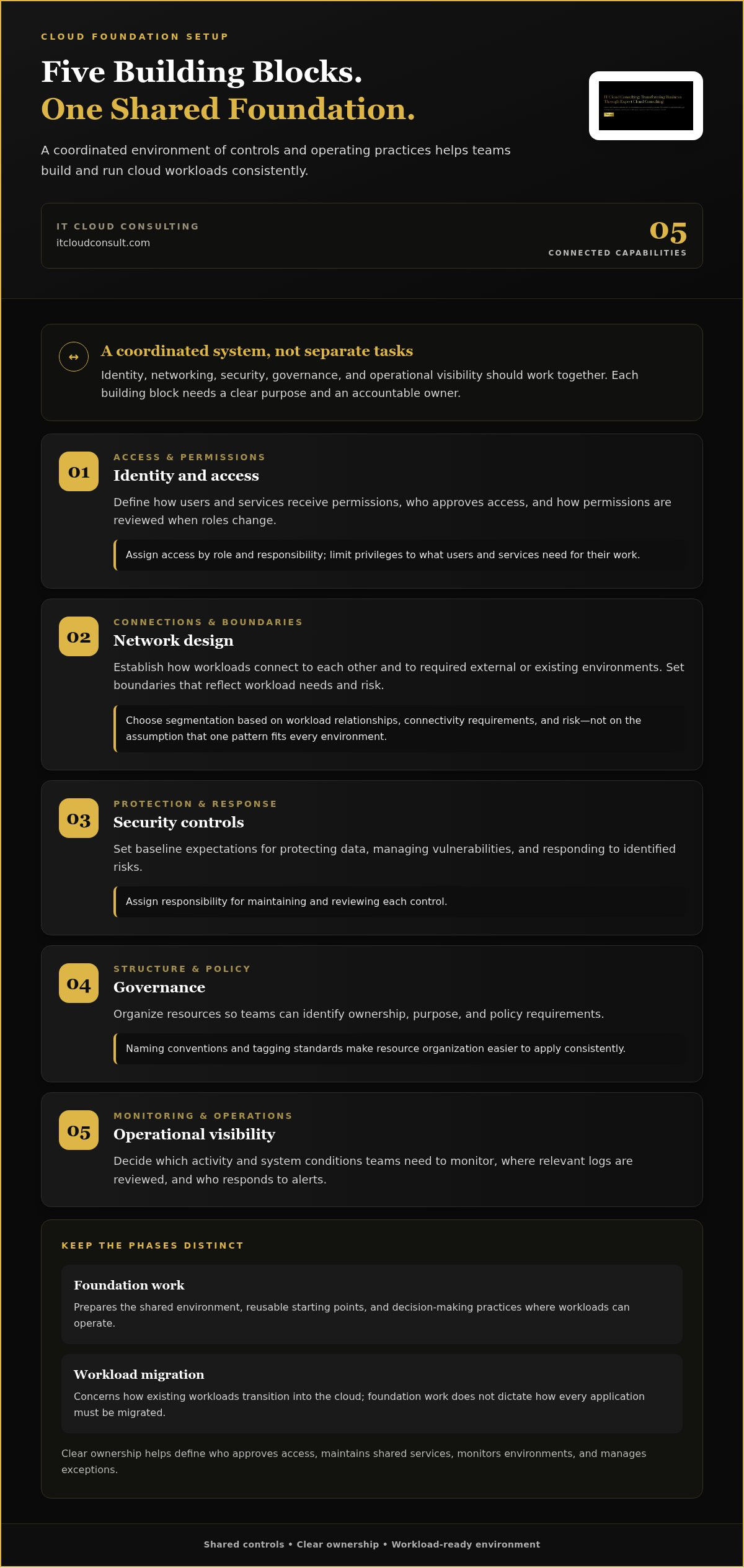
In a practical cloud foundation setup, each building block needs a clear purpose and an accountable owner:
- Identity and access: Define how users and services receive permissions, who approves access, and how permissions are reviewed when roles change.
- Network design: Establish how workloads connect to each other and to required external or existing environments. Set boundaries that reflect workload needs and risk.
- Security controls: Set baseline expectations for protecting data, managing vulnerabilities, and responding to identified risks. Assign responsibility for maintaining and reviewing each control.
- Governance: Organize resources so teams can identify ownership, purpose, and policy requirements. Naming conventions and tagging standards make that structure easier to apply consistently.
- Operational visibility: Decide which activity and system conditions teams need to monitor, where relevant logs are reviewed, and who responds to alerts.
How should identity, networking, and security work together?
Identity and access management provides the basis for granting and reviewing permissions. Teams can assign access by role and responsibility, then limit privileges to what users and services need for their work. Network segmentation complements those decisions by controlling how workloads communicate. Choose boundaries based on workload relationships, connectivity requirements, and risk rather than assuming one network pattern fits every environment.
Security guardrails make these expectations usable across teams. For example, document which controls apply to every environment, who monitors exceptions, and who approves changes. The aim is a shared baseline with a clear process for handling legitimate differences. A cloud infrastructure consulting guide can help connect these architectural choices with wider modernization priorities.
What governance and visibility should be established early?
Start with standards teams can follow: identify resource owners, use consistent names that show purpose, and define how policies apply across environments. These decisions help teams understand what they manage and make governance easier to apply as the environment grows. Document the standards, identify who maintains them, and set a review process so they can evolve with business needs.
Logging, monitoring, and alerting provide operational awareness once workloads are running. Decide which events need attention, who reviews them, and how teams escalate issues. A cloud foundation plan tailored to your organization can bring these decisions together. Ongoing management helps maintain and evolve the controls over time.
How Should You Compare Cloud Foundation Architecture Choices?
Architecture choices determine how teams share control, connect workloads, and apply common safeguards. A sound cloud foundation setup doesn’t default to maximum centralization or unrestricted team independence. Instead, it matches the organization’s accountability model, risk needs, and ability to operate the environment. Compare each pattern by asking who makes decisions, which controls must remain consistent, and where workload teams need room to adapt.
Should cloud resources use a centralized or delegated structure?
Centralized administration places shared policies and services under a central team. This can make oversight and coordination more straightforward, particularly when the organization needs consistent controls or has limited operational capacity. Delegated ownership gives teams more responsibility for their own accounts or subscriptions within agreed guardrails. That can support autonomy, but it also requires clear standards and teams able to manage their responsibilities.
Organization size alone shouldn’t determine the model. Consider who is accountable for risk, whether workloads have distinct requirements, how much oversight is needed, and how mature cloud operations are. A hybrid approach can centralize shared controls while delegating workload-level decisions.
How much standardization should the foundation enforce?
Repeatable templates reduce repeated design choices and help teams apply baseline controls consistently. A workload with distinct connectivity, security, or operational needs may justify a variation. Treat exceptions as managed decisions: record the reason, name the accountable owner, document any compensating controls, and set a review point. This keeps flexibility visible instead of allowing unmanaged differences to accumulate. Security guidance, such as CMU Software Engineering Institute’s Best Practices for Cloud Security, can inform the controls an organization evaluates.
The comparison below highlights common trade-offs. These patterns can be combined, and neither is universally superior.
| Decision | Pattern | Benefits | Trade-offs and conditions |
|---|---|---|---|
| Account or subscription ownership | Centralized | Coordinates shared policies and services; supports consolidated oversight. | Can constrain team autonomy. Consider when central accountability and consistent control are priorities. |
| Account or subscription ownership | Delegated | Gives workload teams more ownership and decision-making flexibility. | Needs defined guardrails and capable owners. Consider when teams can manage responsibilities independently. |
| Network design | Centralized | Concentrates shared connectivity and network controls. | May create dependencies on central services. Consider whether shared routing and oversight fit workload needs. |
| Network design | Distributed | Allows workload environments to manage more of their own connectivity. | Requires coordination to maintain consistent visibility and boundaries. Consider when workloads have distinct network needs. |
Use the table as a starting point, then test each option against business objectives, risk tolerance, regulatory needs, and operating capacity. Strategic planning can connect those requirements to an architecture that balances repeatability with justified flexibility.
How to Set Up a Cloud Foundation: A Practical Sequence
A dependable setup begins with organizational decisions, not configuration. Before implementation, clarify the outcomes the foundation must support, the teams responsible for it, and how you’ll know it is ready for use. This sequence turns those decisions into a working environment, then validates its controls before teams rely on them.
- Define goals and scope. Identify business priorities, target workloads, their dependencies, and relevant nonfunctional needs, such as security, availability, or connectivity. Establish risk expectations and distinguish foundation work from later workload migration or application development.
- Assign owners and responsibilities. Name decision-makers for identity, networking, security, governance, and operations. Clarify who approves changes, manages exceptions, monitors the environment, and maintains shared services.
- Set acceptance criteria. Agree on observable outcomes before designing. For example, specify which user roles should access which resources, which network paths are expected, what events should generate alerts, and how policy compliance will be checked. Set thresholds that match your requirements rather than adopting arbitrary universal targets.
- Design the foundation. Translate requirements into account or subscription boundaries, network patterns, access rules, security controls, resource standards, and operating procedures. Document key trade-offs and how the design supports business goals, risk tolerance, and available skills.
- Implement shared capabilities. Build the agreed environment and apply repeatable controls. Document configuration decisions and approved deviations so teams can tell what is standard and where workload needs call for a different approach.
- Validate, then hand off. Test access, expected network flows, logging, monitoring alerts, and policy enforcement. Review recovery assumptions with the teams responsible for operations, record test results, and resolve gaps before broad workload rollout. Hand over procedures, ownership, and open decisions.
Validate foundation controls before broad workload rollout, so teams can address gaps in access, connectivity, visibility, or policy behavior before those gaps affect more workloads.
What should teams decide before implementation begins?
Requirements should connect business priorities to technical choices. Document the workloads the foundation needs to support, their dependencies, and the operational skills available to maintain shared services. Then assign owners with the authority to make or approve decisions. This preparation reduces ambiguity during implementation and gives teams a practical basis for assessing whether the delivered environment meets its intended purpose.
How can teams validate and prepare the foundation for use?
Test realistic scenarios, not just whether components exist. Confirm that intended roles can perform necessary tasks, unexpected access is restricted, required network paths work, and alerts reach responsible teams. Verify that policies behave as expected and review recovery procedures against the organization’s assumptions. Record outcomes, operating instructions, and approved exceptions so future teams can build on a known baseline.
A structured cloud foundation setup also needs a clear handoff and a plan for ongoing review as workloads and responsibilities change. Plan your cloud foundation with experienced advisors to connect requirements, implementation, and operational readiness.
How IT Cloud Consulting Can Help Your Foundation Evolve
A cloud foundation needs more than a sound initial design. As workloads, priorities, and team responsibilities change, its controls and operating practices need to remain useful. IT Cloud Consulting connects planning with implementation and ongoing management, helping organizations shape a foundation around business goals and the realities of their existing technology.
What does cloud foundation advisory contribute?
Strategic planning turns broad ambitions into a practical roadmap. IT Cloud Consulting works with stakeholders to clarify which business priorities the foundation should support, identify dependencies between workloads and shared services, and surface constraints in the current environment. That context informs decisions about architecture, risk, governance, and operational ownership.
The result is not a universal blueprint. A foundation designed for an organization with established cloud operations may differ from one that needs to develop internal skills while adopting cloud services. Advisory connects those choices to the people who will operate the environment, the controls they can sustain, and the organization’s longer-term direction. It also helps decision-makers sequence foundational work before the next stage of adoption.
Planning is useful only when teams can put it into practice. Implementation support translates agreed architecture into a working environment, keeping the original requirements and ownership model in view as shared capabilities are established. This creates continuity between design decisions and operational reality, while giving teams an opportunity to resolve questions that emerge during implementation.
How does ongoing support sustain the foundation?
Cloud environments don’t stay static. New workloads, changed access needs, updated policies, and evolving operational demands can all affect how a foundation performs. Ongoing technical assistance, monitoring, and management help teams maintain awareness of the environment and address maintenance needs. Clear operational ownership remains essential: support works best when responsibilities, escalation paths, and review practices are understood.
Regular attention also helps organizations assess whether foundational standards still fit the workloads they support. For example, a new workload might introduce a connectivity dependency or require a review of existing access practices. Reviewing such changes against documented controls helps teams preserve consistency while making deliberate adjustments. This is an ongoing cycle of operating, reviewing, and evolving, not a one-time handoff.
A tailored cloud foundation setup brings business priorities, architecture, implementation, and operational responsibilities into alignment. Through strategic planning, implementation support, and ongoing cloud management, IT Cloud Consulting helps organizations establish a foundation and support its evolution as their needs change. Discuss your cloud foundation setup and explore an approach shaped around your organization’s goals, technology, and operating needs.
Build a Foundation That Can Grow With Your Goals
Treat your cloud foundation setup as an evolving capability, not a one-time infrastructure milestone. As priorities shift, revisit whether the foundation still supports how your teams work, the risks they manage, and the services they need to operate. Regular reviews help keep future decisions deliberate instead of allowing the environment to grow through disconnected changes.
A practical plan connects strategic planning and roadmap development with implementation support, then carries that intent into ongoing cloud management. Each stage should strengthen the next: clear priorities guide design, implementation turns decisions into an operating environment, and continued management helps keep that environment aligned as needs develop.
You don’t need to resolve every future architecture question at once. Start with the decisions that give teams a useful, responsible path forward, then refine the foundation as experience builds. Explore a tailored cloud foundation plan with IT Cloud Consulting and take the next step.
Frequently Asked Questions
What is a cloud foundation?
A cloud foundation is the common technical and operational baseline that lets cloud workloads function within agreed boundaries. It combines shared infrastructure with access rules, governance, and operating practices. For example, teams might use a shared approach to granting permissions and recording activity while retaining workload-specific settings. The cloud foundation setup should reflect the organization’s goals, risk requirements, technology choices, and ability to manage the environment.
Is a cloud foundation the same as a cloud landing zone?
Not always. The terms are related, but organizations and cloud platforms may use them differently. A landing zone often describes an environment prepared to receive workloads, while “cloud foundation” may also cover broader governance and operating practices. To avoid confusion, define what each term includes in project documents. For instance, specify whether operational ownership and ongoing reviews are in scope instead of assuming all teams mean the same thing.
Can a company set up a cloud foundation before choosing workloads to migrate?
Yes, teams can define shared requirements before selecting specific workloads, but they should base the design on likely workload needs and business priorities. Consider a company that expects to support both internal applications and services with external users: connectivity and access assumptions may differ. Reviewing representative workload needs early can help identify those differences, while detailed migration planning remains a separate activity on the cloud roadmap.
How long does cloud foundation setup take?
There’s no universal timeline. The effort depends on factors such as existing identity and network arrangements, the number of teams involved, governance decisions, and how much implementation is in scope. Break the work into milestones tied to decisions and evidence of readiness, such as an approved design, tested access paths, or documented operating procedures. This gives stakeholders a way to track progress without relying on an assumed duration.
What happens if a cloud foundation is designed without operational ownership?
Important tasks can fall between teams. For example, access may be granted during setup, but no role is assigned to review permissions as responsibilities change. Monitoring, maintenance, and exception handling can face similar gaps. Name owners while defining the foundation, document routine procedures, and agree who reviews changes. This helps the environment remain manageable as teams and workloads expand.
Does a cloud foundation prevent every security or cost issue?
No. A foundation can make controls and resource activity easier to manage, but it can’t eliminate every risk or guarantee a particular financial result. A workload may change, permissions may need review, or usage may shift beyond initial assumptions. Treat the foundation as a starting point for continued monitoring and improvement. For example, teams can review access, policy exceptions, and resource usage as part of regular operations.


