
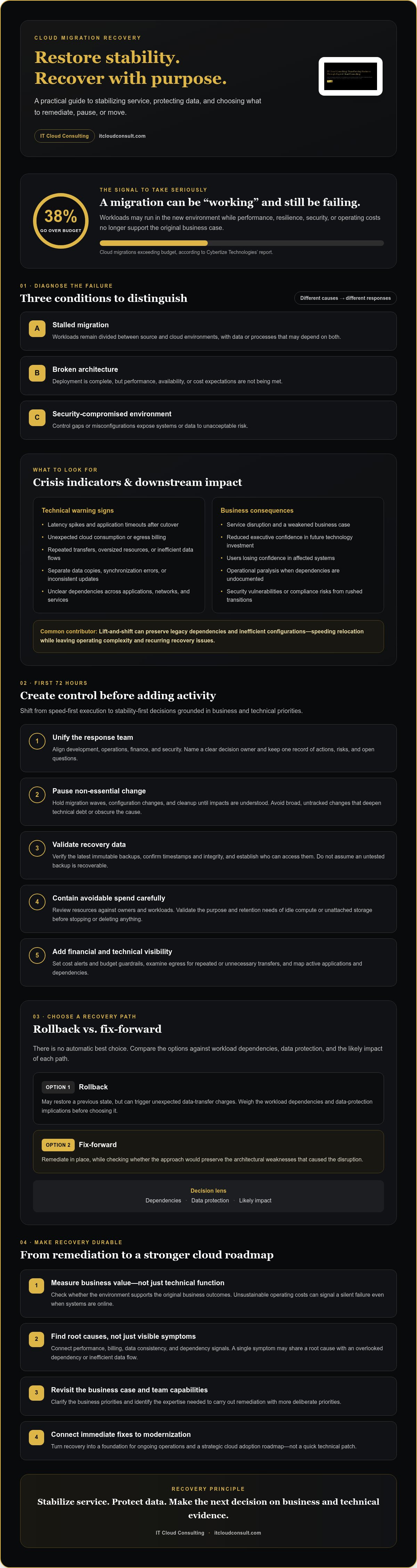
38% of cloud migrations go over budget, according to Cybertize Technologies’ March 2026 report. When egress fees mount, critical applications falter, and exhausted teams are asked to do more, failed cloud migration recovery can’t be reduced to a quick technical fix. The priority is to stabilize service and protect data while making deliberate choices about what to remediate, pause, or move.
If your transition is stalled, you need a way to regain control without losing more time, budget, or stakeholder confidence. A rollback can trigger unexpected data-transfer charges, while an unexamined fix-forward may preserve the architectural weaknesses that caused the disruption. Recovery works best when teams shift from speed-first execution to stability-first decisions grounded in business and technical priorities.
This guide outlines how to stabilize a cloud environment, identify root causes, and build a practical remediation roadmap. You’ll learn how to evaluate recovery options, address cost and skills pressures, and strengthen ongoing operations so the recovery supports a more resilient digital future.
Key Takeaways
- Assess migration success against business value, not technical functionality alone; unsustainable operating costs can signal a silent failure.
- Use the first 72 hours to align development, operations, finance, and security teams, then pause non-essential migration work while you assess risk.
- For failed cloud migration recovery, compare rollback with fix-forward based on workload dependencies, data protection, and the likely impact of each path.
- Revisit the original business case and identify the expertise your team needs to carry out remediation with clearer priorities.
- Turn recovery into a foundation for modernization by connecting immediate remediation to a strategic cloud adoption roadmap.
Understanding the Anatomy of a Failed Cloud Migration
A cloud migration hasn’t succeeded just because workloads run in a new environment. Enterprise migration failure is a mismatch between technical execution and business outcomes: the systems may be online, but performance, resilience, security, or operating costs no longer support the original business case. That distinction matters because it broadens failed cloud migration recovery beyond restoring service. Teams must identify what failed and whether the target environment can still deliver the intended value.
Failure can take several forms. A stalled migration leaves workloads divided between source and cloud environments, often with data or processes that depend on both. A broken architecture may be fully deployed but unable to meet performance, availability, or cost expectations. A security-compromised environment has control gaps or misconfigurations that expose systems or data to unacceptable risk. These conditions can overlap, but each calls for a different response.
The chosen cloud computing models, including service and deployment approaches, influence how workloads are managed and secured. Understanding those foundational differences helps teams assess whether a migration’s design fits its business and operational needs.
Technical Indicators of a Migration in Crisis
Look for changes that began around cutover, not just isolated incidents. Latency spikes and application timeouts can indicate that workloads now depend on services, network paths, or configurations that weren’t accounted for in the migration plan. Meanwhile, unexpected increases in cloud consumption or egress billing may point to oversized resources, repeated data transfers, or architecture choices that need review.
Data can also reveal a fragmented transition. Separate copies of information, synchronization errors, and inconsistent updates between on-premises systems and cloud workloads make it harder to establish which records are current. These signals deserve investigation together: a performance symptom may share a root cause with an overlooked dependency or inefficient data flow.
The Business Impact of Unsuccessful Cloud Adoption
The consequences extend beyond infrastructure. When a migration disrupts service or fails to deliver its business case, executives may question future technology investment, and users may lose confidence in affected systems. Teams can also face operational paralysis if undocumented dependencies make it unclear which applications, integrations, or processes can safely change.
Rushed transitions can introduce security vulnerabilities or create compliance risks when access controls, data handling, and existing obligations haven’t been assessed for the new environment. A common contributing factor is a lift-and-shift approach: moving workloads with minimal redesign can preserve legacy dependencies and inefficient configurations rather than resolving them. That may accelerate initial relocation, but it can leave teams with higher operating complexity and recurring recovery issues. Accurate diagnosis is the first step toward choosing a remediation path that serves both technical stability and business value.
The 72-Hour Triage: Immediate Steps for Migration Recovery
The first 72 hours of a migration crisis should create control, not add activity. Bring development, operations, finance, and security into a shared response group, with a clear decision owner and a single record of actions, risks, and open questions. This “war room” can be virtual; what matters is that technical findings and business priorities inform the same decisions.
Pause non-essential migration waves, configuration changes, and cleanup work until the team understands their potential impact. Avoid broad, untracked changes that could deepen technical debt or make the cause of an incident harder to isolate. Before changing workloads, verify the latest immutable backups, confirm their timestamps and integrity, and establish who can access them. A backup that hasn’t been tested or validated shouldn’t be assumed recoverable.
Stabilizing the Financial Perimeter
Review active resources against known owners and workloads. Flag idle compute, unattached storage, and other possible “zombie” resources, but validate their purpose and retention needs before stopping or deleting anything. Set cost alerts and budget guardrails in the cloud console, then examine egress patterns for repeated or unnecessary transfers. These steps help contain avoidable spend while preserving the data and services recovery may depend on.
Technical Stability and Performance Audit
Build a practical map of active applications and their dependencies, including databases, APIs, identity services, and connections to remaining on-premises systems. Compare API call volumes and database query performance with expected demand to identify bottlenecks or unexpected traffic. Record what the team observes before making targeted changes, so each intervention can be assessed against a clear baseline.
A structured review can reveal whether the immediate issue stems from a local configuration, a dependency, or a broader design flaw. Consider cloud architecture reviews to help assess foundational decisions and organize the next steps. For failed cloud migration recovery, the goal at this stage is not to solve every architectural problem; it’s to protect data, limit avoidable change, and gather enough evidence to choose a safe recovery path.
Close the triage period with a concise status record: what’s stable, what remains at risk, which resources need investigation, and who owns each next action. This gives leaders a dependable basis for decisions and helps the technical team move from crisis response to deliberate remediation.
Rollback vs. Fix-Forward: Evaluating Your Recovery Path
Once the immediate risk is understood, the central decision is whether to return workloads to their source environment or remediate them in the cloud. A rollback moves workloads back to the source, while fix-forward addresses the causes of failure in the cloud environment. Neither option is automatically safer or cheaper. For failed cloud migration recovery, compare data integrity, downtime tolerance, source-environment readiness, security exposure, and the effort required to restore reliable operations.
Use these questions to guide the decision:
- Can the source environment safely run the workload? Confirm that capacity, dependencies, access, and data are available before relying on rollback.
- Can the cloud issue be isolated and corrected? Configuration problems may be suitable for fix-forward; fundamental design flaws may require a broader reassessment.
- How much data must move, and how long can the service be disrupted? Large transfers can add time, coordination, and egress expense, while either path may require downtime.
- Is there a clear integrity and security threshold? Define what would make continued operation unacceptable, and who has authority to halt or reverse changes.
When to Choose a Strategic Rollback
Rollback deserves serious consideration when critical data is corrupted or inconsistent and the team can’t restore integrity in the cloud, or when a security or compliance concern requires isolating the affected environment. It may also be appropriate if ongoing operating costs outweigh the application’s business value and the source environment remains viable. Before proceeding, verify that the source can support the workload and that teams can reconcile data changes made since cutover.
The Case for Fix-Forward Remediation
Fix-forward is often the practical path when the source environment has been decommissioned or repurposed, or when evidence points to correctable configuration issues rather than a fundamental architectural problem. For example, a misconfigured resource or inefficient data flow may be addressed without moving the workload back. A review of cloud optimization consulting can help assess whether cost and performance issues have a viable in-cloud remedy.
Set a point of no return before making the next change. For each critical workload, document the conditions that would trigger rollback, such as failed integrity checks, unacceptable service disruption, or unresolved security exposure. Also identify when the source environment will no longer be recoverable, and require explicit approval before crossing that threshold. This isn’t a single universal moment; it’s a workload-specific decision gate that prevents teams from drifting into a recovery path without an informed choice.
Implementing a Strategic Remediation Framework
Recovery should restore alignment between technology and the business, not simply recreate the migration plan that failed. Revisit the original business case: which outcomes matter most, which workloads support them, and what cost, performance, security, and availability conditions must be met? Rank applications by business criticality, then use those priorities to sequence remediation. This keeps teams from spending effort modernizing components that don’t advance the recovery objectives.
Next, address the people and process gaps that may have contributed to the disruption. Identify where knowledge is concentrated in individuals or teams, and decide whether targeted training, clearer documentation, or support from external advisors is needed. A Cloud Center of Excellence (CCoE) can provide a cross-functional governance structure, with defined decision rights and shared standards for architecture, security, costs, and operations. The right model should strengthen internal capability rather than create another approval bottleneck.
For organizations assessing outside expertise, this guide to managed cloud services can help frame what support arrangements to evaluate. Keep ownership of recovery goals and decisions clear, whether the work is led internally or alongside advisors.
Bridging the Skills and Expertise Gap
Make skills gaps visible. Map the knowledge required to operate each critical workload against the people who can currently perform those tasks, including incident response, cloud architecture, security, and cost management. Then choose where to upskill existing staff and where external guidance can accelerate planning. A CCoE can retain lessons from the recovery and translate them into reusable standards, reducing dependence on undocumented expertise.
Architecting for Long-Term Resilience
Where appropriate, refactor legacy components that create persistent bottlenecks or prevent workloads from meeting their objectives. Avoid treating a complete redesign as a prerequisite for recovery; make changes in controlled increments, with validation and rollback criteria for each cutover phase. Infrastructure as Code (IaC) can make approved infrastructure changes more consistent and reviewable than manual configuration, provided teams govern and test those changes carefully.
Security and operations need the same discipline. Use cloud security assessment checklists to structure reviews of identity, access, configuration, and data handling. Define monitoring for service health, cost anomalies, and security signals, then determine which routine corrective actions can be safely automated. Automation should have clear safeguards and human escalation paths.
Finally, phase future cutovers by workload, with explicit readiness checks and success criteria before each transition. If your organization needs a structured roadmap for failed cloud migration recovery, explore strategic cloud adoption support as a way to align remediation with long-term business goals.
Turning Failure into Evolution: The Path to Strategic Modernization
A recovered migration should leave the organization better prepared for its next stage of growth. Use what the disruption exposed to improve workload placement, operating efficiency, scalability, and accountability. Record the causes, decisions, and outcomes, then turn those lessons into design principles and readiness checks for future initiatives. That converts failed cloud migration recovery from an isolated response into a foundation for more resilient transformation.
With systems stable, shift from emergency remediation to a roadmap tied to measurable business priorities. A strategic cloud adoption plan can clarify which workloads should evolve, what capabilities they require, and how teams will assess readiness before future changes. Treat optimization as ongoing operational discipline: review resource use, performance, security posture, and workload value as business needs change, rather than waiting for another crisis to reveal misalignment.
The Role of Managed Cloud Support in Recovery
Restoring service is only one milestone. Teams also need a sustainable approach to monitoring system health, recognizing emerging issues, and maintaining operational consistency after recovery. Ongoing cloud support can provide continued technical assistance, helping internal staff address infrastructure needs while preserving capacity for business priorities and innovation. Define monitoring responsibilities, escalation paths, and review routines with the provider; don’t assume coverage hours or response commitments without confirming them.
Accelerating Growth through Professional Advisory
Experienced cloud advisors can help connect technical decisions to enterprise goals, especially when teams need to prioritize complex workloads or reconcile competing requirements. A useful roadmap should be grounded in the organization’s environment, constraints, and desired outcomes, with clear phases, decision owners, and measures of progress. This structure helps reduce avoidable risk by making dependencies and readiness criteria visible before subsequent migration steps.
IT Cloud Consulting brings strategic cloud adoption, cloud optimization, and ongoing cloud support together to help organizations plan beyond the immediate disruption. To take the next step, review the strategic cloud adoption roadmap and consider how its principles can guide your recovery and modernization priorities.
Build a More Resilient Cloud Future
A migration setback doesn’t have to define your cloud strategy. Effective failed cloud migration recovery starts by stabilizing what matters, identifying the underlying causes, and choosing a recovery path that protects business priorities. From there, a phased remediation roadmap can turn immediate fixes into stronger architecture and more reliable operations.
Lasting progress also depends on clear strategic guidance and ongoing attention to cost, performance, and system health. IT Cloud Consulting supports enterprise cloud transformation with strategic cloud adoption, cloud optimization, and managed cloud support, including expertise across multi-cloud environments. Together, these capabilities can help organizations move from crisis response toward a more deliberate modernization plan.
Set the next phase in motion with a partner that can help connect technical decisions to long-term goals. Partner with IT Cloud Consulting for strategic cloud guidance and build a clear path from recovery to modernization. With the right priorities and support, your organization can regain confidence and create a stronger foundation for what comes next.
Frequently Asked Questions
How do I know if my cloud migration has officially failed?
There’s no universal “official” failure point; define it against the migration’s agreed business and technical goals. A migration may be failing if critical services remain unstable, data integrity is uncertain, security controls are inadequate, or operating costs undermine the business case. Compare actual results with approved targets for performance, availability, cost, and risk. If the gap persists and the team can’t resolve it through planned corrective actions, treat recovery as a priority.
Is it always possible to roll back a cloud migration?
No, rollback depends on whether the source environment, data, and workload dependencies remain available and usable. Confirm that the original environment can support the workload, that recent data can be reconciled, and that the return path has been tested. If the source has been decommissioned or cloud data has changed since cutover, rollback may be impractical or introduce further risk. Evaluate downtime tolerance and data-transfer implications before committing.
How much does failed cloud migration recovery typically cost?
There’s no reliable standard price for failed cloud migration recovery because the effort depends on the affected workloads, data volume, outage duration, architecture, and recovery path. A rollback may involve data-transfer charges and work to restore dependencies; fixing forward can require diagnosis, configuration changes, testing, or redesign. Estimate these separately from advisory or ongoing support fees, and build a scenario-based forecast before choosing a path.
Can I fix a failed migration without hiring outside consultants?
Yes, if your team has the expertise, authority, documentation, and capacity to diagnose the issue and execute a controlled recovery. Start by assigning clear owners across operations, development, security, and finance; document dependencies and recovery criteria; and protect data before making changes. External advisors may help when cloud architecture, security, or cost-management knowledge is limited, or when internal teams are already stretched by operational demands.
What are the most common causes of migration failure in 2026?
Common causes include complex legacy applications with undocumented dependencies, rushed lift-and-shift decisions, inadequate security planning, skills gaps, and cloud costs that weren’t fully anticipated. Configuration problems and poor visibility into data flows can also undermine performance or integrity after cutover. AI workloads add further planning complexity because their infrastructure and cost needs may be less predictable. Diagnose the specific causes in your environment rather than assuming one issue explains every symptom.
How do I explain a migration failure to executive stakeholders?
Lead with business impact, not technical detail. Summarize what’s affected, the current service and data risks, the financial exposure, and what the team knows or still needs to verify. Then present the available recovery options, their trade-offs, decision owners, and the next review point. Be direct about uncertainty and avoid assigning blame before the cause is established. A clear, evidence-based update helps restore confidence and supports timely decisions.
What is the difference between a stalled migration and a failed one?
A stalled migration has stopped making planned progress, but its intended business outcomes may still be achievable once blockers are addressed. A failed migration has missed essential technical or business objectives, such as reliable service, data integrity, security, or sustainable operating costs. A stall can become a failure if risks remain unresolved or the business case no longer holds. Assess progress against approved milestones and outcomes, not activity alone.
How can I prevent my next cloud migration from failing?
Begin with clear business outcomes, a current view of application dependencies, and realistic cost, security, and performance requirements. Test representative workloads before broader cutovers, define measurable readiness and rollback criteria, and assign accountable owners across technical and business teams. Phase migration work so issues can be contained and lessons applied before the next move. Continue monitoring performance, security, and resource use after migration to catch problems before they undermine results.


