
What if the fastest way to restore cloud operations isn’t to make another change, but to find the cause of the failure first? When services depend on one another, a visible outage may be only a symptom. Teams need to establish who and what is affected, assess the risk, and choose the next diagnostic step. Cloud troubleshooting services bring structure to that uncertainty, helping organizations investigate issues without losing sight of the wider environment.
Recurring incidents drain internal IT capacity, and a quick fix can leave the underlying weakness in place. A disciplined response connects evidence across infrastructure and services, guides targeted remediation, and captures what teams need to reduce the chance of the issue returning. The goal is not only to restore operations, but to build a clearer path toward dependable cloud performance.
In this article, you’ll learn how structured troubleshooting identifies root causes, supports recovery, and informs practical prevention. We’ll also explore how professional assessment and optimization can turn incident findings into infrastructure improvements, and how ongoing cloud support can help organizations sustain more reliable operations.
Key Takeaways
- Separate user-visible symptoms from underlying causes to focus investigation on the issue that needs to be resolved.
- Use evidence from connected applications, infrastructure, identity, and network paths to test root-cause hypotheses.
- Choose containment, restoration, or a lasting fix based on business impact and operational risk.
- Follow a repeatable incident workflow that clarifies who investigates, makes decisions, and communicates updates.
- Cloud troubleshooting services can help turn recurring incidents and complex dependencies into a practical path toward infrastructure improvement and ongoing support.
Cloud Troubleshooting Services: Recognize the Issue Before It Spreads
A cloud incident rarely explains itself. Users may see a page fail to load or an integration stop responding, while the cause sits elsewhere in a chain of connected services. Cloud troubleshooting is a structured process for identifying service issues, restoring expected operation, and learning from the evidence to reduce the risk of recurrence. The visible symptom is a clue, not necessarily the cause. An access error, for example, could stem from an identity setting or a dependency rather than the application itself.
Prioritize an issue by considering who is affected, which business activity is disrupted, and which dependent services may also be at risk. A single report from one user may point to an isolated access problem. Similar reports across teams or locations may signal broader impact. Site Reliability Engineering principles provide a useful foundation for connecting operational decisions with service reliability.
Which cloud symptoms warrant immediate investigation?
Service unavailability, noticeably slower response times, failed integrations, and unexpected access errors all warrant investigation, especially when they interrupt a business-critical workflow or affect multiple users. Record when the symptom began, who or what is affected, what users were trying to do, and what changed beforehand, such as a deployment or configuration update. These details help distinguish an isolated report from a developing service-wide pattern.
Check the scope before settling on a cause. If one user can’t sign in but colleagues can, the issue may be narrower than a failure affecting everyone who relies on the same service. If several applications fail at once, look for a shared dependency. Preserve observations as they occur; a clear timeline helps teams compare symptoms and changes without treating the first visible error as the definitive explanation.
How does cloud troubleshooting differ from routine maintenance?
Troubleshooting responds to an active or suspected incident, so the first decisions depend on urgency, business impact, and the risk of making the situation worse. Routine maintenance is planned work to review, update, or optimize an environment before a specific disruption demands attention. Cloud troubleshooting services focus diagnosis on the immediate issue, while assessment and optimization can address broader operational improvements.
A workaround may restore part of a service, but it doesn’t establish why the disruption occurred. Treat it as containment, then continue investigating the evidence and validate the service after changes. A temporary recovery can reduce immediate impact; a root-cause fix and follow-up review help determine whether further corrective work is needed.
How Cloud Troubleshooting Finds the Root Cause
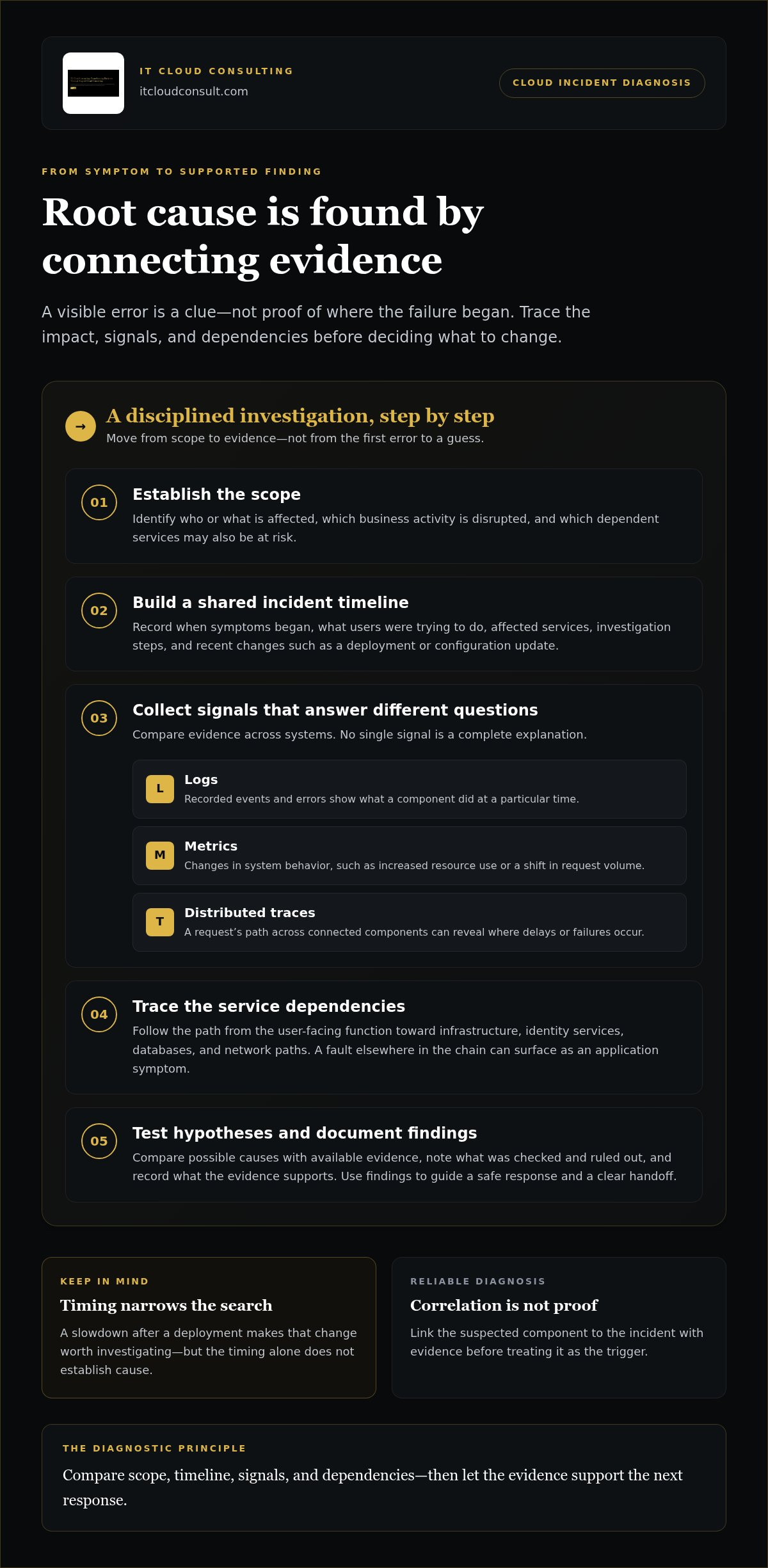
Root-cause diagnosis is an evidence-led process, not a search for the first system that appears unhealthy. Teams establish the scope of the issue, collect relevant signals, form testable hypotheses, and document what the evidence supports. They also map dependencies: a user-facing application may rely on infrastructure, identity services, databases, or network paths, so a fault in one component can surface elsewhere.
Symptom correlation can point toward a cause, but it doesn’t prove which component triggered the incident. A slowdown that begins after a deployment, for example, makes the change worth investigating, but teams still need evidence linking it to the affected service. This disciplined approach helps cloud troubleshooting services move from plausible explanations to findings that can guide a safe response.
What evidence helps isolate a cloud issue?
Start with a consistent incident timeline. Record timestamps, affected services, observed behavior, and investigation steps in shared notes so evidence from different systems can be compared. Use a consistent time basis where possible; otherwise, events that appear related may be difficult to put in the right order.
Each signal answers a different question:
- Logs capture recorded events and errors, helping show what a component did at a particular time.
- Metrics reveal changes in system behavior, such as increased resource use or a shift in request volume.
- Distributed traces follow a request across connected components, helping identify where delays or failures occur along its path.
Use these sources together rather than treating any one signal as a complete explanation. Diagnostic tools and procedures vary by environment, so use the ones documented for the affected systems rather than assuming that names or workflows are identical across platforms.
How do dependencies and recent changes affect diagnosis?
Trace the service path from the user-facing function toward its dependencies. If a transaction fails, for example, investigate the application’s interactions with identity, network routes, and supporting services instead of assuming the application itself is at fault. Then compare the incident timeline with deployments, configuration updates, and scheduled workloads. Timing can narrow the investigation, but each hypothesis still needs to be tested against logs, metrics, traces, or other available evidence.
Document what was checked, what the evidence showed, and which explanations were ruled out. That record supports a clearer handoff and makes later infrastructure assessment more useful. Organizations looking to carry diagnosis into broader cloud infrastructure assessment and optimization can use incident findings to identify improvement opportunities. This shift from reacting to incidents toward proactive reliability engineering connects technical investigation with longer-term operational resilience.
Cloud Troubleshooting Approaches: Containment, Repair, and Root-Cause Fixes
An incident response can have several objectives, and they don’t always happen at the same time. Teams may first limit disruption, then restore a usable service, correct the underlying fault, and strengthen the environment to reduce the chance of recurrence. The right sequence depends on available evidence, business impact, and the operational risk of each action. A fast workaround can restore service while leaving the cause unresolved, so recovery and resolution shouldn’t be treated as the same outcome.
| Response | Purpose | When it fits | Limitation |
|---|---|---|---|
| Containment | Limit further impact | While investigation continues | May leave the fault active |
| Service restoration | Return service to a usable state | When evidence supports a safe recovery action | Doesn’t necessarily explain the failure |
| Root-cause correction | Address the identified technical cause | Once the cause is sufficiently understood | May require planned changes and validation |
| Preventive improvement | Reduce future operational risk | After the incident or during follow-up work | May involve broader planning beyond the immediate fix |
When is a temporary workaround appropriate?
Containment is useful when the issue is continuing to affect users and evidence supports a lower-risk way to limit its reach. Depending on the environment and change controls, a team might roll back a recent change or shift traffic away from an affected component. These actions aren’t universal remedies: assess dependencies and potential side effects before proceeding. Record the workaround, its known risks, who owns it, and when it will be reviewed or removed.
When does an issue need a permanent corrective action?
Repeated incidents call for deeper investigation, not simply another temporary recovery. Look for underlying configuration weaknesses, capacity constraints, fragile dependencies, or operational process gaps. Evaluate corrective options against reliability priorities and the risk of introducing new disruption, then validate the change after implementation. Technical prevention might involve correcting a configuration or strengthening monitoring; broader architecture or governance decisions may require separate planning, ownership, and approval.
Effective cloud troubleshooting services connect immediate remediation to longer-term work. Once teams understand the cause, infrastructure assessment and optimization can help identify practical improvements, while ongoing technical support can help sustain cloud operations. The response should match the evidence: stabilize what’s affected, fix what’s understood, and plan follow-up where the issue points to a wider operational concern.
A Practical Cloud Troubleshooting Workflow for Business Teams
A repeatable workflow helps teams make sound decisions under pressure and keep technical investigation connected to business priorities. Assign clear ownership early: an incident lead coordinates work and updates, technical owners investigate affected services, and business stakeholders communicate impact and help prioritize decisions. In smaller teams, one person may hold more than one role, but responsibilities should remain explicit.
- Assess impact: Identify affected services, users, and business activities. Set an initial priority based on the scope and consequences.
- Preserve evidence: Start a shared incident record and capture the timeline, symptoms, relevant signals, and recent changes.
- Investigate: Assign technical owners to test plausible causes and report findings in the incident record.
- Act: Select a response that reflects the evidence, impact, and risk. Record the decision and its owner.
- Validate: Check that users and dependent systems can complete expected tasks, then monitor relevant signals.
- Review: Document the outcome, remaining risks, and prioritized follow-up work.
What should an incident record include?
Make the record useful to both responders and decision-makers. Include symptoms, scope, start time, affected services, business impact, diagnostic evidence, tested hypotheses, actions, and observed results. Note who owns each task, why key decisions were made, when stakeholders received updates, and which risks or questions remain open. If investigation raises security or control concerns, use this cloud security assessment checklist to guide a structured review.
How should teams validate recovery and prevent recurrence?
A successful technical check alone may not confirm that service has recovered for users. Validate the affected workflow from the user’s perspective and confirm dependent systems are behaving as expected. Continue monitoring relevant signals after remediation so the team can spot renewed errors or degradation rather than relying on one successful test. Then turn unresolved causes and risks into prioritized corrective work.
Use the review to distinguish immediate fixes from broader operational improvements. Some findings may call for infrastructure assessment or optimization; others may require clearer ownership or changes to established processes. Structured cloud troubleshooting services can connect incident evidence to this ongoing improvement work, while technical assistance and monitoring help organizations sustain cloud operations. IT Cloud Consulting’s cloud support for your operations brings ongoing support into that improvement process.
When Cloud Troubleshooting Services Can Strengthen Ongoing Operations
Some incidents are isolated. Others point to operational pressures that a one-time fix won’t address. Recurring disruptions, growing dependency chains, or an internal team stretched between incident response and planned work can signal that additional expertise would be useful. The aim isn’t to add process for its own sake. It’s to give teams a clearer view of the environment and a practical way to move from immediate diagnosis toward sustained improvement.
Cloud troubleshooting services can help organizations investigate active issues while keeping the wider operating context in view. If a similar failure returns, incident patterns may reveal where infrastructure assessment, configuration review, or optimization deserves attention. Ongoing cloud support can extend that work through technical assistance, monitoring, and management.
What can ongoing cloud support contribute after an incident?
Ongoing technical assistance and monitoring can help organizations maintain visibility into cloud operations beyond a single incident. Reviewing trends across incidents helps teams distinguish one-off disruptions from repeated pressure on a dependency, configuration, or operational process. Those findings can inform infrastructure assessment and optimization priorities based on business needs and the organization’s wider cloud objectives. Ongoing support provides continuity for that work and helps teams respond to operational needs as they arise.
Optimization should be guided by evidence and context, not pursued as an isolated technical exercise. Connect proposed cloud improvements to operational priorities, the issues identified, and the organization’s wider goals.
How can a consulting engagement connect diagnosis to improvement?
A tailored engagement can begin by understanding the existing environment, the dependencies involved, and the operational challenges the organization wants to address. Assessment findings can then shape a prioritized set of practical improvements, such as reviewing infrastructure configuration or identifying opportunities to optimize existing cloud resources. Recommendations grounded in the environment and incident history are more useful than a generic list of changes.
IT Cloud Consulting brings strategic cloud guidance, infrastructure assessment and optimization, and ongoing technical assistance together as part of a longer-term operational path. This helps organizations connect technical decisions to efficiency, reliability, and evolving cloud goals instead of treating each incident as a separate event. Explore cloud consulting and support.
Turn Cloud Incidents Into Lasting Progress
Reliable cloud operations depend on more than restoring service. A structured investigation separates symptoms from causes, uses evidence to guide decisions, and turns incident findings into corrective and preventive work. Clear ownership and follow-up help teams move from immediate recovery toward stronger operations.
Cloud troubleshooting services can support that progress when incidents recur, dependencies become difficult to manage, or internal capacity is stretched. IT Cloud Consulting combines strategic cloud guidance and implementation support with infrastructure assessment and optimization. Ongoing technical assistance, monitoring, and management can help organizations sustain their cloud environments as needs evolve.
Each environment and business priority is different, so the path forward should reflect what the evidence reveals and what the organization needs to achieve. Explore tailored cloud consulting and ongoing support to connect diagnosis with practical improvement. With a clear plan and the right expertise, your team can build greater confidence in its cloud operations and keep moving forward.
Frequently Asked Questions
What are cloud troubleshooting services?
Cloud troubleshooting services help organizations investigate and resolve issues affecting cloud applications, infrastructure, access, or performance. A structured process establishes business impact, gathers relevant evidence, tests likely causes, and validates corrective actions. For example, a team might compare an access failure with identity records and recent configuration changes rather than assume the application is at fault. Findings can also inform infrastructure assessment, optimization, and follow-up improvements aligned with operational priorities.
How do you troubleshoot a cloud service outage?
Begin by establishing the outage’s scope, affected users, business impact, and timeline. Preserve relevant logs, metrics, traces, and change records, then map dependencies and test plausible causes against the evidence. Choose a containment or corrective action that fits the situation, and verify recovery from both the user and system perspectives. Document actions, results, and unresolved risks. Use the diagnostic procedures documented for the affected environment.
What is the difference between cloud troubleshooting and cloud monitoring?
Cloud monitoring continuously gathers signals about system health, performance, or activity, helping teams notice changes and potential problems. Troubleshooting is the investigation used to diagnose and resolve a specific issue. Monitoring may reveal an increase in errors or slower response times; troubleshooting examines those signals, tests possible causes, and validates actions. The two practices complement each other: monitoring provides operational visibility, while troubleshooting turns relevant evidence into informed decisions and corrective work.
When should a business use cloud troubleshooting services?
Consider additional support when incidents keep recurring, internal teams have limited capacity, or complex dependencies make the cause difficult to isolate. A structured review can also help when an organization needs to assess existing cloud infrastructure and identify optimization priorities. IT Cloud Consulting provides strategic cloud guidance, infrastructure assessment and optimization, and ongoing technical support. The appropriate scope should reflect the business impact, technical environment, and operational goals, while urgent risks follow established incident processes.
Can cloud troubleshooting prevent future incidents?
Cloud troubleshooting can help reduce recurrence when teams investigate underlying causes instead of stopping at a temporary workaround. After service is restored, document the timeline and evidence, identify corrective actions, and prioritize prevention according to risk and business impact. For example, repeated failures associated with a configuration or dependency may prompt a focused infrastructure review. No troubleshooting process can guarantee that incidents won’t happen again, but learning from them can strengthen operational practices and guide improvements.
What information should we gather before cloud troubleshooting begins?
Record what users experience, when the issue began, which services or workflows are affected, and any recent changes. Preserve relevant logs, metrics, traces, error messages, and incident communications when available. Note actions already taken and their results so investigators can avoid repeating steps and understand the current state. This information helps establish scope and test hypotheses. Protect sensitive information, and don’t share credentials or confidential data through unsecured channels.


