

What if the fastest way to improve cloud performance isn’t adding more capacity, but finding the delay users actually feel? Slow or inconsistent response times can point to bottlenecks across applications, infrastructure, or data flows. Limited visibility makes it hard to know where to act. Effective cloud performance optimization starts with measuring user-facing latency and service-level indicators, not guessing at the cause.
It’s also reasonable to worry that a change intended to improve speed could create reliability, complexity, or cost problems. Optimization works best when teams connect technical metrics to user and business impact, then make controlled changes and monitor their effects on service stability.
This practical guide explains how to set useful performance measures, trace bottlenecks, and prioritize improvements without putting production workloads at unnecessary risk. You’ll also learn how to build an ongoing optimization process with clear ownership, so performance gains can be measured and sustained over time.
Key Takeaways
- Define performance around user and business needs, and distinguish responsiveness goals from cost optimization.
- Trace delays across the application stack to locate contention, saturation, inefficient queries, or unnecessary service calls.
- Use cloud performance optimization to turn representative traffic data into a baseline, testable hypotheses, and evidence-led changes.
- Match improvements such as right-sizing, scaling, caching, or query tuning to the bottleneck, then validate performance and trade-offs.
- Assign clear ownership for monitoring, performance testing, change approvals, and regular reviews as workloads evolve.
What Cloud Performance Optimization Measures, and Why It Matters
Cloud performance optimization measures how effectively a workload serves users and supports business operations, then improves its behavior against defined needs. Cloud performance optimization is the practice of setting measurable performance objectives and adjusting workload behavior to meet them reliably. It is not the same as reducing infrastructure spend. Cost optimization aims to use resources efficiently, while performance optimization focuses on responsiveness, capacity, and dependable service. The goals can overlap because changing resource size or architecture may affect both speed and cost.
Cloud environments rely on shared, adaptable resources, so teams need to connect what users experience with how workloads behave. A useful introduction to cloud computing characteristics explains why resource pooling and elasticity shape how cloud systems are provisioned and managed. The right performance measures, however, depend on what each application needs to do.
Which cloud performance metrics should teams track?
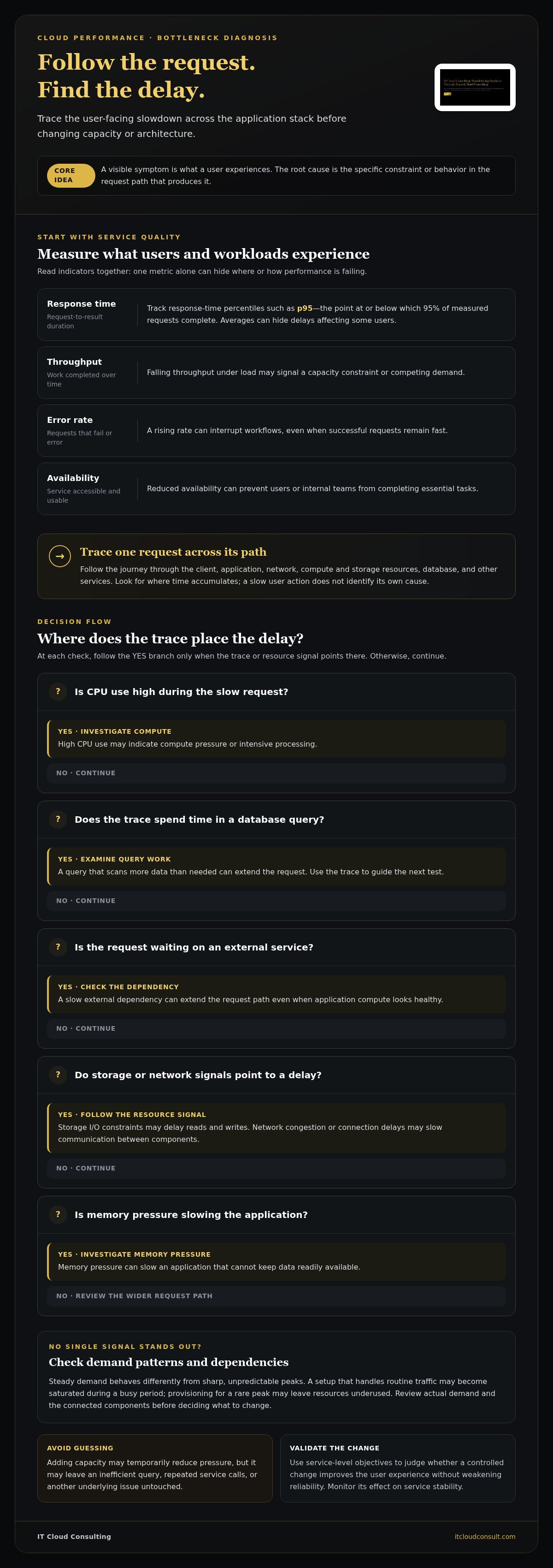
Start with measures that reveal different aspects of service quality. Averages can hide delays affecting a smaller but important share of users, so review response-time percentiles such as p95, the point at or below which 95% of measured requests complete.
- Response time: How long a request takes to return a result. High or inconsistent response times can make pages, searches, or transactions feel slow.
- Throughput: The volume of requests or work completed in a given period. Falling throughput under load may signal a capacity constraint or competing demand.
- Error rate: The share of requests that fail or return errors. A rising rate can interrupt workflows, even if successful requests remain fast.
- Availability: The extent to which a service is accessible and usable when needed. Reduced availability can prevent users or internal teams from completing essential tasks.
Read these indicators together. A service may respond quickly to a small number of requests but struggle as demand rises. It may also remain available while returning errors for a particular operation.
How performance affects user experience and business operations
Variable response times disrupt more than a single screen. A customer may abandon a checkout when each step loads unpredictably; an employee may lose time waiting for a report or approval workflow. Repeated slowdowns can also make operational planning harder because teams can’t reliably predict how long routine processes will take.
Separate the visible symptom from its possible cause. A slow search is an application-level symptom; the underlying issue could be an inefficient query, saturated compute, storage delays, or network contention. Define service-level objectives around important actions and workflows, then use them to judge whether a change improves the experience without weakening reliability.
How Cloud Performance Bottlenecks Form Across an Application Stack
A user request travels through several connected components before the application returns a result. It may pass from a browser or mobile client to an application, cross a network, use compute and storage resources, query a database, and call other services. Delay or failure at any point can affect the whole journey. The NIST definition of cloud computing describes characteristics such as resource pooling and elasticity. These shape how capacity is supplied, but they don’t reveal where a request is slowing down.
A visible performance symptom is what a user experiences; the root cause is the specific constraint or behavior in the request path that produces it. Adding capacity can temporarily reduce pressure, but it may leave an inefficient query, repeated service calls, or another underlying issue untouched. In cloud performance optimization, tracing a request across components helps teams distinguish correlation from cause before changing infrastructure.
Where latency and resource contention can originate
Different resource signals suggest different lines of investigation. High CPU use may indicate compute pressure or intensive processing; memory pressure can slow an application that can’t keep data readily available. Storage I/O constraints may delay reads and writes, while network congestion or connection delays can slow communication between components. A database query that scans more data than needed, or a slow external dependency, can extend the request path even when the application’s own compute resources appear healthy.
Example: A user submits a report request. The application receives it promptly, but generating the report triggers a slow database query and then waits for an external service. Increasing compute capacity might not help because the delay comes from query execution and dependency response time. A trace showing the time spent at each step can guide the next test.
How architecture and workload patterns shape performance
A workload with steady demand behaves differently from one with sharp, unpredictable peaks. A configuration that handles routine traffic may become saturated during a busy period. By contrast, provisioning for a peak that rarely occurs may leave resources underused. Review actual demand patterns and dependencies before choosing a response.
Caching can reduce repeated work by serving reusable data more quickly, but it raises questions about freshness and invalidation. Distributed services can separate responsibilities and support independent scaling, yet each additional network call creates another dependency that can add latency or a failure point. Neither approach is universally best. The right choice depends on the workload, user expectations, and operational requirements. A structured cloud infrastructure assessment can help connect these factors before a change is made.
How to Diagnose Cloud Performance Without Guesswork
Reliable diagnosis follows evidence in a deliberate order. Start with the user impact, establish a baseline, correlate telemetry across the request path, test a specific hypothesis, then validate the result. This sequence helps teams avoid treating every slow response as a reason to add capacity or change architecture.
- Define the impact: Identify the affected user journey, operation, or business workflow.
- Baseline performance: Record relevant metrics under representative traffic and workload conditions.
- Correlate telemetry: Compare traces, logs, and metrics to locate where the behavior changes.
- Test a hypothesis: Make a controlled change that targets a plausible cause.
- Validate: Repeat the measurement under comparable conditions and check for side effects.
An architecture assessment can reveal how dependencies and design decisions shape the request path. This cloud architecture review guide offers a useful perspective on connecting structural factors to performance symptoms.
Build a useful performance baseline
Choose indicators that match the user impact, such as p95 latency, throughput, errors, and resource utilization. Where possible, segment results by workload, user journey, dependency, and time period. This helps distinguish a slowdown affecting one operation from a broader service issue. Record deployments and configuration changes alongside metric trends so teams can compare performance before and after an intervention.
Observe normal patterns as well as periods of higher demand before changing infrastructure. A test based on unusually light traffic may suggest an improvement that won’t hold under real operating conditions.
Turn monitoring signals into testable hypotheses
Use traces to follow request timing, logs to examine application events, and metrics to see changes in system behavior. The continuous monitoring framework describes a structured approach to monitoring information systems. Its emphasis on gathering and analyzing evidence also supports a disciplined performance review.
A dashboard spike is a clue, not proof of cause. Rank possible explanations by user impact, supporting evidence, and how safely each can be tested. Where practical, change one relevant factor at a time, then compare results against the same workload conditions. Document the intended outcome and any side effects, such as new errors, increased resource use, or slower behavior elsewhere. This evidence-led cycle makes cloud performance optimization more controlled and repeatable.
Which Cloud Optimization Changes Improve Performance Safely?
The safest change addresses a measured bottleneck, not simply the most visible metric. Match the intervention to the evidence, define how you’ll judge its effect, and consider what could worsen. This makes cloud performance optimization a controlled process rather than a blanket exercise in adding resources or redesigning systems.
Match the intervention to the bottleneck
Use the suspected constraint to guide the response. Resource scaling may help when testing confirms a capacity limit, but high utilization alone doesn’t prove that extra capacity will reduce user-facing delays. Compare results under similar workload conditions.
- Right-sizing: Adjust resource capacity when evidence shows a workload is constrained or provisioned in a way that affects its behavior. Validate response times, throughput, and errors before and after, and check that the change doesn’t create new capacity limits.
- Scaling: Add or remove capacity to respond to demand or relieve verified saturation. Test across representative traffic patterns, including periods of higher demand, and monitor whether dependent components can handle the added load.
- Caching: Consider caching when repeated requests perform the same work or retrieve the same data. Check whether latency improves and confirm that users still receive sufficiently current information.
- Query tuning: Investigate inefficient database queries when traces show data access taking a meaningful share of request time. Compare query behavior and end-to-end latency, while checking that changes preserve correct results.
- Architecture changes: Explore redesign when evidence points to persistent coordination overhead, tightly coupled dependencies, or limits that smaller adjustments can’t address. Architectural changes can add dependencies and failure modes, so test them thoroughly before broader rollout.
For a broader view of how cloud optimization can align infrastructure decisions with organizational goals, see cloud optimization consulting.
Balance speed, reliability, and operational complexity
A change that lowers latency may introduce components to monitor, maintain, and troubleshoot. Caching, for example, can reduce repeated data access but adds cache behavior to account for. Scaling can increase available capacity, yet it won’t correct a slow dependency or inefficient request path. Assess the full operational effect, not just the target metric.
Before changing production, define measurable acceptance criteria, such as the response-time or error-rate behavior the change must preserve or improve. Record baseline results, stage the rollout where practical, and set clear rollback conditions if reliability declines or side effects appear. Compare the outcome under equivalent workload conditions, then document what changed and what the evidence shows. IT Cloud Consulting provides customized cloud optimization guidance to help teams assess these trade-offs. Explore cloud optimization support for a structured, evidence-led approach to performance changes.
How to Sustain Cloud Performance as Workloads Evolve
Performance work doesn’t end when a change passes its initial validation. Traffic patterns shift, releases introduce new behavior, and infrastructure changes can alter how services interact. A repeatable review cycle helps teams spot these changes early and keep technical decisions aligned with user and business needs.
Create a repeatable performance review cycle
Review trends and incidents against defined service objectives rather than reacting to an isolated dashboard snapshot. Revisit assumptions after releases, traffic shifts, or infrastructure changes, since yesterday’s workload profile may no longer represent current demand. Document decisions, results, and follow-up actions so teams can learn from changes and maintain continuity as responsibilities shift.
Make ownership explicit. Teams should know who responds to performance alerts, schedules performance testing, approves production changes, and tracks follow-up work. Regular reviews can bring these responsibilities together with telemetry, incident findings, and planned workload changes, making optimization an ongoing operating practice.
When expert cloud optimization support can help
An assessment can connect application behavior with infrastructure evidence, helping teams see where a performance concern originates and how it relates to operational priorities. Implementation support can put agreed changes into practice, while ongoing monitoring and management help teams evaluate whether performance remains aligned with their objectives as workloads evolve.
IT Cloud Consulting provides tailored cloud optimization guidance and ongoing technical support to help organizations sustain this cycle. For a broader view of service models and operational considerations, read the managed cloud services guide.
To make performance reviews more systematic, discuss a tailored cloud assessment and explore how infrastructure evidence and workload needs can inform your next steps.
Make Performance a Sustainable Advantage
Cloud performance optimization is most effective when it starts with user experience, follows evidence across the application stack, and favors targeted changes over assumptions. Measure meaningful service indicators, trace slowdowns to their underlying causes, and validate each improvement against representative workloads. Then make performance reviews and clear ownership part of ongoing operations, so evolving demand doesn’t undo progress.
Connecting infrastructure behavior to business priorities takes technical insight and a consistent process. IT Cloud Consulting provides customized cloud assessment and optimization guidance, with implementation support and ongoing technical assistance to help organizations sustain their approach.
Discuss a tailored cloud performance optimization approach and identify practical next steps for your workloads. With clear measures and informed decisions, your team can improve responsiveness while maintaining the reliability and control your operations depend on.
Frequently Asked Questions
What is cloud performance optimization?
Cloud performance optimization is the systematic measurement and improvement of how cloud-hosted workloads behave. Teams define objectives, such as response time or availability, then use telemetry and testing to find bottlenecks. They make targeted changes and verify the results under representative conditions. The aim is to improve service performance for users while maintaining reliability and operational control, rather than making infrastructure changes based on assumptions alone.
How do you measure cloud performance?
Measure indicators that reflect user and service experience: response time, throughput, error rate, and availability. Percentile latency, such as p95, can reveal slow requests that an average may conceal. Correlate these measures with logs, traces, workload patterns, and recent changes to investigate possible causes. Choose measurement windows and objectives that fit the application, then compare results under similar conditions to assess whether a change helped.
Which cloud metrics matter most for performance optimization?
The most useful metrics depend on the workload, but often include latency percentiles, request volume, error rates, availability, and resource utilization. Application traces and dependency timings can show where requests spend time. No single metric confirms a bottleneck on its own. Interpret signals together, relate them to service objectives and user impact, then use the combined evidence to decide what to investigate or change.
Can cloud performance optimization reduce costs?
It can affect costs, but improving performance and reducing spend aren’t interchangeable goals. Scaling resources or adding components may improve responsiveness while increasing costs, while other changes may benefit both. Define performance objectives and review cost impact alongside them. Test proposed changes against workload evidence rather than assuming that lower utilization or a smaller bill means better performance. The right balance depends on application needs and operational priorities.
What causes poor performance in cloud applications?
Poor performance can result from constrained compute or memory, storage or network delays, inefficient database queries, excessive service calls, or dependencies outside the application. Workload spikes and configuration changes may also expose weaknesses. These are possible causes, not a diagnosis. Compare user-facing symptoms with relevant metrics, logs, and traces to narrow the source, then test a targeted response before changing infrastructure more broadly.
How often should cloud performance be reviewed?
Monitor performance continuously, then review trends and incidents during regular operational reviews. Give performance closer attention after significant releases, architecture changes, incidents, or shifts in workload. The appropriate review cadence depends on service criticality and how quickly conditions change. Track objectives over time, and assign clear ownership for alert investigation, performance testing, change approval, and validation so findings lead to considered action.
When should a business use cloud performance optimization consulting?
Consulting can help when teams struggle to isolate recurring bottlenecks, lack a useful measurement baseline, or need to coordinate application and infrastructure changes. An assessment can connect telemetry and architecture with business objectives, while implementation support helps put changes into practice and evaluate them. Ongoing technical assistance can support monitoring and regular reviews as workloads evolve, helping organizations maintain a consistent optimization process.


