
Cloud migration is difficult because moving workloads can expose hidden dependencies, security gaps, compliance obligations, cost assumptions, and data-integrity risks. Addressing cloud migration challenges and solutions means treating the move as a planned transformation, not a simple transfer: assess workloads, set priorities, protect data, and validate each stage before cutover.
Cloud infrastructure can improve flexibility, but that benefit depends on how well the destination fits existing systems and business needs. A rushed move can lead to unexpected costs, performance issues, or disruptions. A deliberate approach gives teams time to address risks before they affect operations.
This article explains why cloud migration is challenging and how to manage the risks. It covers security and compliance, planning and integration, cost monitoring and resource sizing, and large-scale data transfers with integrity checks, helping you make informed decisions and move forward with confidence.
Key Takeaways
- Build security and compliance into migration planning, with safeguards for data and access in the destination environment.
- Map workloads, dependencies, priorities, and responsibilities before choosing how each asset should move.
- Forecast cloud usage, then monitor spending and adjust resources to better match actual demand.
- Protect data with backups, phased transfers, and validation between migration stages.
1. How can I ensure data security and compliance during and after migration?
Treat security as a design requirement, from initial assessment through ongoing cloud operations. Before moving workloads, classify data, identify who can access it, and trace how it moves between applications. Encrypt migration data in transit and at rest. For sensitive information, use a secure private connection and choose an environment with appropriate security and compliance capabilities. Keep protections consistent with those used for comparable on-premises systems.
Map applicable compliance obligations before cutover, since moving data doesn’t remove existing responsibilities. HIPAA may be relevant to healthcare data, according to the U.S. Department of Health and Human Services. GDPR may matter when an organization handles data within its scope, according to the European Union. Cloud providers may comply with ISO 27001, an industry standard identified by the International Organization for Standardization. These names are starting points for assessing requirements, not substitutes for mapping which obligations apply to specific workloads.
Define the shared responsibility boundary for each cloud service. Providers typically secure the underlying infrastructure and offer tools to protect cloud environments, while organizations remain responsible for their own security settings and data. In hybrid and multicloud designs, document which team owns access controls, encryption settings, monitoring, and incident response in each environment. For example, a legacy application spanning local servers and cloud storage needs consistent access rules in both places.
Set a consistent security policy for identities and data, then adapt its implementation to each platform. A zero-trust approach can combine multifactor authentication, encryption, and least-privilege access, limiting permissions to what each role needs. Schedule security audits and vulnerability assessments before, during, and after migration. Test access controls and logging during each workload move, then review them after cutover. This helps teams identify configuration gaps before they expose applications or sensitive data, while clear ownership keeps protections active as systems change.
2. Why is Cloud Migration Difficult?
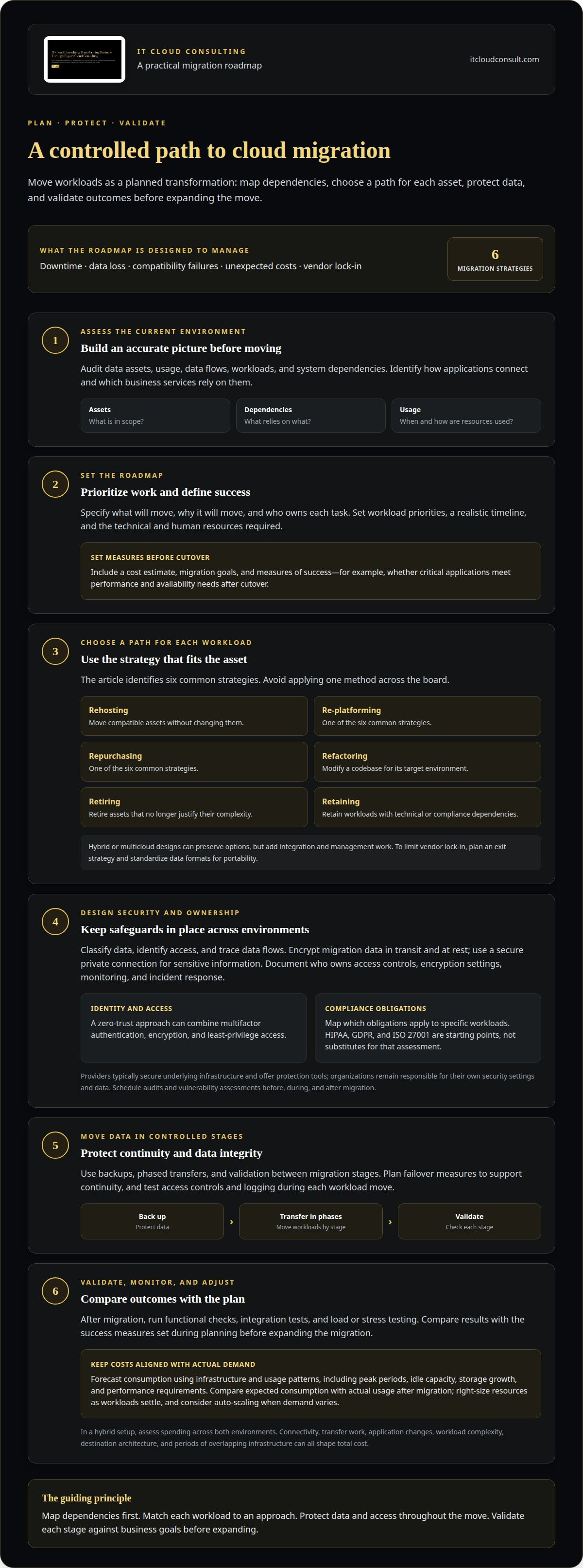
Cloud migration is difficult because infrastructure, applications, and dependencies rarely move as isolated units. Key risks include downtime, data loss, compatibility failures, unexpected costs, and vendor lock-in. Downtime can interrupt dependent services, while incomplete transfers can leave records unavailable or inconsistent. The right cloud migration challenges and solutions depend on how workloads connect and which business services rely on them.
Start by auditing data assets, usage, data flows, and system dependencies. Then build a roadmap that explains what will move, why it will move, and who owns each task. Set workload priorities, a realistic timeline, and the technical and human resources required. Include a cost estimate, migration goals, and measures of success, such as whether critical applications meet performance and availability needs after cutover. This helps reveal legacy constraints before they affect the schedule.
Choose a migration approach for each workload instead of applying one method across the board. The six common strategies are rehosting, re-platforming, repurchasing, refactoring, retiring, and retaining. Rehosting, for example, moves compatible assets without changing them, while refactoring modifies a codebase for its target environment. Retire assets that no longer justify their complexity, and retain workloads with technical or compliance dependencies. To limit vendor lock-in, plan an exit strategy and standardize data formats for portability. Hybrid or multicloud designs can preserve options, but they add integration and management work.
Downtime and data loss are key risks, alongside failed integrations, performance problems, and disrupted dependencies. Plan failover measures to support continuity, then test workloads after migration with functional checks, integration tests, and load or stress testing. Compare the results with the success measures set during planning before expanding the migration.
Successful execution needs cloud architecture, data, security, and operations skills. Teams use asset inventories, dependency maps, migration utilities, and performance monitoring to surface issues and guide decisions. A structured approach to cloud migration challenges and solutions can align workload choices, responsibilities, and validation with business goals. For complex environments, cloud migration strategy guidance can help.
3. Cloud cost monitoring and resource right-sizing
Cloud platforms can scale resources as demand changes, but flexibility doesn’t automatically control spending. Migration budgets should account for connectivity, transfer work, application changes, and the ongoing cost of running workloads. The total depends on data volume, workload complexity, destination architecture, and how long on-premises and cloud infrastructure operate together. For a cloud migration engagement, service pricing depends on project scope and is provided after a quote request; workload needs, connectivity, and migration activities shape the estimate.
Forecast consumption before selecting services. Review existing infrastructure and usage patterns, including peak periods, idle capacity, storage growth, and performance requirements. Use this baseline to estimate cloud resources by workload, then compare expected consumption with actual usage after migration. This gives organizations a practical budget and helps identify where forecasts need adjustment. In a hybrid cloud setup, include costs across both environments rather than assessing spending in isolation.
Right-size resources as workloads settle. If an application consistently uses less capacity than provisioned, reduce its instance size. If demand varies, consider auto-scaling so resources respond to workload changes. Automating provisioning and deprovisioning can also limit charges for temporary environments that are no longer needed. Reserved or spot instances may suit workloads whose usage patterns fit those purchasing options. Match each choice to workload requirements and service policies rather than applying one cost tactic everywhere.
Make monitoring part of ongoing operations. Assign teams to review budgets, usage, and billing regularly, then investigate unexpected changes by workload or service. Track whether scaling decisions preserve application performance, since reducing resources too aggressively can affect the platform’s ability to serve users. Cloud optimization connects these checks with modernization: teams can remove unused capacity, align resources with demand, and scale without carrying unnecessary infrastructure. Cost controls work best when owners can see consumption and act on it, not just review a total bill after the billing period ends.
4. Large-scale data migration and data integrity
Large data transfers can strain network capacity and extend migration, especially when legacy systems support active operations. Start by measuring available bandwidth and identifying which datasets must move first. Prioritize information that supports essential applications, then schedule less urgent transfers around network demand. Compression and incremental transfers can reduce transfer volume. Incremental copying also limits repeated movement when source data changes.
Use a phased approach instead of switching every workload at once. Divide data by application, business function, or dependency, then move one group at a time. After each phase, test whether applications can access the transferred records and connected systems still exchange information correctly. This makes errors easier to isolate and gives teams a controlled point to pause before moving the next group.
Protect the source before transfer by creating backups and documenting the recovery process. During validation, compare source and destination record counts, inspect representative files, and use checksums when supported by the transfer tools. For example, verify a database phase for missing records before users rely on its cloud copy. Keep the original data available until validation confirms that the migrated copy is usable.
Data location matters, too. Before choosing a public cloud region or provider, map where sensitive datasets may be stored and which privacy obligations apply. Record those requirements in the migration plan, including how data flows between cloud providers, local systems, and any hybrid environment. This helps prevent a technically successful transfer from conflicting with internal privacy commitments or applicable rules.
Set clear completion criteria for each phase: transfer status, integrity checks, application access, and recovery readiness. Assign an owner to review those results before approving the next move. A structured cloud migration plan can help coordinate transfer priorities, validation, and workload dependencies.
IT Cloud Consulting
IT Cloud Consulting helps organizations plan cloud adoption, optimize cloud environments, and manage them as needs evolve. Turn to the team when migration decisions involve complex dependencies, unclear workload priorities, resource-sizing questions, or ongoing operational demands. Strategic Cloud Adoption helps align migration choices with business goals, while Cloud Optimization supports effective use of cloud resources. Ongoing Cloud Support helps teams manage their cloud environment beyond the initial move.
A structured approach connects migration planning with security, cost oversight, transfer validation, and post-migration improvement. This gives your organization a clearer path from infrastructure assessment to a cloud environment that supports its priorities. Contact IT Cloud Consulting to discuss your cloud migration needs.
Move Forward With a Clear Cloud Roadmap
A cloud move should create a stronger foundation for what comes next, not simply relocate today’s systems. Its lasting value comes from making migration decisions part of a broader modernization plan, so infrastructure can evolve with changing priorities, workloads, and customer expectations. Treat the destination as a long-term business capability, not just a technical endpoint.
This perspective makes cloud migration challenges and solutions an ongoing discipline: define what progress means for your organization, learn from each transition, and refine the environment as needs change. The next step is to connect technical choices with business direction, ownership, and operational readiness. Revisit those priorities as strategies and workloads evolve, so cloud decisions continue to support the organization’s trajectory rather than constrain it.
IT Cloud Consulting can help shape that next phase through guidance aligned with your cloud goals. Contact IT Cloud Consulting to discuss a practical path forward. With a clear direction and the right support, your next move can build momentum with confidence.
Frequently Asked Questions
Why is Cloud Migration Difficult?
Cloud migration is difficult because changing one system can affect connected services. For example, moving an application without accounting for its identity service or reporting database can disrupt user access or business workflows. Organizations also need clear operational ownership, so teams know who handles incidents and changes after workloads move. The complexity depends on how closely systems rely on one another.
First, what’s the wrong migration approach?
A common mistake is treating every workload as a simple copy-and-move task. This can carry outdated configurations into the new environment or overlook an application that needs redesign. Instead, assess each workload’s purpose, dependencies, and constraints before choosing a migration method. A stable application may suit a direct move, for example, while a tightly coupled legacy system may need staged changes or continued operation in a hybrid environment.
How can Cloud costs be controlled and optimized?
Control costs by assigning ownership to workloads and reviewing consumption against business needs. For example, a team can investigate a storage increase by identifying which application generated it, whether the data remains active, and what retention needs apply. Connect these reviews to budget alerts and usage reports, then document resource changes. This makes spending easier to explain and helps teams catch growth before it becomes a persistent operating expense.
How can I ensure data security and compliance during and after migration?
Keep security ownership clear as systems transition, including responsibility for access reviews, configuration changes, and incident handling. Define who removes temporary migration permissions after a transfer and who investigates unusual activity across cloud and local systems. Maintain records of relevant data flows and security decisions so teams can explain how a workload is protected. Revisit controls whenever applications, integrations, or data access patterns change.
What strategies help avoid vendor lock-in?
Reduce lock-in by planning for portability before workloads depend heavily on provider-specific services. Document how data can be exported, which formats preserve its usefulness, and which applications rely on proprietary features. An exit strategy should identify the sequence for moving workloads, dependencies that must remain available, and teams responsible for the transition. Multicloud can provide another placement option, but it also introduces integration and operational complexity.
What are the most common cloud migration challenges for businesses?
Common challenges include application compatibility, hidden dependencies, security ownership, compliance needs, cost visibility, limited migration skills, and data-transfer constraints. Their impact varies by workload. A customer-facing application, for instance, may be especially sensitive to latency, while a records system may require careful access and retention controls. Group risks by application and business function, then prioritize those that could interrupt essential operations or compromise information.


