
A SaaS product runs in the cloud, but cloud computing is not synonymous with SaaS. Choosing cloud for SaaS companies starts with understanding the difference: SaaS is ready-to-use software delivered over the internet, while cloud computing also includes the infrastructure and platforms used to build and run applications.
It’s easy to focus on the software customers see, but the underlying service model determines how much control a company has over its technology and what it must manage. This article compares SaaS with cloud computing, explains how infrastructure, platform, and software models differ, and shows how resource usage and data egress fees can affect cost predictability. With that distinction clear, you can assess which cloud approach best supports your product, operations, and growth plans.
Key Takeaways
- Match hosting choices to your product’s stage and workload, then adjust the architecture as demand evolves.
- Account for data transfer patterns alongside infrastructure use to understand what drives cloud cost variability.
- Compare infrastructure, platform, and software services by how much control and management responsibility your team needs.
- Design for secure customer data separation and scalable resource allocation to support growth without losing operational clarity.
SaaS-Based vs Cloud-Based: What’s the Difference?
SaaS describes how customers receive software; cloud describes where computing resources run. Salesforce, for example, is a SaaS application accessed over the internet, while cloud computing can also provide servers, storage, networks, and development environments. A SaaS product is therefore one cloud service model, not a synonym for every hosted application.
The distinction determines what a business manages. With SaaS, the provider operates the application and its underlying infrastructure, while customers use the software and configure available features. With cloud infrastructure, a SaaS company can deploy its own application on rented resources and control more of the software stack. That flexibility also brings greater responsibility for operations and maintenance.
How do SaaS companies choose between multi-tenant and single-tenant cloud deployments? Choose multi-tenant when one application instance can serve customers with shared features and consistent releases. Choose single-tenant when customer-specific configuration or separation is central to the product and the company can support separate environments.
Hosting choices should reflect the business stage and workload. A team validating a new product may prefer managed cloud services, which reduce infrastructure tasks while developers refine the application. As customer demand grows, the company can scale resources or separate workloads, such as customer-facing services and data processing. A resource-intensive analytics engine may need a different configuration from a lightweight management portal.
Both SaaS and cloud services support business operations, but in different ways. Tools such as Slack and Google Drive provide distributed teams with ready-to-use communication and file sharing. A company building its own SaaS can use cloud resources to host its CRM, billing, and customer-management systems, then adjust capacity as usage changes.
Analytics offers another use case. A SaaS analytics platform can process data, create visualizations, and produce reports to inform business decisions. For example, a company can use customer activity data to understand product engagement. SaaS reduces software maintenance for users, while cloud infrastructure gives the product team more control over deployment and workload design.
Infrastructure cost predictability and data egress fees
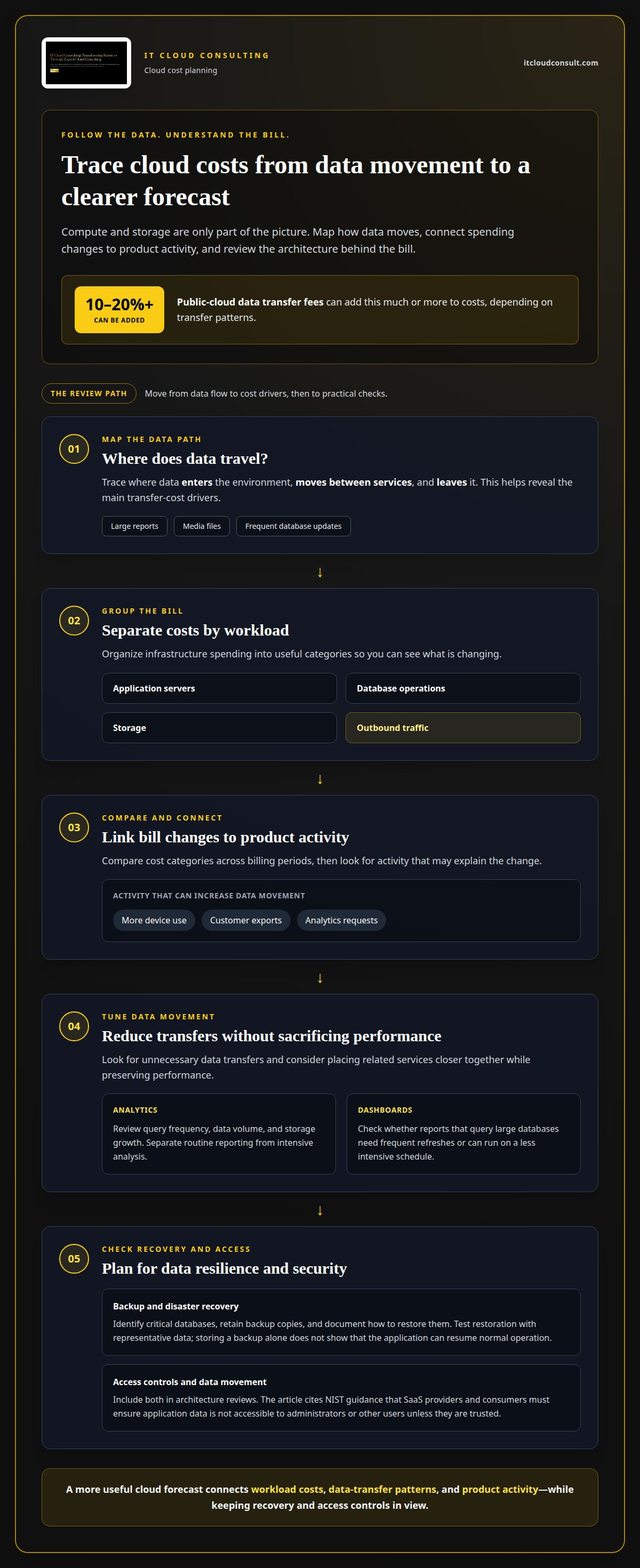
Cloud bills reflect more than compute and storage. Public-cloud data transfer fees can add 10-20% or more to costs, depending on transfer patterns. A SaaS product that sends large reports, media files, or frequent database updates may incur different charges from one that mainly processes data internally. Map where data enters, moves between services, and leaves the environment to identify the main cost drivers.
For a useful forecast, group infrastructure costs by workload, such as application servers, database operations, storage, and outbound traffic. Compare those categories across billing periods, then connect changes to product activity. More device use, customer exports, or analytics requests may increase data movement. Teams can optimize architecture by reducing unnecessary transfers and placing related services closer together while preserving performance.
Backup and disaster recovery also affect storage and data-transfer patterns. For example, a SaaS company can identify its critical database, retain backup copies, and document how to restore them after a disruption. Test the restoration process with representative data, since storing a backup alone does not demonstrate that the application can resume normal operation. Recovery planning should account for where copies reside and how the service accesses them.
Analytics can add costs when dashboards repeatedly query large databases or move datasets between services. Separate routine reporting from intensive analysis, then review query frequency, data volume, and storage growth. For example, a product team can assess whether a customer activity report needs frequent refreshes or can run on a less intensive schedule. This makes analytics costs more predictable while supporting informed decisions.
Cost control must preserve data security. According to the National Institute of Standards and Technology, SaaS providers and consumers must ensure application data isn’t accessible to administrators or other users unless they’re trusted. Include access controls and data movement in architecture reviews. For teams refining forecasts or reducing unnecessary cloud usage, cloud optimization planning can connect infrastructure decisions with operational needs.
Cloud computing service models
Cloud computing provides access to computing resources through networked, remote environments. The service model determines what the provider manages and what the business controls. For a SaaS company, that distinction shapes how teams build, deploy, and maintain digital products. The main models are infrastructure as a service, platform as a service, and software as a service.
Infrastructure as a service (IaaS) supplies resources such as virtual servers, storage, and network capacity. AWS EC2 is an example of IaaS. A development team installs and manages its operating systems, databases, and application code, while the provider supplies the underlying infrastructure. This model offers control over the software stack, but leaves more operational work with the company.
Platform as a service (PaaS) provides a cloud-based environment to build, deploy, and manage applications without managing the underlying infrastructure. Developers can focus on source code and application features rather than configuring servers. PaaS suits teams that want deployment flexibility but prefer to offload infrastructure management. The trade-off is reduced control over platform configuration.
Software as a service (SaaS) delivers a ready-to-use application over the internet, usually through a browser. Zendesk is one example. The provider manages the application and its hosting, while customers use its features. This model suits businesses that need complete digital tools rather than platforms for building their own products.
Model as a service (MaaS) is designed for machine-learning models and AI use cases. A SaaS team could use it to access machine-learning capabilities without managing general-purpose servers. Its role differs from PaaS, which supports application development, and SaaS, which delivers finished software to users.
The right cloud for SaaS companies depends on how much control and operational responsibility a team needs. Choose IaaS for custom infrastructure requirements, PaaS for a managed development environment, or SaaS for ready-made business software. These models can also be combined: a company might run its application on IaaS, build through PaaS, and use SaaS tools for operations. Match each workload to the right balance of control and management.
How should a SaaS company design a secure, scalable cloud architecture?
Start with customer data boundaries, workload patterns, and the services the product must deliver. In a multitenant design, one application instance serves multiple customers, so the architecture must keep each tenant’s records separate. The National Institute of Standards and Technology (NIST) describes cloud resource pooling as serving multiple consumers through a multitenant model, with resources dynamically assigned according to demand. This approach can use capacity efficiently when tenant separation is built into data access and application logic.
Define clear access boundaries between customers, staff, and application components. For example, a customer account should retrieve records associated with its tenant, while an operational role should have only the permissions needed for its task. Separate sensitive services, such as identity management and billing, from general application functions. This limits the impact of a compromised account or faulty software change.
Design for changes in demand by identifying which components can scale independently. A customer-facing API, background processing queue, and reporting database have different workload patterns. Scaling them separately helps avoid allocating extra capacity to every component when only one faces a traffic increase. Hyperscale cloud providers can handle traffic spikes of 100x in an hour, but applications still need to distribute work and manage bottlenecks. This is a key consideration when designing a secure cloud for SaaS companies.
Use monitoring to connect system behavior with customer experience. Track application errors, database response, queue backlogs, and resource consumption together. If reporting slows during heavy processing, isolate that workload rather than redesigning the entire platform. Document deployment steps and test changes in a separate environment before releasing them to production.
Use multiple cloud platforms only when the architecture has a clear operational reason. Each environment adds coordination across identity, monitoring, data movement, and deployment. For cloud for SaaS companies, a focused architecture review can clarify these trade-offs and shape a secure growth plan. Plan your cloud architecture around your product’s security and scaling needs.
IT Cloud Consulting
IT Cloud Consulting helps SaaS companies align cloud decisions with product needs and business goals. Turn to its team when choosing an adoption path, reviewing infrastructure use, or planning for changing workloads. Strategic Cloud Adoption can guide cloud decisions, while Cloud Optimization helps improve the use of existing resources. Ongoing Cloud Support provides continued assistance as requirements evolve.
These services connect architecture decisions with practical operating needs, from choosing suitable service models to addressing cost predictability and scaling priorities. The right next step depends on where your environment needs direction, refinement, or continued support. Contact IT Cloud Consulting to discuss your cloud needs.
Make Your Cloud Strategy Ready for What’s Next
A cloud strategy for SaaS companies should evolve with the product, customer expectations, and operating model. Turn architectural decisions into a practical roadmap, with priorities that reflect current workloads and future direction. This helps teams make deliberate changes instead of reacting to each new demand in isolation.
IT Cloud Consulting supports this work through Strategic Cloud Adoption, Cloud Optimization, and Ongoing Cloud Support. Whether you’re planning a cloud transition or refining an existing environment, its guidance can connect technical choices with your business priorities.
Contact IT Cloud Consulting to discuss the next stage of your cloud strategy. A clear direction can give your SaaS business a stronger foundation for continued growth.
Frequently Asked Questions
How do I know if I’m using SaaS or just cloud infrastructure?
You’re using SaaS when you access a finished application and its provider operates the software. You’re using cloud infrastructure when your team manages resources such as virtual machines, networks, or databases to run its own application. For example, logging into a hosted project-management tool is SaaS; deploying your own project-management software on virtual servers uses cloud infrastructure.
What cloud platforms are best for SaaS companies?
The best platform is the one that fits your workload, technical skills, and operational priorities. Compare how each option supports your application’s compute, database, storage, networking, security, and deployment needs. Consider how your team will monitor workloads and manage data movement as usage changes. A concise requirements matrix can show whether one environment meets your needs or multiple platforms serve distinct purposes.
How much does cloud hosting cost for a SaaS startup?
Cloud hosting costs depend on how an application uses resources, so estimate them from expected workloads rather than a generic startup figure. Account for compute activity, database capacity, storage growth, backups, network traffic, and separate development or test environments. A product with frequent file downloads has different data-transfer needs from one that mainly processes information internally. Revisit estimates as customer activity and product features change.
Which cloud services do SaaS companies need for compute, databases, storage, and networking?
A typical SaaS environment needs compute resources to run application code, a database for structured records, storage for files and backups, and networking to connect services and users. For example, a document platform might run its application on virtual servers, store account details in a database, and keep uploaded files in separate storage. Match each service to its data and workload requirements.
How can SaaS companies reduce cloud costs and estimate usage?
Build estimates from observed resource use, then connect each expense to a product feature or environment. Track compute, database activity, storage growth, and outbound data separately; label resources by application and purpose to make reviews clearer. For example, compare a reporting workload’s resource use with its actual refresh schedule. This can reveal idle capacity or unnecessary processing before teams change essential services.
How can a SaaS company migrate its application to the cloud?
Plan migration in stages: map application dependencies, classify data, select a hosting model, and move a limited workload first. Test core user journeys, integrations, access controls, and backup restoration in the new environment before shifting more traffic. For example, migrate an internal reporting component before the customer-facing application. Use the pilot’s findings to refine the migration plan and coordinate the next release.


