
Cloud performance depends on more than technology. Cloud operations management brings cloud architecture, IT operations, application development, security, and compliance together to manage cloud-based applications and services. Teams monitor workload health, respond to incidents, and optimize performance and resource use.
This work is most effective when people, processes, and technology operate as a coordinated model rather than as separate functions. This article explains what cloud operations involves and how teams manage resources, improve performance and cost efficiency, automate infrastructure, and coordinate their operating model. You’ll learn how monitoring and operational metrics inform decisions, where automation can reduce routine effort, and how clear governance and shared practices help teams support reliable cloud services as business needs change.
Key Takeaways
- Connect deployment with ongoing monitoring so teams can spot workload health and performance issues and respond with greater clarity.
- Use resource usage and performance insights to identify inefficiencies and guide cloud spending decisions.
- Automate repeatable infrastructure tasks and use version-controlled templates to support consistency as cloud needs change.
- Align people, processes, and technology so governance, security, and operational responsibilities work together.
What is cloud operations?
Cloud operations coordinates the people, processes, and technology that keep cloud applications and services effective. Cloud operations management connects deployment, monitoring, troubleshooting, security, and compliance across an organization’s workloads.
Cloud Application Deployment and Monitoring
Cloud application deployment moves an application and its configurations into a cloud environment; monitoring then tracks how it performs. This matters because a release can affect workload health, service availability, and user experience. Teams monitor application behavior alongside cloud services, using logs, metrics, events, and network traces to identify changes that need attention. Clear deployment processes also help teams pinpoint which release or configuration may have contributed to an issue.
Workload and Infrastructure Monitoring
Workload and infrastructure monitoring tracks the health and performance of cloud-based applications, services, and supporting resources. It helps teams spot performance issues and understand how resource use affects workloads. Cloud providers manage physical infrastructure, server hosts, and hardware maintenance, allowing operations teams to focus on workload performance and business value. Security, compliance, and operational risks include misconfigurations, gaps in protection, excessive access, and workload disruption. Monitoring configurations and access controls helps teams identify concerns and coordinate incident response.
Troubleshooting and Observability
Observability uses telemetry, including logs, metrics, events, and network traces, to explain what is happening across an application and its cloud network. Monitoring identifies a signal, such as a performance change; observability helps teams investigate related activity and narrow down possible causes. For example, teams can correlate an application error with a network event or configuration change. NIST describes a broker that aggregates cloud-provider performance and availability information within an internal reporting and alerting framework, providing a consolidated view for operational decisions.
Cloud Operations Compared With Traditional IT
Cloud operations manages workloads on cloud services, while traditional operations may involve more manual management of IT resources. This distinction affects how teams provision capacity: cloud resources can be rapidly provisioned and released with minimal management effort or interaction with the service provider, according to the National Institute of Standards and Technology. Teams still need processes for monitoring, security, and recovery, but they can adapt cloud resources as operational needs change. This distinction helps organizations plan cloud transformation around workload requirements instead of treating cloud infrastructure like fixed physical capacity.
Cloud resource performance and cost optimization
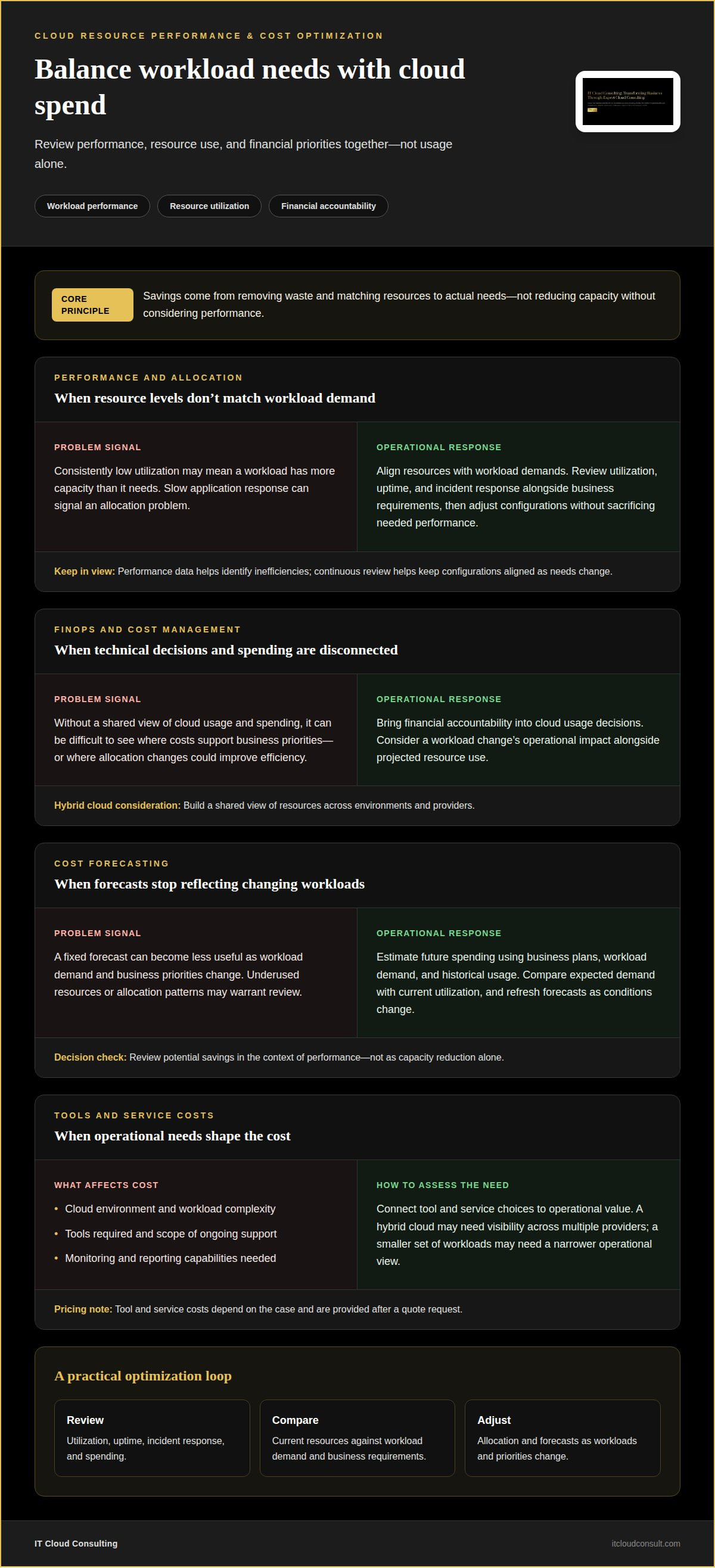
Optimization connects workload performance with resource use and financial priorities. Reviewing both helps an organization make cloud decisions based on operational needs, not usage alone.
Resource Performance Optimization
Resource performance optimization aligns cloud resources with workload demands, then uses performance data to identify inefficiencies. For example, a workload with consistently low utilization may have more capacity than it needs, while slow application response can signal an allocation problem. Teams assess utilization, uptime, and incident response alongside business requirements. Continuous review helps them optimize configurations without sacrificing the performance users and business processes depend on.
FinOps and Cost Management
FinOps brings financial accountability into cloud usage decisions by connecting technical choices with spending information. A DevOps team planning a workload change, for instance, can consider its operational impact alongside projected resource use. In a hybrid cloud, teams also need a shared view of resources across environments and providers. This coordination helps explain where spending supports business priorities and where allocation changes could improve efficiency.
Cost Forecasting and Savings
Cloud cost forecasting estimates future resource spending based on business plans, workload demand, and historical usage. Teams can compare expected demand with current utilization, then identify underused resources or allocation patterns that warrant review. Forecasts are most useful when refreshed as workloads and priorities change, rather than treated as fixed budgets. Savings come from removing waste and matching resources to actual needs, not from reducing capacity without considering performance.
Tool and Service Costs
The cost of cloud operations management tools and services depends on the case and is provided after a quote request. Factors include the cloud environment, workload complexity, tools required, and the scope of ongoing support. Tool costs also reflect which monitoring and reporting capabilities an organization needs. For example, a hybrid cloud environment may require visibility across multiple providers, while a smaller set of workloads may need a narrower operational view. Considering these needs alongside hardware and cloud resource usage helps keep cost decisions connected to operational value.
Infrastructure automation and infrastructure as code
Automation applies repeatable actions to cloud infrastructure, while infrastructure as code defines configurations in reusable templates. Teams select tools by considering workload needs, hybrid cloud integration, governance requirements, and how well systems connect.
CloudOps Automation and Analytics
CloudOps automation combines operational data with automated actions to manage routine cloud tasks. Analytics can identify emerging issues, while remediation workflows respond to operational events. For example, a team can use workload signals to trigger a predefined response instead of relying on manual intervention for every recurring event. This approach reduces routine effort and helps operations teams focus on complex decisions that require context.
Capacity Planning Automation
Capacity planning matches available cloud resources to changing workload demand, and automation helps adjust capacity as needs shift. Teams can define when resources should expand or contract, supporting scalable operations without maintaining unnecessary capacity. Cloud computing resources can be rapidly provisioned and released with minimal management effort or interaction with the service provider, according to the National Institute of Standards and Technology. This flexibility helps organizations respond to demand without relying on fixed infrastructure assumptions.
Orchestration, Policies, and APIs
Orchestration coordinates related automated tasks, while policy automation sets conditions that must be met before an action runs. For example, a deployment workflow can apply approved configurations consistently across cloud infrastructure. Cloud APIs let separate systems communicate without exposing their internal logic, supporting coordination across a hybrid environment. Teams can also manage infrastructure as code templates under version control, reducing configuration drift and human error while making changes easier to trace.
For organizations aligning automation with broader resource decisions, Cloud Optimization can support a more coordinated operational approach.
Cloud operating models, people, processes, and technology
A cloud operating model connects responsibilities, workflows, and technology across cloud environments. Clear ownership helps teams deploy changes consistently and maintain visibility as workloads evolve.
Cloud Operating Models
A cloud operating model defines how an organization manages cloud services through coordinated people, processes, and technology. It matters because teams need consistent decisions across environments, not isolated practices for each workload. For example, shared governance can set configuration expectations while allowing teams to deliver workload changes. The model should also define service targets and how teams assess workload disruption, so operational priorities reflect business impact.
People and Processes
Cloud operations brings technical teams and business stakeholders together around defined responsibilities and repeatable processes. Release planning sessions help operations teams prepare to support changes, while incident reviews turn disruptions into practical improvements. Cloud center of excellence meetings can align standards across teams. Clear identity and access controls matter because operations personnel may need elevated permissions to respond to incidents or implement configuration changes. Defined escalation paths help teams coordinate those actions.
Technology in Cloud Operations
Technology provides the shared foundation that enables teams to operate cloud services consistently. A cloud foundation layer can bring identity, network management, logging, central backup management, infrastructure as code, and central monitoring together. These capabilities improve visibility across cloud environments and support repeatable controls. Cloud security also involves shared responsibility between enterprise operations teams and the cloud provider. Clear policies help teams maintain configurations that support security, privacy, business goals, and compliance requirements.
To align people, processes, and technology with your cloud goals, plan your cloud operating model.
IT Cloud Consulting
IT Cloud Consulting helps organizations connect cloud decisions with operational goals through strategic cloud adoption, cloud optimization, and ongoing support. Turn to its consulting when cloud workloads need clearer operating processes, resource use needs review, or an evolving cloud environment calls for coordinated planning.
Engagements can address how teams manage performance, costs, automation, and responsibilities across cloud operations. The focus is on aligning technical decisions with business priorities, whether an organization is planning a cloud transformation or improving an existing environment. This support helps clarify priorities and shape a practical path forward without treating every cloud challenge as the same problem.
To discuss your cloud operations needs, contact IT Cloud Consulting.
Build an operating model that evolves
Cloud maturity isn’t a finish line. It’s the ability to adapt operating decisions as business priorities, workloads, and risk considerations change. Treat cloud operations management as an evolving capability: define what success means for your organization, assign clear ownership, and use operational insights to guide the next improvement. This perspective helps teams avoid treating each new demand as an isolated technical task. Instead, they can make deliberate choices that strengthen the organization’s ability to deliver value from its cloud environment.
The next step is to identify where expert guidance can bring greater clarity, whether you’re shaping a cloud strategy or refining established operations. A focused conversation can help connect your current priorities with a practical direction for development. Contact IT Cloud Consulting to discuss your cloud goals and consider the path ahead. Every well-aligned operational change creates a stronger foundation for what your organization wants to achieve next.
Frequently Asked Questions
How does CloudOps work?
CloudOps works by coordinating responsibilities across cloud teams and operational stages. For example, when a release changes a service, engineering and operations teams clarify ownership, support expectations, and follow-up. This helps prevent releases from becoming disconnected handoffs. A shared approach to cloud operations management makes responsibilities clearer as services move from launch into ongoing operation.
What are the benefits of CloudOps?
CloudOps helps organizations align operational decisions with business needs. A product team planning a new service, for example, can coordinate requirements with operations before launch. This preparation can reveal support needs early and improve collaboration across teams. Reviewing outcomes also helps an organization focus attention on the services most important to its priorities.
What do CloudOps teams do?
CloudOps teams oversee the operational lifecycle of cloud workloads, from service readiness to incident response and improvement. They can maintain cloud asset inventories, document response procedures, coordinate recovery planning, and review disruptions. After an incident, teams can assign follow-up actions and adjust processes. These activities connect routine operations with service continuity.
Why is it important to improve CloudOps?
Improving CloudOps helps organizations adapt as services and business priorities change. A process that suited a small workload portfolio may create delays as teams add services or shift ownership. Reviewing recurring incidents, handoffs, and operational targets can reveal where practices no longer fit. Those insights give teams a basis for refining their cloud operations management approach.
What is cloud operations management?
Cloud operations management coordinates the responsibilities and decisions needed to operate cloud-based services. It gives an organization a way to assign ownership, manage operational changes, and connect cloud activity with business needs. For example, defining service ownership clarifies who handles routine decisions and who leads when a workload disruption affects business operations.
What are the main functions of cloud operations management?
Main functions include operational governance, workload oversight, incident coordination, recovery planning, and financial management. Together, they connect service expectations with operational decisions. For example, a recovery plan can clarify how teams coordinate after disruption, while financial management links resource decisions to business priorities. Clear responsibilities help these functions work together across teams.


