
Cloud governance should enable cloud use while controlling its risks, costs, and responsibilities. Useful cloud governance policy examples turn that balance into clear rules, processes, and guardrails that guide how people use cloud resources and support business goals. Effective policies address meaningful risks and give teams practical ways to follow them.
Governance can seem like a set of restrictions, but clear policies also make decisions more consistent and cloud operations more efficient. This article explains cloud governance and shows how policies can address costs, operations, data, resources, AI, compliance, and provider oversight. Each example connects a specific rule with the risk it is designed to manage, helping you assess what may fit your organization.
Key Takeaways
- Connect each cloud policy to a specific business risk, and make its requirements clear enough for teams to apply consistently.
- Use cost, resource, data, and AI policies to clarify ownership, monitor usage, and set practical controls for day-to-day cloud activity.
- Translate compliance obligations into infrastructure controls and ongoing checks, while regularly reviewing cloud service providers’ security practices.
- Apply policies at appropriate organizational scopes and choose enforcement measures that match the risk, from alerts and monitoring to blocking non-compliant actions.
What is cloud governance?
Cloud governance is the framework of policies, processes, and guardrails that directs cloud activity toward business goals while managing risk. It connects organizational rules to monitoring and enforcement throughout the cloud lifecycle.
Policy Communication and Compliance Monitoring
Policy communication explains the required cloud behaviors, while compliance monitoring checks whether configurations and actions follow those rules. Clear communication helps teams understand their responsibilities before a violation disrupts a workload or exposes data. AWS, Azure, and Google Cloud offer native governance tools, but their policy syntax, scope structures, and integrations differ. Compare how each platform applies rules across accounts or subscriptions and reports configuration drift.
A multi-cloud asset inventory gives monitoring systems visibility into resources across providers, including their ownership and configuration. Continuous monitoring can alert teams to policy violations and stop activities that breach a rule. Governance should also identify the risk behind each policy, so teams can assess whether monitoring detects the issue the rule is meant to prevent.
Monitor-First Enforcement and Block Lists
Monitor-first enforcement observes policy violations before applying restrictive controls, while block lists identify prohibited services or configurations. This lets teams understand a rule’s impact before enforcement interrupts legitimate work. For deployment controls, block lists can prevent known disallowed services without restricting every unlisted option through an allow list.
Automation can alert teams, pause an action until approval is complete, or stop non-compliant activity. For example, automated controls can terminate a virtual machine with unauthorized open ports. Start by monitoring lower-priority risks, then strengthen enforcement as stakeholders review the findings and requirements change.
Policy Implementation and Risk Avoidance
To create and implement a policy, identify the business risk, define the required behavior, assign ownership, communicate the rule, and monitor compliance. Review results with stakeholders and adjust enforcement as cloud requirements change. This sequence connects a policy’s purpose to its configuration and response.
Common mistakes include writing rules without identifying the risk, applying restrictive enforcement before understanding its effects, and relying on annual audits instead of continuous monitoring. These gaps can leave misconfigurations undetected or block valid work. Use alerts and ongoing monitoring to surface issues, then review whether each control still addresses its intended risk.
Cost, operations, data, resource, and AI policies
These policies connect cloud activity to financial limits, operational standards, data protection, and responsible AI use. Together, they clarify which actions teams can take and what controls apply.
Cost Allocation and Deployment Restrictions
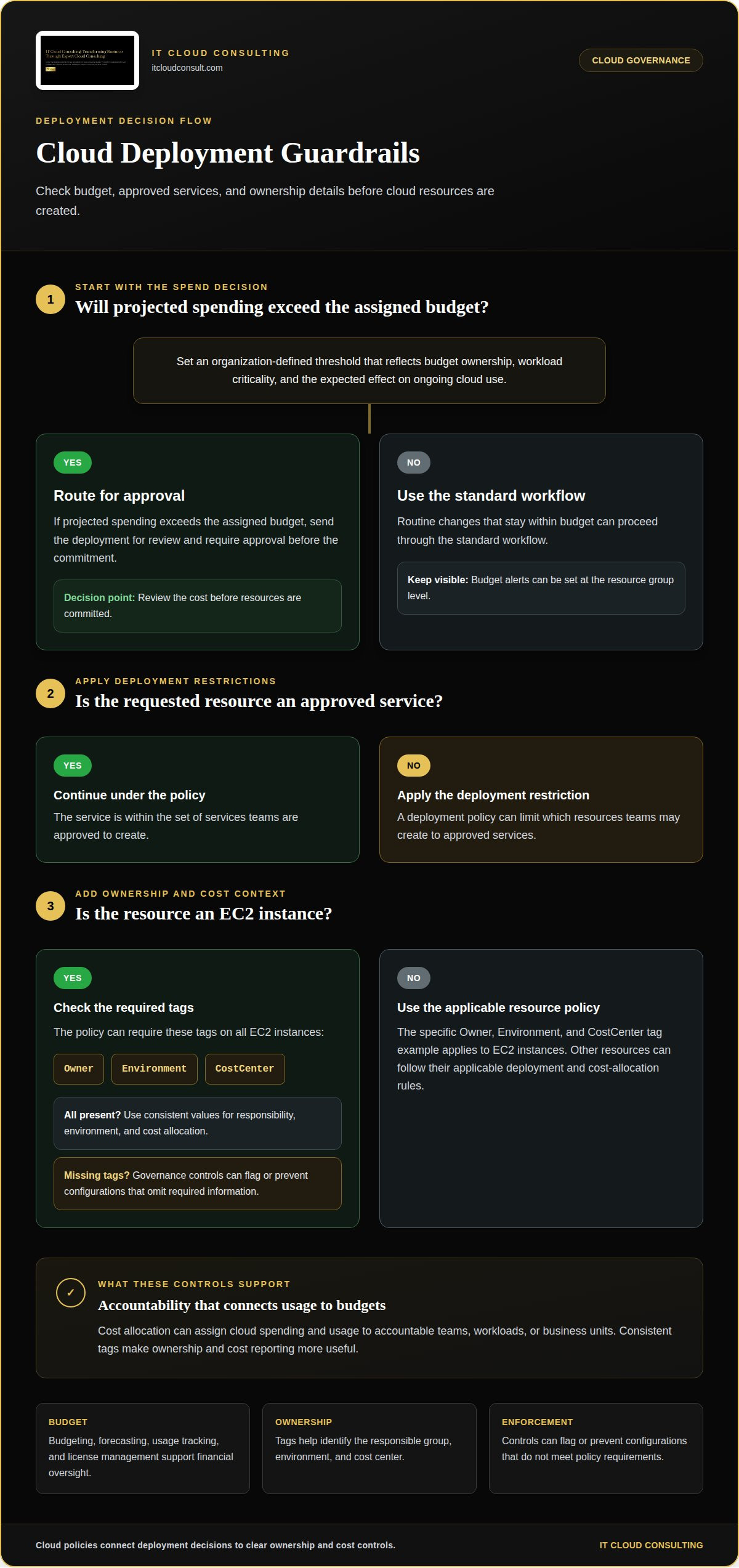
Cost allocation assigns cloud spending and usage to accountable teams, workloads, or business units, while deployment restrictions define which resources teams may create. These controls help decision-makers connect cloud consumption to budgets and intended business use. A policy can limit deployments to approved services and require workload teams to set budget alerts at the resource group level. Financial management also includes budgeting, forecasting, usage tracking, and license management.
Cost-Based Deployment Approvals
A cost-based approval policy routes deployments for review when projected spending exceeds an organization-defined threshold. Set the threshold to reflect budget ownership, workload criticality, and the expected effect of the resource on ongoing cloud use. This gives teams a clear decision point before they commit resources. For example, a policy can require approval for a deployment that would exceed its assigned budget, while routine, budgeted changes proceed through the standard workflow.
Resource Tagging for Cost Governance
Resource tags attach ownership and cost context to cloud assets, making allocation and reporting more useful. A policy can require Owner, Environment, and CostCenter tags on all EC2 instances. Consistent values help teams identify which group is responsible, distinguish production from development, and assign usage to a cost center. Governance controls can require tags during deployment, then flag or prevent configurations that omit required information.
Operational policies can require architecture evaluations and biannual reviews for production workloads. Data policies can require encryption in transit and at rest for sensitive data, with reviews annually or after significant infrastructure changes. AI governance can set a minimum medium configuration for content filtering and define when autonomous actions need human approval. These rules turn broad expectations into controls teams can apply across environments.
For organizations refining spending controls, cloud optimization can help align resource use with financial priorities.
Regulatory compliance and cloud service provider oversight
A compliance framework translates applicable regulatory, industry, and internal requirements into infrastructure controls and ongoing checks. For HIPAA, SOC 2, and FedRAMP, policies can map each applicable requirement to a control, an owner, and evidence of monitoring; HIPAA is relevant to data governance practices, according to the U.S. Department of Health and Human Services.
Compliance Governance and Continuous Evidence
Compliance governance assigns responsibility for controls and keeps evidence of whether they remain active. Ongoing records of configuration changes, access decisions, and monitoring results help teams identify gaps and demonstrate how policies operate. A written rule alone cannot show whether a cloud environment follows it. Regular checks connect each requirement to current infrastructure and accountable owners.
Regulatory Compliance and Security Controls
Regulatory compliance combines applicable requirements with security measures that protect systems and sensitive information. A policy can define access roles, encryption expectations, backup and recovery practices, and monitoring responsibilities. Healthcare providers, for example, can use governance to manage data storage and access, assess data-handling risks, and train staff on patient privacy. These controls clarify responsibilities across teams.
Cloud Security and Compliance Frameworks
A cloud security and compliance framework organizes controls for identity and access management, application security, encryption and key management, privacy, risk management, and reporting. The framework should define which requirements apply to each workload and how teams monitor them. For a multi-cloud organization, an active inventory helps link each provider’s services and configurations to relevant controls instead of relying on one broad policy.
Example Security and Compliance Policies
Useful policies specify data classifications, permitted access, retention expectations, and how teams handle exceptions. For example, an organization can classify records as public, internal, or sensitive, then define access and encryption controls for each class. A retention policy can assign an owner to each data set and document its review and deletion process. Organizations should also regularly assess cloud service providers’ security practices against relevant requirements.
Cloud governance policy examples
Useful cloud governance policy examples turn broad expectations into rules teams can implement consistently. They establish who owns decisions, which workloads require controls, and how exceptions are handled.
Set policies at a scope that supports consistent enforcement. For example, apply a rule at the management-group level so it inherits to subscriptions and resource groups. This can reduce gaps between environments while keeping governance aligned across teams.
- Provisioning and ownership: Define resource allocation requirements, IAM role policies, and subject-matter-expert ownership. Clear responsibilities help teams know who approves changes and responds to issues.
- Configuration controls: Block public access to all S3 buckets to reduce exposure from unintended configurations.
- Resilience: Require mission-critical workloads to use cross-region active-active architecture, with updates completed within 90 days under the example policy.
- AI oversight: Require monthly red-team testing for customer-facing AI systems, so teams can identify risks through recurring review.
Policies can also define responses to specific findings. For example, require teams to resolve sensitive-data compliance report issues within one day. For public-source libraries, set monthly manual audits using the quarantine pattern. These rules make expectations measurable and clarify what happens when a review identifies a concern.
Broader governance can establish which cloud services are allowed, classify data, and define escalation procedures, access controls, network rules, disaster recovery practices, and usage protocols. A separate policy may move multi-tenant workloads from one account or subscription into separate accounts. Service-level agreements can define minimum expectations for availability, security, and responsiveness. Each policy works best when its owner, scope, and intended risk are explicit.
To align governance decisions with cloud adoption goals, develop a strategic cloud adoption plan that connects policy design with operational priorities.
IT Cloud Consulting
IT Cloud Consulting helps organizations turn cloud governance priorities into practical decisions through Strategic Cloud Adoption, Cloud Optimization, and Ongoing Cloud Support. Its guidance connects policy design with cloud operations, resource use, and evolving business needs.
Consider this support when governance responsibilities are unclear, cloud practices vary across teams, or existing controls need to evolve alongside adoption. The right focus depends on your environment and priorities, whether you are shaping an adoption strategy, improving cloud use, or sustaining operations over time.
For a conversation about aligning your cloud approach with governance goals, contact IT Cloud Consulting.
Make Governance a Capability That Evolves
Cloud governance works best as an ongoing management capability, not a document that stays unchanged after approval. As business priorities and cloud environments evolve, policies should stay connected to the decisions teams make and the outcomes the organization needs. Treat cloud governance policy examples as starting points: adapt each to your operating model, then refine it as experience reveals where controls help or create friction.
The next step is to identify which governance decisions need clearer ownership and how policy can support them. A focused conversation can help connect those priorities with a practical cloud direction. Discuss your cloud governance priorities with IT Cloud Consulting and consider how the right approach can support your organization’s next stage of cloud development.
Frequently Asked Questions
What are common cloud governance policy examples for AWS, Azure, and Google Cloud?
Common policies set organization-wide expectations for identity, approved configurations, resource ownership, and cost accountability across AWS, Azure, and Google Cloud. The principles can remain consistent while each provider’s account, subscription, project, and resource structures shape implementation. For example, establish a shared baseline for access reviews, then map each workload to the appropriate cloud scope and record approved exceptions.
What should a cloud governance policy cover, including security, compliance, cost, and operations?
A policy should define who makes cloud decisions, which risks it addresses, and how teams handle exceptions and changes. Include security responsibilities, applicable compliance controls, spending oversight, operational ownership, and how policy performance is reviewed. For example, changing a critical workload’s architecture could require an assigned owner, a documented risk assessment, and a review of related controls before the change proceeds.
What are examples of cloud access control and least-privilege policies?
Least-privilege policies give each identity only the access needed for its assigned responsibilities. For example, separate routine user access from administrative access, assign permissions through role-based groups, and grant temporary elevated access only for an approved task. Define how managers review access when responsibilities change, and remove permissions that no longer support a current role or workload.
What cloud security policies address logging, monitoring, incident response, and vulnerability management?
Security policies can specify which events teams record, who reviews alerts, and how incidents move from detection to resolution. For example, require logging for administrative actions and access to sensitive systems, then define escalation responsibilities for suspicious activity. A vulnerability policy can assign system owners to assess findings, prioritize remediation by risk, document exceptions, and track unresolved issues through closure.
What cloud cost management policies set budgets, alerts, tagging, and resource limits?
Cost policies can assign budget ownership, trigger alerts when forecasts indicate likely overspending, and require consistent tags for chargeback or reporting. They can also set resource limits by workload or environment and define an approval path for exceptions. For example, a temporary test environment could have an owner, a spending alert, and a planned review before continued use.


