
Cloud issues need a clear route to resolution. Effective cloud IT support services log and prioritize requests, investigate incidents, protect data, maintain hosted systems, and troubleshoot problems remotely. This gives employees a defined way to get help and helps the business keep its cloud environment stable and usable.
If you’re unsure where to start, that’s understandable: cloud support can cover everything from an access problem to a wider service disruption. The right approach depends on what’s affected, how the system is hosted, and the security and operational needs of your business.
This guide explains how support teams manage tickets and incidents, safeguard information, assist with cloud-hosted infrastructure and applications, and monitor systems to diagnose issues. You’ll also learn what shapes the support approach and when strategic guidance or ongoing cloud management can help your organization move forward with greater confidence.
Key Takeaways
- Classify requests, incidents, and service needs clearly so support teams can prioritize work and route each issue toward resolution.
- Understand how data protection needs and applicable requirements shape security practices for cloud environments.
- Identify how public, private, and hybrid cloud setups affect access to hosted applications and infrastructure.
- Use remote monitoring and troubleshooting to spot operational issues and guide the next support step.
Ticket, incident, and service request management
Cloud IT support services give employees a defined route for reporting problems with hosted systems. A web-based help desk records each request as a ticket, making its status and assigned work easier to track. For example, an employee who can’t access a cloud application can report the issue and provide details for investigation.
Support teams classify tickets by impact and type. An incident interrupts an existing service, while a service request asks for routine help, such as access to an application. This distinction helps the team route work appropriately, communicate progress, and identify recurring problems that may need a broader fix.
Compared with in-house IT support, cloud support can manage tickets and troubleshoot hosted environments remotely, while an internal team works directly within the business. The right model depends on existing staff, cloud complexity, and how much ongoing support your organization needs. Some businesses combine provider support with internal oversight.
Dedicated technical account management can connect support activity with business priorities. The account manager can coordinate requests, clarify system context, and help identify patterns across applications. For instance, repeated access tickets may point to a permissions or onboarding process that needs review, rather than separate fixes for each employee.
Remote workstation management extends support to employee devices used to access cloud systems. A technician can investigate reported software or connectivity issues remotely, then document the work in the relevant ticket. Application patch management follows a planned process: identify updates, assess their relevance, and coordinate deployment to maintain supported software and security.
When assessing your cloud support needs, consider ticket ownership, escalation paths, relevant cloud expertise, and reporting that helps identify recurring issues. Also consider how incidents, workstation support, and application patches will be handled, since these processes shape day-to-day continuity.
Small businesses in the United States can use managed service providers or cloud-focused IT support firms. Choose a support model that aligns with your hosted systems, internal capabilities, and operational needs.
Cloud security and data protection
Security begins with understanding which information each cloud solution stores and who needs access. A support team can map users to roles, then remove permissions that no longer match their responsibilities. For example, staff who process invoices may need access to a finance application, while other employees don’t. This limits unnecessary exposure and makes access decisions easier to review.
Security and compliance monitoring should connect technical controls with your organization’s obligations. A support team can review account activity, configuration changes, and alerts, then investigate unusual events. It can also document what happened and how the response was handled. This helps businesses assess whether controls are working as intended, rather than treating a security tool as proof of protection.
Applicable requirements depend on the business and the information involved. The European Union identifies GDPR as an example of a regulation with which U.S.-based cloud support providers may be familiar. The U.S. Department of Health and Human Services identifies HIPAA as another example. These references don’t establish that every business is subject to either regulation. They show why cloud security work should account for context.
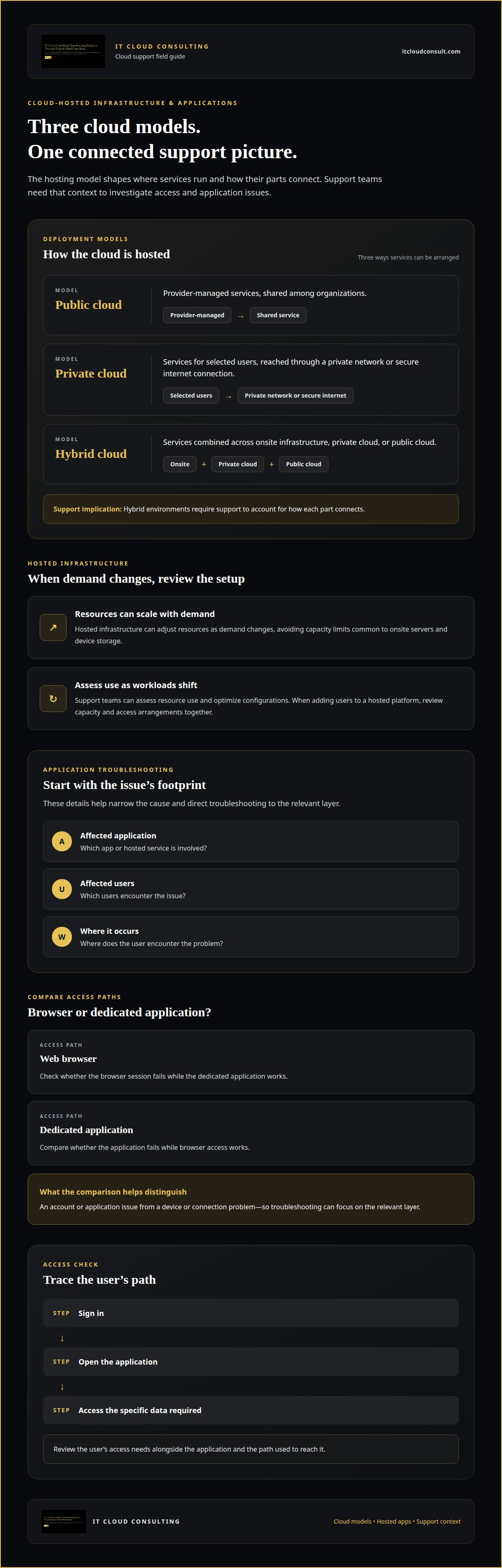
Data security and accessibility must work together. Strong access controls should protect information without blocking employees who need it for legitimate tasks. A practical review can trace a user’s path: signing in, opening an application, and accessing the specific data required. If a role changes, updating permissions helps keep access aligned with current responsibilities.
For cloud computing environments, a support team can prioritize risks, review security settings, and establish a process for escalating suspicious activity. Clear ownership enables faster investigation because staff know who assesses alerts and coordinates a response. Businesses planning a more structured approach can explore cloud security planning as part of their wider cloud strategy.
Cloud-hosted infrastructure and applications
Cloud environments can use public, private, or hybrid infrastructure. Public cloud services are managed by a provider and shared among organizations. Private cloud services serve selected users through a private network or secure internet connection. Hybrid cloud combines services across onsite infrastructure, private cloud, or public cloud, so comprehensive cloud IT support services must account for how each part connects.
Hosted infrastructure can scale resources as demand changes, avoiding the capacity limits common to onsite servers and device storage. Support teams can assess resource use and optimize configurations as workloads shift. For example, a business adding users to a hosted platform may need to review capacity and access arrangements together.
For cloud-based productivity suites and other office applications, support often focuses on practical access and continuity. A technician can investigate a sign-in problem, review user permissions, or troubleshoot an application that won't load. Understanding which application is affected, which users encounter the issue, and where it occurs helps narrow the cause.
Employees may reach cloud applications through a web browser or a dedicated application. Support teams can compare those access paths when a browser session fails but the application works, or when the reverse occurs. This helps distinguish an account or application issue from a device or connection problem, then directs troubleshooting to the relevant layer.
Cloud platforms can also reduce routine administrative effort through automation. The Centers for Medicare & Medicaid Services notes that cloud computing can reduce the administrative burden on internal IT resources through automation. IT Cloud Consulting can review which operational tasks are suitable for automation, then monitor whether those workflows continue to serve business needs.
Cloud help desk software is delivered as Software-as-a-Service, with the provider hosting and maintaining the application. This can remove the need to maintain the help desk on onsite infrastructure, while updates are handled through the hosted service. Separating the support platform from business applications helps clarify which system needs attention when an issue arises.
Remote system monitoring and troubleshooting
Remote monitoring gives organizations visibility into cloud resources without requiring technicians onsite. A support team can review resource use, system availability, and reported errors, then investigate changes that coincide with a problem. For example, if a business application becomes unavailable after a configuration change, technicians can examine the affected service and its recent activity. This evidence helps narrow the troubleshooting before changes are made.
The National Institute of Standards and Technology describes cloud services as supporting transparency through resource use that can be monitored, controlled, and reported. For businesses, that visibility can help connect system activity with operational needs. A support team can review usage patterns, flag unusual demand, and explain which resources are involved. This helps organizations make informed decisions about capacity and service performance.
Remote access also supports employees working away from an office. If an employee can’t open a hosted application, a technician can assess whether the issue involves the account, device, browser, or internet connection. Comparing access from another approved device or network can help isolate the cause. This structured process helps staff keep working while support focuses on the affected layer.
Remote hosting depends on internet connectivity, so troubleshooting should distinguish a cloud service problem from a local connection issue. For instance, if a company’s websites and hosted applications are inaccessible from one workplace, support can compare reports with access from another location. That comparison helps determine whether the disruption is localized or affects the hosted service more broadly.
Effective monitoring also connects findings to action. A support team can document the affected resource, assess its business impact, apply an appropriate fix, and observe whether normal operation returns. This creates a record that can inform future troubleshooting and cloud optimization. To strengthen oversight of hosted systems, plan your cloud optimization with expert support.
IT Cloud Consulting: Ongoing Cloud Support
IT Cloud Consulting helps businesses manage and evolve their cloud environments through Ongoing Cloud Support. Turn to this service when hosted systems need continued attention, operational priorities shift, or recurring issues call for a more coordinated approach. Ongoing management can help connect daily cloud operations with broader business objectives.
For organizations planning a move to cloud platforms, Strategic Cloud Adoption provides guidance on aligning the transition with business needs. If existing resources or configurations need refinement, Cloud Optimization can help improve how the environment supports current workloads. The right focus depends on your systems, priorities, and desired direction.
Discuss your cloud environment, current challenges, and goals with IT Cloud Consulting to explore a practical next step. Contact IT Cloud Consulting to start the conversation.
Move Your Cloud Strategy Forward
Cloud operations work best when support evolves alongside business priorities. As teams, applications, and workloads change, revisit how your cloud environment can support the next stage of growth. A clear direction helps align technical decisions with operational needs, rather than treating each new requirement as an isolated task.
Set a practical focus for what comes next: strengthen ongoing management, refine the environment you already use, or plan a broader move to cloud technology. The right priorities depend on your systems and objectives. Cloud IT support services can form part of that longer-term approach, connecting day-to-day operations with deliberate modernization.
IT Cloud Consulting can help businesses consider those priorities through its cloud-focused services. Share the business outcomes you’re working toward and the challenges shaping your plans. Contact IT Cloud Consulting to discuss a thoughtful next step for your cloud strategy. A considered plan can help your systems keep pace with your organization’s ambitions.
Frequently Asked Questions
Not Sure Where to Start?
Start by identifying the business process most affected by your current cloud setup. Note which teams rely on it, what slows their work, and what outcome matters most, such as smoother access or a clearer cloud roadmap. This gives an initial assessment a practical focus and connects technical priorities with business goals.
What’s Included?
The scope depends on your support arrangement and cloud objectives. IT Cloud Consulting offers Strategic Cloud Adoption for planning cloud transitions, Cloud Optimization for assessing existing environments, and Ongoing Cloud Support for continued technical assistance and management. A useful scope clarifies which systems and business priorities the work addresses, so support aligns with your organization’s needs.
What are cloud IT support services?
These services help businesses adopt, manage, or improve technology hosted in cloud environments. The work may include guidance on cloud strategy, assistance with existing infrastructure, and ongoing technical management. For example, a company planning to move a business function to the cloud may need a roadmap before deciding how its systems should evolve.
What services are included in cloud IT support?
Common service areas include cloud planning, assessment of existing infrastructure, optimization, and continued management. The right mix depends on whether your business is preparing for cloud adoption, refining its current environment, or seeking ongoing assistance. IT Cloud Consulting offers Strategic Cloud Adoption, Cloud Optimization, and Ongoing Cloud Support, with the focus shaped by your business priorities.
How much does cloud support cost in the United States?
The cost of cloud IT support services depends on the scope of work and is provided after a quote request. Factors include the complexity of the cloud environment, the systems involved, and whether the need centers on adoption planning, optimization, or ongoing support. Defining desired outcomes and the work scope helps establish a relevant proposal without relying on a generic price estimate.
What security and compliance risks come with cloud IT support?
Risks can include access being broader than needed, sensitive information being exposed, or cloud practices not matching an organization’s obligations. The European Union identifies GDPR as an example relevant to provider familiarity, while the U.S. Department of Health and Human Services identifies HIPAA. Businesses benefit from clear responsibility for data access, security oversight, and escalation of concerns.


