

What if your backups are intact, but the systems your teams depend on can’t be restored within the time the business can afford? Choosing cloud backup and recovery solutions means more than copying files. You need to protect the right data and infrastructure, then confirm you can restore them when disruption strikes.
Cloud platforms don’t automatically protect everything they host. Data protection and infrastructure configuration are separate considerations, and an untested backup may not support a usable recovery. Clear recovery time and data loss objectives help turn those concerns into practical priorities: what must return first, how quickly, and how much recent data the organization can accept losing.
This guide explains how to match backup scope to business needs, assess security and restoration capabilities, and build a realistic testing plan. It also shows how recovery planning connects to cloud adoption and infrastructure decisions. The result is a strategy built around recovery your organization can prepare for and verify.
Key Takeaways
- Define acceptable data loss and downtime for each critical service so recovery objectives reflect business priorities.
- Choose cloud backup and recovery solutions that cover the data, configurations, and dependencies workloads need to resume.
- Compare security controls, platform integrations, restoration capabilities, and operational ownership against your environment.
- Map service dependencies and assign recovery owners to establish a practical restoration order.
- Test recovery procedures and use the results to strengthen your plan over time.
What Cloud Backup and Recovery Solutions Protect, and Why It Matters
Cloud backup preserves recoverable copies of data, but a copy alone doesn’t restore a working business service. Organizations need to know what is protected, how the components depend on one another, and what steps will make them usable again. Cloud-hosted workloads still need deliberate protection: a provider’s infrastructure and availability controls don’t automatically cover every customer data set, application component, or configuration required to resume operations.
Recovery readiness means restoring the right protected data and systems in an order that reflects business priorities. That distinction helps teams evaluate cloud backup and recovery solutions by more than storage capacity. For a foundation on backup approaches and how they work, see What is Cloud Backup?
What should a cloud backup strategy protect?
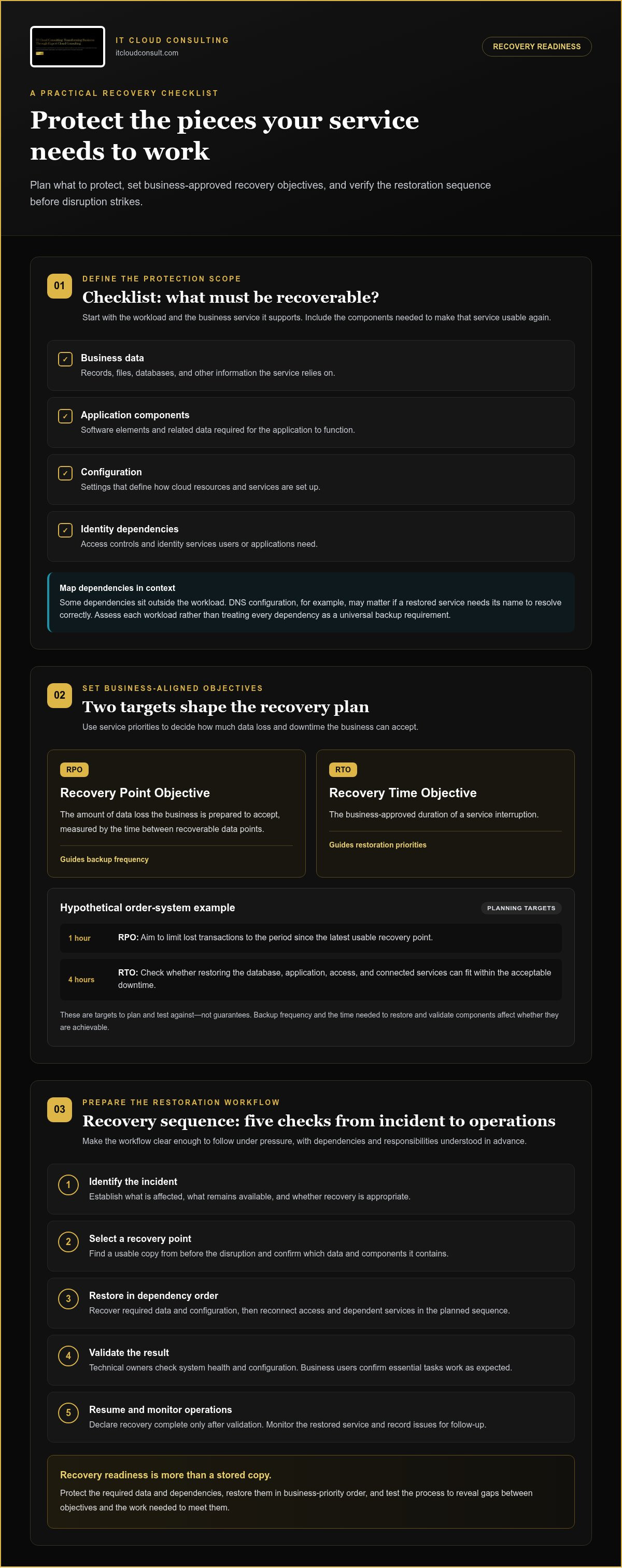
Start with the workload and the business service it supports. Then list the assets required to bring that service back. The scope will vary: a system supporting a critical process may need a different protection plan from a low-priority development environment.
- Business data: Records, files, databases, and other information the service relies on.
- Application components: The software elements and related data required for the application to function.
- Configuration: Settings that define how cloud resources and services are set up.
- Identity dependencies: Access controls and identity services needed by users or applications.
Dependencies can sit outside the workload itself. DNS configuration, for example, may matter if a restored service needs its name to resolve correctly. That doesn’t make DNS backup a universal requirement. It makes dependency mapping important. Assess each workload in context so the protection scope reflects what that service needs to operate.
Cloud backup, disaster recovery, and business continuity
Backup creates recoverable copies. Disaster recovery covers the processes for restoring data, applications, and services after disruption. Business continuity considers how the organization will keep essential operations moving during recovery. Backups support disaster recovery, but they don’t define restoration order, assign responsibilities, or explain how teams will work if a service remains unavailable.
Cloud backup and recovery solutions need to fit within a broader plan: identify the systems and dependencies to restore, determine who coordinates each action, and test whether the steps work as intended. This connects technical recovery to operational priorities. For a deeper look at continuity planning, explore the cloud disaster recovery planning guide.
How Cloud Backup and Recovery Solutions Restore Data and Services
A recovery process turns a stored copy into a working service. Because teams may need to make decisions under pressure, clarify the steps, responsibilities, and dependencies before an incident occurs. Cloud backup and recovery solutions support that process, but achievable recovery depends on factors such as the selected recovery point, workload architecture, and the time required to restore and validate each component.
How RPO and RTO shape recovery design
RPO, or recovery point objective, describes the amount of data loss the business is prepared to accept, measured by the time between recoverable data points. RTO, or recovery time objective, defines the business-approved duration of a service interruption. Together, RPO and RTO guide backup frequency and restoration priorities. They are targets to plan and test against, not guarantees.
Hypothetical example: A business sets a one-hour RPO for an order system, meaning it aims to limit lost transactions to the period since its latest usable recovery point. If backups are taken less frequently, that objective may not be achievable. The business sets a four-hour RTO as its acceptable downtime, then checks whether restoring the database, application, access, and connected services can fit within that window.
Restoration dependencies matter. A database may be available before the application that uses it, while access controls or network settings can add steps before users connect. Account for those activities when estimating RTO, rather than measuring only the time it takes to copy data. Technical research and engineering discussions, including resources surfaced through IEEE Research on Cloud Data Security, can help inform broader planning around cloud systems and security.
What happens during a cloud recovery?
Keep the workflow simple enough to follow and detailed enough to guide action. A typical sequence is:
- Identify the incident. Establish what is affected, what remains available, and whether recovery is appropriate.
- Select a recovery point. Locate a usable copy from before the disruption and confirm which data and components it contains.
- Restore in dependency order. Recover the required data and configuration, then reconnect access and dependent services in the planned sequence.
- Validate the result. Technical owners check system health and configuration. Business users confirm that essential tasks work as expected.
- Resume operations. Declare recovery complete only after validation, then monitor the restored service and record any issues for follow-up.
Testing this sequence can reveal gaps between a stated objective and the work required to meet it. Cloud adoption and optimization planning can also help align recovery design with existing infrastructure and business priorities. Explore cloud adoption and optimization planning as part of that broader alignment.
How to Compare Cloud Backup and Recovery Solutions
Start a comparison with your workloads and recovery requirements, not a platform label or feature list. Identify what needs protection, how quickly critical services should return, and who will operate the process. This gives your organization a consistent way to compare cloud backup and recovery solutions across AWS, Microsoft Azure, Google Cloud, and hybrid environments, where services and dependencies may differ.
Use this framework to identify gaps and guide a closer evaluation:
| Evaluation area | What to compare |
|---|---|
| Coverage | Protection for business data, application workloads, and infrastructure configuration, assessed separately. |
| Recovery objectives | Whether available recovery points and restoration processes align with business-approved RPO and RTO targets. |
| Security controls | Access restrictions, separation of backup administration, and safeguards against unauthorized changes. |
| Testing | Whether restoration can be exercised, validated, and documented for relevant workloads. |
| Integrations | Fit with the cloud platforms, applications, identity services, and hybrid dependencies in use. |
| Operational ownership | Who monitors protection, manages retention, coordinates restoration, and maintains procedures. |
Which workloads and environments are covered?
Assess coverage for data, application workloads, and infrastructure configuration separately. Protecting one doesn’t automatically protect the others. Map each critical service to the platforms and dependencies it uses, including hybrid components that connect cloud resources with other environments. AWS, Microsoft Azure, and Google Cloud have distinct service ecosystems, so verify coverage at the workload level rather than assuming a platform name means everything is protected. Understanding Cloud Backup Services can provide context on common backup approaches as you assess fit.
Consider how the scope may change as your cloud environment evolves. Strategic adoption plans, migrations, and infrastructure optimization can introduce new services or dependencies. Keep the comparison tied to your current architecture and its planned direction so protection decisions don’t rely on an outdated inventory.
How to evaluate security and recovery readiness
Compare who can access backup systems and whether backup administration is separate from routine workload administration. Consider how the design limits unauthorized changes, then determine whether teams can test restoration and document the outcome. A successful test should demonstrate more than data retrieval: it should show that the relevant workload and its access paths can function. The cloud security assessment checklist provides related context for reviewing safeguards.
Cost also depends on the amount of data protected, retention choices, recovery requirements, and operational effort. Model these factors against realistic usage and restoration needs. A storage-only comparison may miss the resources involved in maintaining and using the plan.
For support aligning these criteria with your cloud roadmap, explore cloud consulting services as part of your broader infrastructure planning.
How to Build and Test a Business-Aligned Cloud Recovery Plan
A useful recovery plan connects business impact to practical technical actions. It identifies which services matter most, what they rely on, who makes decisions, and how teams will verify restoration. Keep the plan aligned with changes to your cloud environment: a new workload or altered dependency can change priorities and the steps required to recover.
A backup is useful only when restoration has been validated against the systems and business tasks it is meant to support. Testing turns assumptions into evidence and gives teams a basis for improving their recovery approach.
Set priorities, owners, and recovery objectives
Bring business and technical stakeholders together to rank services by their impact on operations. For each priority, identify supporting data, applications, configuration, and access dependencies. Agree on RPO and RTO targets based on business needs, then assign ownership for backup operations, recovery decisions, and communications. Clear roles reduce uncertainty during an incident and help teams coordinate actions across connected systems.
Use this workflow to develop the plan:
- Prioritize services. Identify the services whose disruption would most affect customers, employees, or essential operations, then establish a restoration order.
- Set recovery objectives. Agree on acceptable data loss and service interruption for each priority, involving the people accountable for business outcomes.
- Map dependencies. Document the data, applications, identity services, configuration, and connections each service needs to function.
- Assign owners. Name the people responsible for maintaining backups, authorizing recovery decisions, carrying out technical tasks, and communicating status.
- Test the plan. Run a scoped restore that exercises relevant components and checks whether the sequence supports the agreed objectives.
- Improve and update. Resolve gaps, revise procedures, and revisit priorities after tests or material changes to the environment.
Test restores and turn findings into improvements
Start with a defined test scope, such as restoring a selected workload and the dependencies needed to use it. Record how long each stage takes, whether the restored content is complete, and where teams encounter access, configuration, or coordination blockers. Testing isolated files can confirm that a copy is retrievable, but it won’t show whether a connected service can resume.
Include technical owners who can validate system health and business users who can confirm essential tasks work. Document the recovery point used, components included, validation performed, results, issues, and follow-up actions. This record helps distinguish a successful data restore from a usable service recovery.
Use the findings to make specific changes: clarify an unclear owner, update a recovery step, or address a missed dependency. Re-test where needed, and refresh the plan when cloud infrastructure or business priorities change. Strategic cloud adoption and optimization can help keep recovery planning aligned with that evolving environment. Build a cloud recovery plan aligned with your business.
How Cloud Consulting and Ongoing Support Strengthen Recovery Readiness
Recovery planning works best when it reflects how an organization is adopting and operating cloud infrastructure, not just what it wants to restore. Advisory support can connect backup scope and recovery priorities to business goals, existing architecture, and planned changes. That alignment helps teams avoid gaps between a recovery plan and the environment it is meant to support.
When cloud recovery needs strategic guidance
Strategic guidance is especially useful during a cloud transition, when services span multiple environments, or when teams aren’t sure who owns recovery decisions. An infrastructure assessment can reveal overlooked configuration, access, and service dependencies before an incident forces teams to discover them under pressure. Tailored planning then translates business requirements into a technical roadmap, with recovery priorities considered alongside the broader strategic cloud adoption roadmap.
This perspective also helps organizations revisit assumptions as workloads move or change. A service that once relied on a single environment may develop new connections, while a cloud migration can change responsibility for its components. Reviewing the intended architecture and recovery plan together helps keep protection scope relevant. Cloud backup and recovery solutions can then be evaluated as part of a broader adoption and optimization strategy, rather than as an isolated technical decision.
How ongoing cloud support sustains operational readiness
Recovery readiness needs attention after the initial plan is created. IT Cloud Consulting provides ongoing technical assistance, maintenance, monitoring, and management to support cloud operations. As infrastructure changes, this operational work can help teams review whether updates affect recovery dependencies, documentation, or established procedures. Regular review helps identify when a plan needs refinement instead of relying on outdated assumptions.
Support also connects planning to day-to-day cloud management. An assessment may reveal a configuration gap; ongoing maintenance and monitoring can help teams keep the environment aligned with its intended design. When workloads or dependencies change, reviewing the impact on recovery plans helps preserve a clear link between operational decisions and business priorities. For organizations evaluating local technical support, partnering with providers of managed IT services for business Coventry can help maintain day-to-day system health and ensure backup workflows remain dependable. For wider context on cloud operations and service models, the managed cloud services buying guide explores how organizations can approach operational support.
Strategic planning, infrastructure assessment, and ongoing support can help organizations evolve recovery readiness alongside their cloud environment. Discuss your cloud strategy with IT Cloud Consulting.
Make Recovery Readiness Part of Every Cloud Decision
Cloud environments evolve as organizations adopt new services, refine infrastructure, and respond to changing business priorities. Treat recovery readiness as a design principle for that evolution, not a task to revisit only after disruption. Each cloud decision is an opportunity to consider how future changes may affect the systems and dependencies the business relies on.
Turn recovery priorities into a path forward. Strategic planning and roadmap development can connect business direction with cloud choices, while infrastructure assessment and optimization can reveal where the environment needs attention. Ongoing technical assistance, maintenance, monitoring, and management help keep operational practices aligned as the environment changes. Together, these efforts support a deliberate approach to cloud backup and recovery solutions without treating any plan as static.
IT Cloud Consulting can help your organization connect its cloud strategy with practical recovery planning. Discuss your cloud strategy with IT Cloud Consulting and take a considered next step toward a cloud environment built to evolve with your business.
Frequently Asked Questions
What are cloud backup and recovery solutions?
Cloud backup and recovery solutions create protected copies of selected cloud resources and provide processes or tools for restoring them. Depending on the design, the protected scope may cover business data, application workloads, or infrastructure configuration. They aren’t the same as a complete disaster recovery plan, which also addresses how an organization coordinates recovery and manages disruption. Think of backup as a recovery resource, not the full operating plan.
Is cloud backup enough to protect a business from outages or ransomware?
How do I choose a cloud backup and recovery solution?
Compare coverage for the workloads and configurations your business relies on, then assess recovery objectives, security controls, platform fit, testing capabilities, and who will operate the process. Consider how the solution fits your current architecture and planned cloud changes, not just its feature count. Start with critical services, identify coverage or ownership gaps that could complicate restoration, and weigh options against those priorities.
What is the difference between RPO and RTO in cloud recovery?
RPO describes the amount of data loss a business can accept, expressed by the timing of available recovery points. RTO describes how long a service can remain interrupted before it needs to be restored. For instance, a business may accept a longer recovery-point gap for a low-priority archive than for active transaction records. Set both objectives according to business needs, then use testing to assess whether the plan supports them.
Can cloud backups protect infrastructure configuration as well as data?
They can if the protection design includes those configuration elements. Business data, application settings, and infrastructure definitions are distinct assets, so protecting one doesn’t establish that the others are recoverable. A team might preserve database records but still need network or DNS settings to reconnect an application. Document each configuration component’s protection method and dependencies, then clarify how it will be restored alongside the associated workload.
How often should an organization test cloud backups and recovery?
There isn’t one testing interval that suits every organization. Set a cadence based on service criticality, how quickly the environment changes, risk, and recovery requirements. Also consider testing after a significant architecture or access change, since the previous result may no longer reflect the current setup. Record what was restored, what worked, where teams encountered blockers, and who owns corrective actions so each exercise informs the next.
What should a cloud recovery plan include?
A cloud recovery plan should identify priority services, recovery objectives, protected assets, dependencies, responsible owners, restoration steps, validation criteria, and communication responsibilities. Make it usable under pressure: keep instructions accessible to the people expected to act, define who can authorize key decisions, and provide a clear way to record status. Review the plan after tests and meaningful environment changes so its instructions remain aligned with actual operations.


