
Hidden cloud costs are easier to eliminate when teams can see what drives spending and act before charges accumulate. Set alerts for unusual usage, move infrequently accessed data to lower-cost storage, and review the full pricing details for services, including data transfers and subscriptions. Regular audits can also uncover idle resources, oversized capacity, and backups that no longer serve a clear purpose.
A cloud bill can feel unpredictable even when every charge reflects a service in use. Costs build across resources, storage, and data movement, but a monthly invoice may show them only after the decisions that drove the spending. This guide explains why charges go unnoticed and how to reduce waste through continuous visibility, storage lifecycle policies, resource reviews, and closer attention to service pricing. You’ll find a practical framework for understanding hidden cloud costs and how to eliminate them without losing sight of performance or business needs.
Key Takeaways
- Audit cloud resources and compare provisioned capacity with actual use to spot oversized or idle assets.
- Set budgets and anomaly alerts so teams can respond to unexpected usage before it compounds.
- Match storage tiers to access patterns, and use lifecycle policies to manage older data and backups.
- Look beyond service list prices by reviewing data transfer, license, and commitment costs alongside usage.
1. Why Hidden Cloud Costs Are So Hard to Detect?
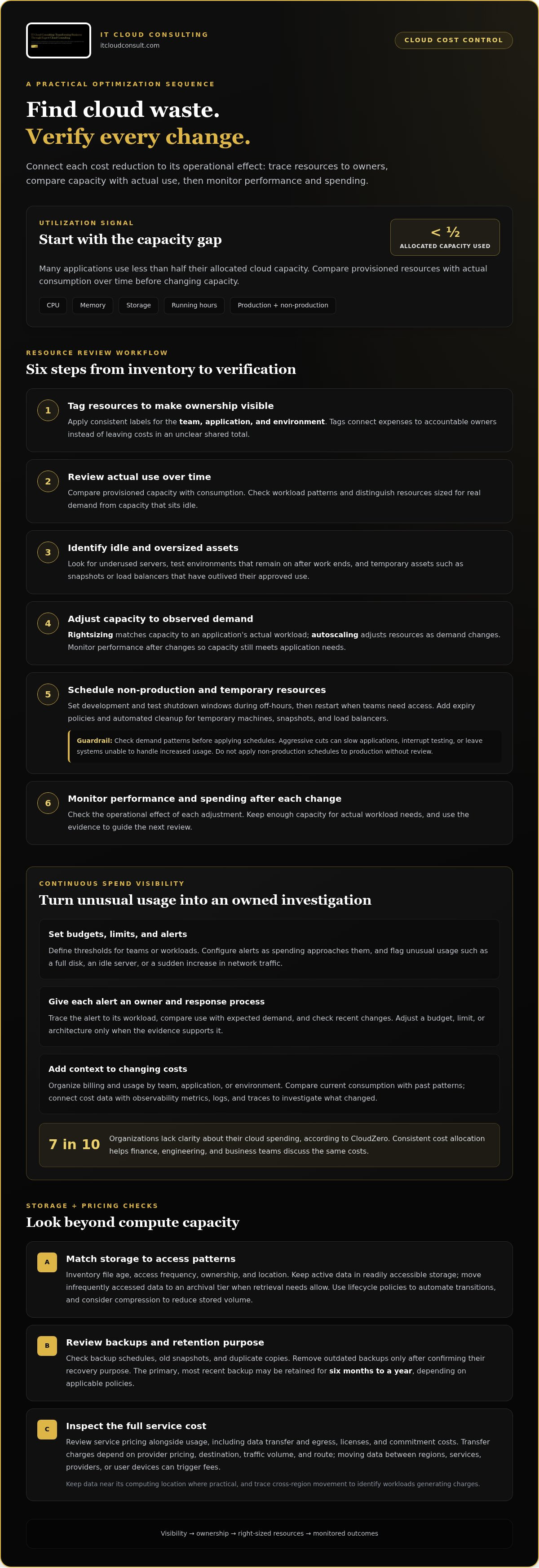
Autoscaling adjusts computing resources as demand changes, while rightsizing matches capacity to an application's actual workload. Together, they limit idle capacity while keeping resources available when usage rises. Many applications use less than half their allocated cloud capacity, so reviewing utilization is a practical starting point.
Start an audit by comparing provisioned capacity with actual consumption over time. Review CPU, memory, storage, and running hours across production and non-production environments. For example, a test server sized for peak demand may sit mostly idle after development work ends. Right-size it to observed needs, then monitor performance to confirm the adjustment still meets application requirements.
Resource tags make expenses easier to trace. Apply consistent tags for the team, application, and environment when creating each cloud resource. These labels connect charges to accountable owners instead of leaving costs in an unclear shared total. Set expiry policies for temporary machines, snapshots, and load balancers, then use automated cleanup routines to remove assets when their approved use ends.
Non-production environments often need different schedules from customer-facing systems. Set shutdown windows for development and test resources during off-hours, then restart them when teams need access. Don’t apply those schedules to production workloads without checking demand patterns. Cutting capacity too aggressively can slow applications, interrupt testing, or leave systems unable to handle increased usage. Keep enough capacity for actual workload needs.
A practical optimization sequence is straightforward: tag resources, review utilization, identify idle or oversized assets, and adjust capacity to observed demand. Then schedule non-production resources and set expiry policies for temporary assets. Finally, monitor performance and spending after each change. This sequence connects each cost reduction to its operational effect, helping teams eliminate waste without assuming every active resource is unnecessary.
2. Continuous spend visibility and anomaly alerts
To understand how to eliminate hidden cloud costs, teams need earlier signals than a monthly invoice provides. Continuous monitoring reveals spending changes while infrastructure is running, giving teams time to investigate. Cloud cost management platforms combine billing and usage data, then organize expenses by team, application, or environment. This view helps identify who pays for each service and where spending is changing.
These platforms can also support forecasting. Compare current consumption with past patterns to estimate likely spending, then assess whether architecture changes explain the difference. Connecting cost data with observability metrics, logs, and traces adds context. A rise in virtual machine costs may reflect increased demand, while an unexpected bandwidth spike may point to data transfer that needs investigation.
Set budgets and resource limits for defined teams or workloads, then configure alerts as spending approaches those thresholds. Alerts can flag unusual usage, such as a full disk, an idle server, or a sudden increase in network traffic. Assign an owner to each alert and establish a response process, so teams investigate the affected service rather than treating every notification as a billing issue.
Governance matters because resources created outside standard processes can fragment visibility and accountability. Apply consistent cost allocation across projects and environments, and review exceptions with no identifiable owner. Seven out of ten organizations lack clarity about their cloud spending, according to CloudZero. Clear allocation helps finance, engineering, and business teams discuss the same costs and make informed trade-offs.
A practical response starts by tracing an alert to its workload, comparing usage with expected demand, and checking for recent changes. Then adjust a budget, limit, or architecture when the evidence supports it. This is how teams can eliminate hidden cloud costs without treating every alert as a reason to cut resources. A focused cloud cost optimization review can help make visibility part of ongoing decisions.
3. Moving infrequently accessed data to lower-cost storage
Start with a storage inventory showing file age, access frequency, ownership, and location. An enterprise might keep completed project files in standard storage long after active work ends. Move infrequently accessed data to an archival tier when retrieval needs allow, and use lifecycle policies to automate the transition. Compression can also reduce the volume stored while preserving the files teams need.
Storage tiers, snapshots, backups, and retention policies all affect expenses. Frequently accessed tiers suit active data, while old snapshots and duplicate backups continue occupying paid capacity. Review backup schedules and remove outdated copies only after identifying the recovery purpose each one serves. A retention policy should balance operational needs, applicable obligations, and efficiency. The primary, most recent backup may be retained for six months to a year, depending on applicable policies.
Set lifecycle rules around actual access patterns rather than moving every older file automatically. For example, keep active customer records in readily accessible storage, then transition completed project archives after teams stop using them regularly. Test retrieval workflows before changing tiers, since access requirements should guide the choice. Review the policy regularly as enterprise data needs change.
Transfer and egress charges depend on the provider’s pricing, destination, traffic volume, and route. Moving data between regions, services, providers, or user devices can trigger fees, even when data entering the cloud is free. Keep data near the computing location where practical, and trace cross-region movement to understand which workloads generate charges.
For a focused review, map storage locations and transfer paths, then flag redundant datasets, outdated snapshots, and backups without a clear purpose. Removing duplicates reduces stored volume; keeping frequently used data near its processing location can also limit unnecessary transfers. Track who owns each dataset and why it remains available. This helps ensure storage changes support access and retention needs while reducing avoidable cloud expenses.
4. Cloud service costs beyond the sticker price
Common hidden cloud costs include idle resources, overprovisioned capacity, storage growth, data transfers, overlapping licenses, and unused commitments. Support fees or extra services may also add costs beyond a service’s headline rate. Reviewing charges by workload helps reveal what drives the total.
Managed databases, Kubernetes, and serverless services can cost more than their base price suggests because of allocated capacity, shared infrastructure, and usage-based components. For Kubernetes, allocating cluster expenses to namespaces and teams can show who uses capacity and how shared platform overhead is distributed. Compare those allocations with workload needs before changing the architecture.
A reserved instance or savings plan can reduce expenses when usage stays high, but an underused commitment can leave the business paying for unneeded capacity. Compare actual consumption with reserved capacity and review contract terms as demand changes. Pay-as-you-go pricing can suit variable workloads, while fixed plans may better fit predictable usage.
Licenses also deserve a detailed review. Teams can pay for overlapping software at both infrastructure and cloud levels, or retain subscriptions after users stop needing them. Check active license use, remove unnecessary overlap, and assess whether consolidating subscriptions under an enterprise agreement fits the organization’s consumption. Flexera reports that 32% of cloud budgets are considered wasteful, making careful cost review a practical optimization priority.
Build a full service-cost view by comparing listed rates with actual usage, commitments, support charges, licenses, and shared infrastructure. Then remove unused resources and reassess pricing arrangements against current demand. This helps teams distinguish useful savings from cuts that could disrupt workloads. Review your cloud service costs to identify where a structured optimization effort can clarify expenses and improve spending decisions.
IT Cloud Consulting: Strategic Cloud Adoption
IT Cloud Consulting helps organizations turn cloud cost findings into practical adoption and optimization plans. If spending reviews reveal persistent inefficiencies, complex workloads, or difficulty connecting technical decisions with business priorities, Strategic Cloud Adoption can help shape the path forward. Cloud Optimization focuses on improving existing cloud use, while Ongoing Cloud Support helps businesses maintain effective cloud management as needs evolve.
This support is especially useful when cost visibility, service configuration, and operational priorities need to be considered together. A structured approach helps teams prioritize improvements, align cloud resources with actual requirements, and make informed decisions as their environment changes.
Contact IT Cloud Consulting to discuss your cloud priorities.
Build cost discipline into your cloud roadmap
Cloud efficiency isn’t a one-time cleanup. As applications, teams, and priorities change, cost decisions need to evolve too. A useful next step is to clarify ownership: connect each spending decision to a business purpose, an accountable team, and an ongoing review. This creates a foundation for eliminating hidden cloud costs over time, rather than treating each unexpected charge as an isolated problem.
IT Cloud Consulting helps organizations turn cloud priorities into a structured plan through Strategic Cloud Adoption, Cloud Optimization, and Ongoing Cloud Support. The right focus depends on whether your next challenge is planning a cloud transition, improving an existing environment, or maintaining effective operations as requirements shift.
Choose a next step that fits your cloud roadmap and gives teams a clear basis for decisions. Contact IT Cloud Consulting to discuss your cloud priorities and move forward with greater clarity.
Frequently Asked Questions
Why Hidden Cloud Costs Are So Hard to Detect?
Cloud costs can be difficult to trace because charges may span accounts, services, and shared platforms. A product team may see its application expenses but not the infrastructure supporting other workloads. Build a cost map connecting billing accounts to projects, applications, and owners. This makes it easier to investigate charges that cross team boundaries and identify the business activity they support.
How can I find out about a cost spike before the invoice arrives?
Compare current consumption with an expected baseline and route anomaly alerts to the people responsible for each workload. For example, after a software release, a sudden increase in requests may raise compute or network usage. A forecast can help determine whether that trend is likely to continue. Set thresholds that prompt investigation, then review the affected service before the billing period closes.
How can businesses reduce cloud computing costs without sacrificing performance?
Use performance indicators to guide changes rather than cutting capacity based on cost alone. Record response times, error rates, and resource utilization before adjusting a workload. Change one setting at a time, then compare results under typical and peak demand. If performance still meets the application’s requirements, keep the adjustment. If it degrades, restore capacity or test a different configuration.
How do you avoid unnecessary cloud costs?
Make resource creation and retirement part of a defined operating process. Require a purpose and owner for new workloads, and set a review point for temporary projects. Before removing a resource, check whether another application depends on it. For example, an old test environment may still support a scheduled release task. Checking dependencies helps prevent avoidable charges without disrupting useful work.
Is pay-as-you-go always cheaper?
No. Pay-as-you-go can suit workloads that rise and fall because spending follows actual consumption. A stable workload may fit a fixed plan or advance commitment better, provided the business uses the capacity it agrees to buy. Compare options with real demand patterns, including seasonal changes and quiet periods. Flexibility also has value, especially when workload requirements are uncertain.
Overspending on Licenses and Subscriptions?
Overspending often occurs when assigned seats exceed active use or teams maintain overlapping subscriptions. Review usage and ownership before renewals, then reclaim seats that no longer serve a current role. For example, compare application access lists with recent sign-in activity and confirm that duplicate tools serve distinct purposes. Track renewal dates centrally so unused subscriptions don’t continue without an owner.


