
A cloud environment setup brings together environment definitions, network access, secrets, installation scripts, and startup settings so a project can be prepared consistently. For tasks that use a private network, both the cloud environment’s access settings and the organization’s VPN rules must allow the required destinations.
Getting these details right reduces setup friction and gives developers a repeatable starting point. This guide explains how to create and publish an environment, configure access and secrets, and use installation scripts and startup settings. It also covers domain allowlists and network access, so required connections work without opening access more broadly than necessary.
Key Takeaways
- Set network access around the destinations each task needs, and align allowlists with organizational VPN rules.
- Define an environment for your project, refine its configuration, and publish it when it is ready for team use.
- Separate configurable environment variables from sensitive network secrets, and control access to each appropriately.
- Use installation scripts and startup settings to prepare dependencies and establish a consistent working state.
Network access levels and domain allowlists
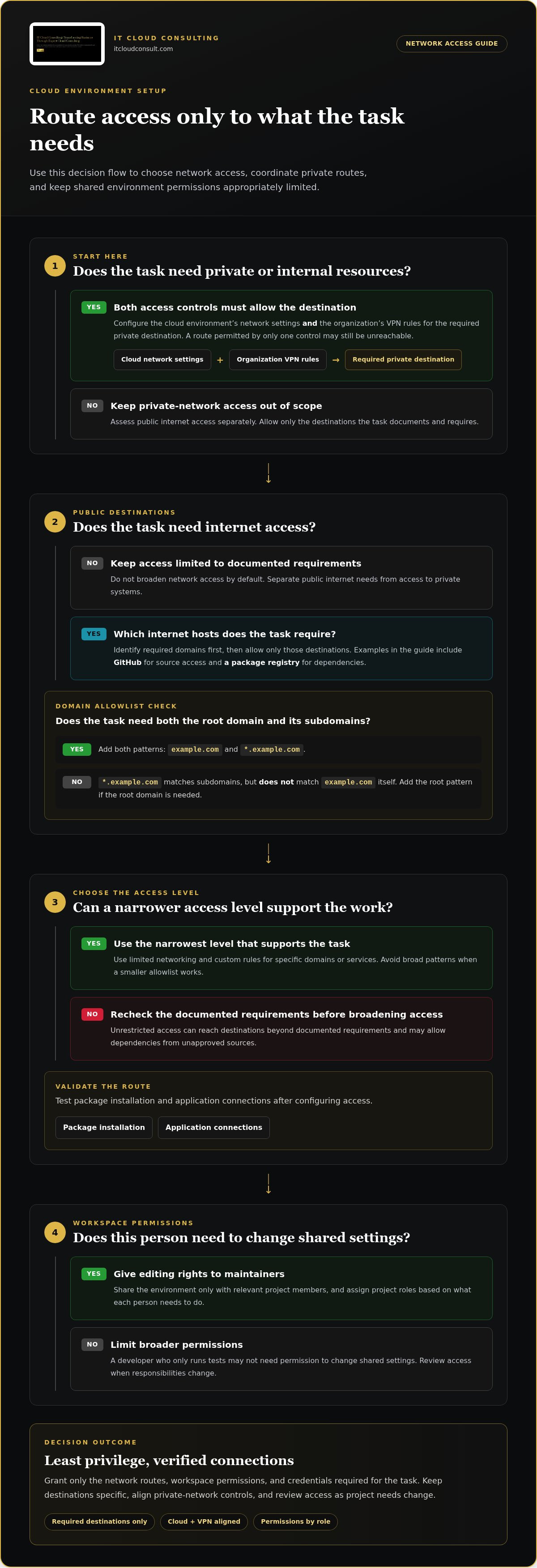
A secure cloud environment setup limits connections and access to what each task needs. Follow least privilege by granting only the network routes, workspace permissions, and credentials required. Define access by role, restrict allowed destinations, and protect credentials. For private-networked tasks, Codex Cloud settings and organizational VPN rules must both allow the required destinations.
A network access level defines which destinations an environment can reach. Start with the narrowest level that supports the work, then test package installation and application connections. A domain allowlist specifies which internet hosts an environment may contact. For example, *.example.com matches subdomains but not example.com itself. Add both patterns if tasks need the root domain and its subdomains.
Workspace access determines who can use or change a shared environment. Share it only with relevant project members, and review access when responsibilities change. Project roles define what each member can do. Give editing rights to maintainers and limit broader permissions to those who need them. For example, a developer who only runs tests may not need permission to change shared settings.
Unrestricted network access lets tasks contact destinations beyond their documented requirements. This can expose services to unnecessary connections and allow dependencies from unapproved sources. Identify required domains first, such as GitHub for source access or a package registry for dependencies, then allow only those destinations. Avoid broad patterns that grant access to every host when a smaller allowlist will work.
Internet access controls whether an environment can reach public network services. Distinguish that need from access to private systems, and document the purpose of each destination. If a task needs internal resources, align the cloud network settings with the organization’s VPN rules; either control alone may block access. Review allowed destinations as projects evolve, especially when an application adds an external dependency. Keep access tied to the work rather than expanding it by default.
Creating and publishing cloud environments
A cloud environment packages the operating system, tools, and settings a project needs. Define its configuration before applying it to a workspace.
Creating and Applying Environments
An environment is a reusable configuration that prepares a workspace for development. Select a base image, such as Ubuntu, then define the required resources and tools. Add setup commands and test them while the environment is running. Apply the validated configuration to the intended workspace, then publish it for team use. This sequence helps keep development and deployment workflows consistent.
For a Cloud Marketplace product, Producer Portal is where publishers prepare product information for listing. Organize the product’s setup guidance alongside its configuration so customers can plan deployment. Its Getting Started document should explain recommended machine configuration, disk sizes, and zones. It should also clarify whether customers need to open ports such as 80 or 443. Clear documentation helps users select settings that match their requirements.
Setup Steps and Operating Costs
A setup sequence turns project requirements into a usable environment. Choose a base image, define resources, add necessary tools and commands, test the workflow, then publish and apply the environment. Typical setup and monthly operating costs depend on the provider, machine configuration, storage, network transfer, software, and usage duration. Estimate these factors against the workload instead of relying on a generic figure.
Keep the first configuration focused on the project’s actual needs. For example, a team running an Ubuntu-based application can validate its build commands before sharing the environment. Document decisions about machine configuration, disk sizes, zones, and required ports in the Getting Started guide. Review the configuration when dependencies or deployment needs change, then publish an updated version for the workspace. This makes the cloud environment setup easier to reproduce and maintain.
Only 7% of organizations can create development environments in under an hour, while most teams lose days before writing a line of code on a new project or branch because environments take time to create. A prepared, reusable setup can help teams get started sooner.
Among surveyed executives, 75% say cloud platform-based environments will have the greatest impact on developer productivity. For Marketplace customers, Getting Started guidance should cover recommended machine configuration, disk sizes, and zones, and whether ports such as 80 or 443 need opening.
Environment variables and network secrets
An environment variable is a named setting that supplies configuration to a running process. A secret is sensitive data, such as an API token or password, that grants access. Keep ordinary settings separate from secrets, and store credentials using the platform’s protected secret mechanism. For example, set an application endpoint as a variable, but store its database password as a secret.
A secret-handling workflow controls how sensitive values enter and leave a project. Add secrets through the approved environment settings, grant access only to tasks and roles that need them, and avoid printing values in logs. Never commit credentials to GitHub or a configuration file tracked by version control. If a secret is committed, remove it from the repository history and replace the exposed value.
A Tailscale VPN provides private network connectivity between authorized devices and services. Use it when a development task needs private resources, such as an internal database. Configure the environment’s network settings and the organization’s VPN access rules for the required destination. A permitted route in only one control may still leave the service unreachable.
Limited networking allows only defined connections, while unrestricted networking permits broader outbound access. Choose limited mode when a task needs only specific domains, such as a package registry or internal service. Use custom rules that match the task’s dependencies, and avoid a broad default that allows every destination. This reduces unnecessary exposure and makes access decisions visible.
Network troubleshooting isolates the setting blocking a required connection. Start by checking the hostname, port, and permission used by the failing task. Confirm that the destination is allowed in the environment settings, then inspect VPN access and DNS resolution. For example, if an internal database name fails but its address works, investigate name resolution. If both fail, review routing and credentials separately, then retest after each change.
Setting BASH_DEFAULT_TIMEOUT_MS above 1800000 milliseconds lengthens the foreground default and the background command time limit. Because this is an environment setting rather than a credential, handle it as configuration, keeping it distinct from sensitive values and using the platform’s protected secret mechanism for credentials.
Installation scripts and startup configuration
A cloud environment combines compute, software, network settings, and startup instructions. Installation scripts prepare these components consistently whenever the environment starts.
VM Deployment and Configuration
VM deployment is the process of launching and configuring a virtual machine for a workload. Choose an operating system and compute configuration suited to the application, then use an installation script for required tools. A script can be loaded from a text file up to 64 KB. Keep commands focused, and test them before relying on each new session.
For a Cloud Marketplace product, document recommended machine configuration, disk sizes, and zones. State whether customers need ports such as 80 or 443. These details help readers align deployment settings with their application’s requirements.
Cloud Networking Configuration
Cloud networking configuration defines how cloud resources communicate with one another and with external services. A cloud environment includes compute resources, software, network configuration, and operational settings. Plan the VPC, divide it into subnets based on workload needs, and configure DNS to resolve the service names applications use.
Organize application, data, and management traffic by purpose. For example, identify which subnet hosts the application and which services it must reach. Add startup checks for required connections, then review the configuration when services or repositories change.
Infrastructure as Code Automation
Infrastructure as code means defining environment resources and settings in version-controlled files. Use it to automate repeatable provisioning, then review proposed changes before applying them. Store startup scripts and configuration alongside relevant project files, while keeping credentials in protected secret storage. This creates a traceable workflow across development and deployment.
Monitoring tracks resource and application health; logging records events for investigation. Configure both to capture useful signals, then define backup and disaster recovery steps around the data and services the workload depends on. For expert guidance aligning deployment, configuration, and ongoing operations, explore strategic cloud adoption support.
IT Cloud Consulting: Strategic Cloud Adoption
IT Cloud Consulting helps businesses plan and advance cloud adoption through strategic guidance and implementation support. If environment settings, access models, and startup workflows need to work together across teams, Strategic Cloud Adoption can align the technical foundation with business priorities.
Turn to this support when evaluating a cloud transition, refining an existing environment, or establishing a more consistent operating approach. Cloud Optimization can improve how cloud resources are configured and used, while Ongoing Cloud Support helps sustain operations as requirements evolve. The right focus depends on whether your priority is planning, refinement, or continued management.
For guidance on your cloud environment plans, contact IT Cloud Consulting or visit itcloudconsult.com.
Make Your Cloud Foundation Ready to Evolve
Treat cloud environment setup as an operating capability, not a one-time technical task. As teams, applications, and priorities change, revisit who owns environment decisions and how teams communicate updates. This creates a clearer path for adapting cloud operations while keeping business goals in view.
IT Cloud Consulting supports that progress through Strategic Cloud Adoption, Cloud Optimization, and Ongoing Cloud Support. These services help organizations plan their cloud direction, improve how they use cloud resources, and sustain operations as needs evolve. Start by identifying where your environment creates friction and which outcome matters most to your organization.
Contact IT Cloud Consulting to discuss your cloud priorities. A considered next step can turn today’s setup into a stronger foundation for what comes next.
A setup script can be loaded from a text file of up to 64 KB, and a wildcard allowlist such as *.example.com matches subdomains, not example.com itself.
Frequently Asked Questions
What cloud account, IAM, and access-control settings should I configure?
Start with account ownership, centralized identity, and strong sign-in controls. Require multifactor authentication for administrators, and use separate identities for routine work and privileged changes. Assign permissions through job-based groups rather than sharing credentials. For example, give a deployment role permission to release an application without granting account-wide administration. Review account activity and remove access when responsibilities change.
What are common cloud setup mistakes, risks, and compliance requirements?
Common mistakes include unclear resource ownership, untracked configuration changes, and backups that teams never test. Establish accountable owners, record changes, and periodically verify that recovery procedures work. Compliance depends on the data and business context. Identify applicable obligations, classify the information handled, and map controls and evidence to relevant frameworks such as HIPAA, GDPR, or SOC 2. Treat PII as sensitive data requiring deliberate governance.


