
Choosing a cloud platform is only part of the decision. The team managing it matters, too. A managed service provider (MSP) handles ongoing IT operations, while a cloud service provider (CSP) supplies services such as infrastructure, platforms, and software. A cloud MSP comparison should weigh both who will manage daily operations and which cloud services your business needs.
It’s reasonable to start with the platform, but the right fit also depends on your team’s technical capacity, security priorities, compliance needs, and data location requirements. Pricing and sales terms matter because they shape the full working relationship, not just the initial selection.
This guide explains how to compare cloud MSPs by business fit, security, compliance, data geography, pricing, and contract terms. You’ll also learn how an MSP differs from a CSP, which services managed providers typically handle, and how to use a practical decision guide to identify the model that best supports your organization.
Key Takeaways
- Match the provider model to your team’s cloud skills and how much day-to-day IT management you need.
- Clarify security responsibilities, compliance needs, and required data geography before comparing proposals.
- Compare AWS, Azure, and Google Cloud support by looking at workload fit, management needs, and how services integrate with your existing environment.
- Assess the scope of ongoing support and the sales terms alongside pricing to understand the full business fit.
Choosing a provider based on business needs
For a small business with limited internal technical capacity, the best cloud MSP is one that can manage daily IT operations. Mid-market and enterprise teams should prioritize providers whose expertise matches their cloud strategy, applications, and operational complexity. A technically capable business that mainly needs cloud infrastructure may prefer a cloud service provider (CSP), while a hybrid environment may benefit from combining both models.
IT Expertise and Provider Incentives
IT expertise determines whether a provider can support your cloud platforms and business applications, rather than simply maintain infrastructure. Compare the provider’s capabilities against your actual environment, such as productivity suite workloads, public cloud resources, or recovery needs after a disaster. Incentives matter too: a provider that earns through cloud consumption may recommend more capacity than your workloads require. Review how recommendations connect to business outcomes and how usage is monitored.
Cloud Managed Services
A cloud MSP combines cloud services with ongoing management, which can include monitoring, maintenance, helpdesk support, software updates, backup, and disaster recovery. This differs from a CSP, which supplies cloud infrastructure, platforms, or software but may not manage your day-to-day IT operations. For example, a business using cloud productivity applications may need an MSP to manage the surrounding IT environment, not just access to the software.
Before comparing proposals, define the scope: identify which cloud services need management, who handles support, and how usage is tracked. Misaligned incentives can arise when a contract rewards consumption rather than efficient operations. Clear reporting on cloud use helps connect provider decisions with your goals, whether you’re scaling applications or controlling unnecessary resource use.
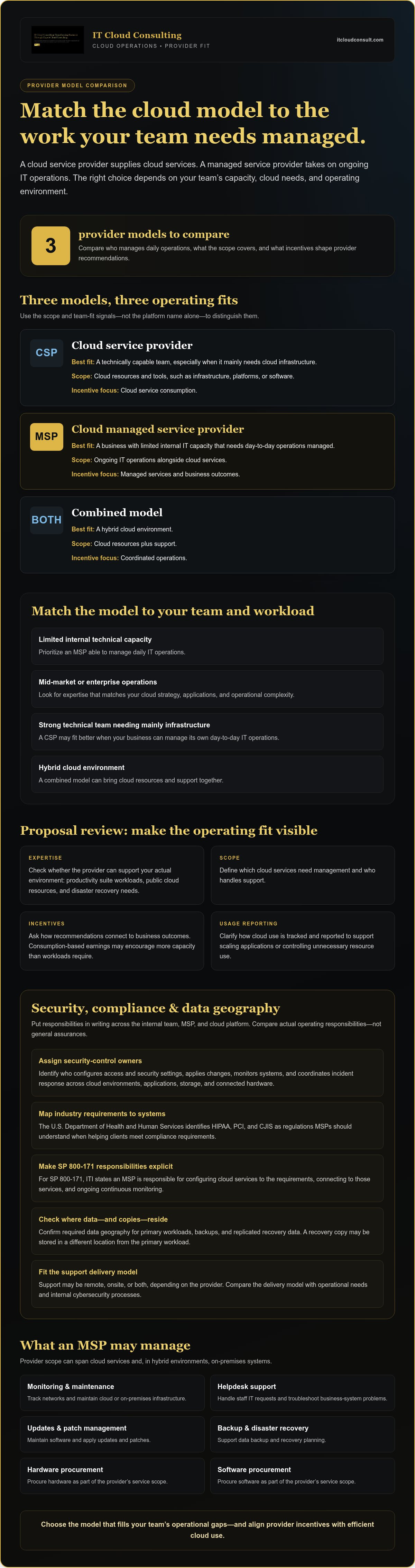
| Option | Best fit | Management scope | Incentive focus |
|---|---|---|---|
| CSP | Technically capable team | Cloud resources and tools | Cloud service consumption |
| Cloud MSP | Limited internal IT capacity | Ongoing IT operations | Managed services and outcomes |
| Combined model | Hybrid cloud environment | Cloud resources plus support | Coordinated operations |
Choose the model that fills your team’s operational gaps and aligns provider incentives with efficient cloud use, drawing on expertise like IT Cloud Consulting when navigating complex migration and management choices.
Security, compliance, and data geography
Security review should define who manages each control across cloud environments, applications, storage, and connected hardware. Put responsibilities in writing: identify who configures access, applies security settings, monitors systems, and responds to incidents. This prevents a gap between your internal team, the MSP, and the cloud platform that hosts your servers.
Cloud MSPs serving U.S. businesses may support AWS, Azure, or Google Cloud environments. Whether support is remote, onsite, or both depends on the provider’s delivery model. Compare that model with your operational needs, and establish how support responsibilities fit with your internal cybersecurity processes.
Industry requirements should guide the cloud solutions you consider. The U.S. Department of Health and Human Services identifies HIPAA, PCI, and CJIS as regulations MSPs should understand when helping clients meet compliance requirements. Map each applicable requirement to the systems that handle the relevant data, then document security responsibilities and evidence of ongoing oversight.
For SP 800-171, Information Technology Industry Council (ITI) states an MSP is responsible for configuring cloud services to the 171 requirements, connecting to those services, and ongoing continuous monitoring. This makes configuration, connectivity, and monitoring explicit comparison criteria, rather than general assurances about security.
Be equally precise about data geography. If security or compliance rules require data to remain in a particular geography, identify where it is stored and how the cloud environment supports that requirement. Include backups and replicated data in your review. For example, a primary workload and its recovery copy may be stored in different locations, so both should meet the organization’s requirements.
To compare cybersecurity practices, document the policies your business sets or adopts from the MSP. Then assign owners for access management, configuration changes, monitoring, and incident coordination. This creates a practical framework for comparing managed environments without confusing the cloud platform’s capabilities with the MSP’s operational responsibilities. For support aligning cloud decisions with business priorities, explore cloud adoption planning.
What services do cloud managed service providers (MSPs) typically offer?
A cloud MSP can manage cloud infrastructure and related IT operations, connecting platform capabilities with day-to-day business needs. Some providers also maintain on-premises systems for businesses with hybrid environments, so their scope may span cloud and local infrastructure.
Core operational work often includes network monitoring and maintenance, helpdesk support, software updates, and patch management. These activities help maintain business systems and give staff a defined route for resolving technical issues. A provider’s scope may also include backup, disaster recovery, and hardware or software procurement.
- Monitoring and maintenance: Track networks and maintain cloud or on-premises infrastructure.
- Helpdesk support: Handle staff IT requests and troubleshoot problems with business systems.
- Updates and patches: Manage software updates across covered systems and applications.
- Backup and recovery: Maintain backup processes and support recovery planning for business data.
- Procurement: Coordinate hardware and software purchasing as part of managed IT operations.
For Microsoft 365, the operating relationship involves the MSP, the customer, and Microsoft. Define which party manages each task, including user support and service administration, so requests reach the right team. Cloud-first service stacks may also include Microsoft 365, cloud-native backup, and cloud-based security tools as standard recommendations.
Scope the engagement by listing each workload, its owner, and the required management activity. For example, separate Microsoft 365 support from backup management and network maintenance. Then identify which services cover cloud resources, which extend to on-premises systems, and how staff access helpdesk support. This makes gaps between the proposal and actual operating needs easier to spot.
Distinguish routine management from project work. A provider may maintain an existing cloud environment, while a separate migration or modernization project requires strategic planning. Clear boundaries for monitoring, updates, recovery, and procurement help you compare service scope without assuming every MSP handles the same tasks.
How do leading cloud MSPs compare for AWS, Azure, and Google Cloud?
AWS, Microsoft Azure, and Google Cloud are popular public cloud service providers. A useful comparison focuses less on brand rankings and more on how an MSP supports your chosen platform, workloads, and operating model. The same provider may suit one environment well and another less effectively.
Start with what your cloud platform does. AWS, Azure, and Google Cloud can provide infrastructure such as virtual machines, storage, and networking. Compare MSP proposals by asking how their managed services align with the resources your business actually uses. For example, a team hosting virtual machines should assess infrastructure management, while an application development team may need support for its platform services.
Use the same criteria for each platform:
- Workload fit: Match the MSP’s support scope to your applications, infrastructure, and cloud usage.
- Operational coverage: Compare monitoring, maintenance, backup, recovery, and support responsibilities.
- Cost oversight: Assess how the provider reviews consumption and identifies unused or unnecessary resources.
- Environment alignment: Consider existing systems and whether your business uses one platform or multiple platforms.
For example, a business already using Azure should compare how each MSP manages its Azure environment rather than relying on broad claims of cloud expertise. A company using AWS and Google Cloud should assess whether the proposed support covers both platforms and coordinates operations across them. These differences matter more than a provider’s broad platform list.
Make your cloud MSP comparison practical by requesting a consistent description of responsibilities for each environment. Map each workload to its platform, then compare management scope, reporting, and support processes side by side. This helps reveal whether a proposal addresses your current architecture or simply describes generic services.
Choose the MSP whose platform capabilities and operating approach best match your workloads and internal expertise. Plan cloud platform adoption around your existing systems, business priorities, and future direction.
IT Cloud Consulting: Strategic Cloud Adoption
IT Cloud Consulting helps businesses turn cloud priorities into a practical path through Strategic Cloud Adoption. This can be a useful next step when your organization is assessing AWS, Azure, or Google Cloud, planning a transition, or aligning cloud decisions with operational goals.
For an existing environment, Cloud Optimization can help improve resource use and efficiency. Ongoing Cloud Support provides continuing assistance as cloud needs evolve. Together, these services connect platform choices with a broader plan for adoption and ongoing improvement.
To shape your cloud direction, contact IT Cloud Consulting to discuss your business needs.
Turn Your Cloud Decision into a Practical Roadmap
A provider choice matters most when it supports how your business intends to operate. Treat your cloud MSP comparison as the start of a working roadmap, not a one-time purchasing decision. Identify the capabilities your organization wants to strengthen, the responsibilities it plans to retain, and the changes that could reshape its cloud environment.
Your direction may evolve as workloads, teams, and priorities change. A deliberate review connects today’s provider arrangement with future requirements, keeping cloud decisions grounded in business objectives rather than habit. IT Cloud Consulting can support that progression by helping organizations plan cloud adoption, optimize cloud use, and maintain ongoing support.
Choose a next step that fits your organization’s priorities. Explore cloud consulting with IT Cloud Consulting and shape a direction that supports your business’s continued growth.
Frequently Asked Questions
What is a Managed Services Provider (MSP)?
A managed service provider (MSP) takes ongoing responsibility for agreed IT operations. A business might outsource routine maintenance, user support, or cloud environment management so its internal team can focus on other priorities. The service scope depends on the agreement, so define which systems and tasks the provider will manage, along with escalation responsibilities.
What Is an MSP?
An MSP is the shortened term for a Managed Services Provider. In a cloud arrangement, it may coordinate the operational work around services supplied by a cloud service provider, rather than replacing that platform. For example, Microsoft supplies Microsoft 365, while a separate MSP may manage related administration and support. The distinction clarifies which organization owns each part of the service relationship.
How much do cloud MSPs charge, and what pricing models do they use?
Cloud MSP fees depend on the agreed scope and are provided after a quote request. Common pricing structures include charges per user, device, or workload, a fixed fee for defined services, or fees based on cloud resource consumption. Compare what each model includes, such as support coverage, monitoring, backups, and platform management. Key cost factors include environment complexity, service scope, and resource use.
How do cloud MSPs compare on certifications, security, and compliance expertise?
Compare providers by matching their documented expertise to your organization’s actual requirements. Distinguish staff credentials from company-level certifications, and check whether each credential applies to the people and services involved in your environment. For compliance, assess their experience supporting relevant frameworks, such as HIPAA or PCI DSS, and whether they can explain how their work supports your controls. Credentials alone don’t establish operational fit.
What should businesses evaluate when choosing a cloud MSP?
Evaluate platform expertise, service scope, security responsibilities, data location requirements, support processes, and contract terms. For a practical cloud MSP comparison, use one workload as a test case: map its platform, users, operational tasks, and business owner, then assess how each proposal addresses it. This makes gaps and assumptions visible. Also establish how changes to workloads or priorities affect agreed responsibilities.
What are the risks and drawbacks of hiring a cloud MSP?
Outsourcing can create dependency if internal teams lose visibility into systems or key operational knowledge. Unclear contract boundaries may leave tasks uncovered, while provider incentives can diverge from efficient resource use. Reduce these risks by defining ownership, access, reporting, escalation paths, and transition responsibilities in the agreement. Keep internal oversight of business priorities, and ensure staff understand how managed services affect their workflows.


