
Cloud risk doesn’t stop at the provider’s perimeter. Effective cloud project risk management accounts for the shared responsibility model: providers secure the cloud infrastructure, while customers protect their settings, permissions, and data. It also assesses technical, business, compliance, and operational risks as one connected picture.
Moving systems to the cloud changes how risks arise and who is responsible for addressing them. A clear process helps teams identify threats, assess their significance, and choose practical responses instead of treating every alert as equally urgent.
This guide explains cloud risk management, how to inventory threats, and how to prioritize them by business impact and likelihood of exploitation. It also compares cloud and on-premises risk management, then outlines a repeatable approach to mitigation, monitoring, and remediation as cloud environments evolve.
Key Takeaways
- Separate provider responsibilities from your own so cloud settings, permissions, and data receive the right controls.
- Build a risk inventory across cloud resources, then prioritize threats by business impact and likelihood of exploitation.
- Account for the shift from managing physical infrastructure on-premises to governing cloud configurations, access, and services.
- Make risk management a continuous cycle of mitigation, monitoring, and response as your cloud environment changes.
1. What is Cloud Risk Management?
Cloud risk management coordinates security, compliance, and continuity across cloud projects. Under the shared responsibility model, providers secure the underlying infrastructure, while organizations govern their cloud settings, permissions, and data. Assess technical, business, compliance, and operational risks together to protect assets, data integrity, and service availability, while identifying potential threats.
Access governance defines who can reach each cloud resource and what actions they can take. Apply least privilege so identities receive only the permissions required for their work. Require multi-factor authentication, and review access when responsibilities change. Map sensitive data and the paths leading to it to help prioritize vulnerabilities that could expose critical information.
Compliance risk depends on the data, industry, and regions involved. The Health Insurance Portability and Accountability Act of 1996 is cited as an example of a compliance requirement by U.S. Congress. Security reviews can also assess relevant standards such as PCI DSS, ISO 27001, and SOC 2. Regular audits and compliance checks reveal control gaps before they disrupt a project.
Business continuity planning prepares teams to respond when systems or data become unavailable. Document which systems and data are covered by backups, and test restoration procedures. An incident response plan should assign roles and explain containment, recovery, and post-incident analysis. This structure helps teams respond to disruptions in a coordinated way.
Project-level security summaries turn technical findings into decisions. Report significant risks, affected assets, owners, remediation progress, and unresolved issues to stakeholders. Pair these summaries with recurring access reviews and security audits. Employee awareness training should cover phishing, secure use of cloud services, and data privacy, using realistic examples from everyday workflows.
Software and consulting costs depend on project scope, cloud resources, required capabilities, and the level of support; pricing is provided after a quote request. Common mistakes include assuming the provider secures everything, retaining excessive permissions, and leaving risks without owners. Define responsibilities, review access regularly, and assign each remediation action to an accountable role.
2. Cloud risk identification, threat analysis, prioritization, and remediation
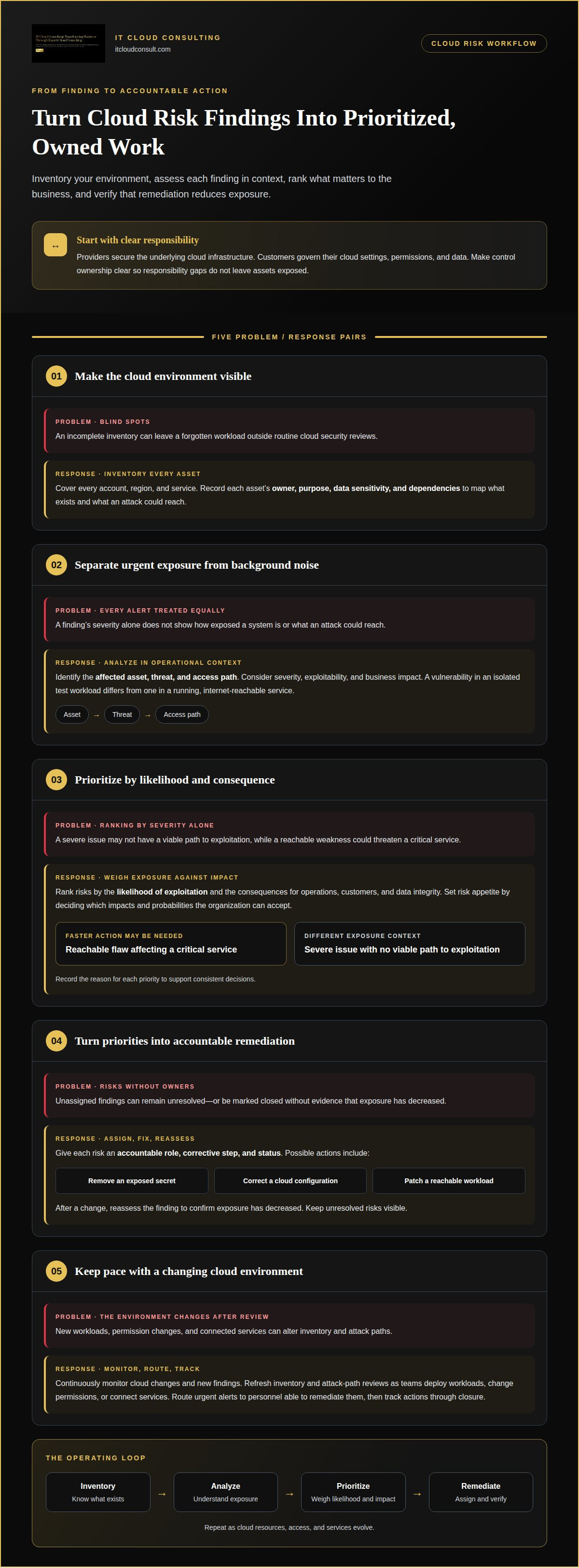
Begin by inventorying cloud assets across every account, region, and service. Record each asset’s owner, purpose, data sensitivity, and dependencies. This map helps teams identify threats and understand which systems an attack could reach. Without an accurate inventory, a forgotten workload can remain outside routine cloud security reviews.
Common cloud project risks include vulnerabilities, exposed secrets, and misconfigurations. Assess each finding in its operational context rather than treating alerts as equally urgent. A vulnerability in an isolated test workload, for example, presents a different level of exposure from one in a running, internet-reachable service. Identify the affected asset, the threat, and the access path connecting them.
Threat analysis should consider severity, exploitability, and business impact. For vulnerabilities, prioritize known CVEs in running workloads based on whether the workload is reachable and exploitable. Attack-path analysis adds context by showing whether a weakness could lead to sensitive data or a critical service. This helps distinguish an isolated defect from a chain of conditions that increases exposure.
Rank risks by weighing the likelihood of exploitation against the consequences for operations, customers, and data integrity. Set risk appetite by deciding which business impacts and probabilities the organization can accept. A reachable flaw affecting a critical service may require faster action than a severe issue with no viable path to exploitation. Record the reason for each priority to support consistent decisions.
Remediation turns priorities into owned actions. Assign each risk an accountable role, a corrective step, and a status. Actions might include removing an exposed secret, correcting a cloud configuration, or patching a reachable workload. Reassess the finding after making a change to confirm exposure has decreased. Keep unresolved risks visible rather than closing them without evidence.
During delivery, monitor cloud changes and new findings continuously. Review inventory and attack paths as teams deploy workloads, change permissions, or connect services. Route urgent alerts to personnel able to remediate them, then track actions through closure. For organizations refining this process, cloud optimization can help align cloud resources and risk priorities.
3. Cloud and on-premises risk management differences
On-premises organizations manage physical data centers, including infrastructure maintenance and security. A server room outage, for example, may require facilities and IT teams to coordinate recovery. Cloud environments shift some infrastructure responsibilities to the provider, changing where teams focus detection, visibility, and remediation. Risk management must account for this shift rather than simply reusing an existing checklist.
Under the cloud shared responsibility model, providers secure the underlying infrastructure, while customers remain responsible for security within their cloud environments, including customer data, configurations, and permissions. A provider’s infrastructure controls cannot correct a customer’s overly broad access settings. Assign clear ownership for each control so gaps between provider and customer responsibilities do not leave assets exposed.
Risk perceptions also differ. More than half of survey respondents believed risks were higher with cloud operations than with on-premises operations. That perception may reflect concerns about visibility, data access, or reliance on provider-managed infrastructure. However, cloud risk varies by project: the services used, data sensitivity, and customer controls shape each project’s threat landscape.
Detection requires different operational views. On-premises teams can focus on facilities, network devices, and servers they manage directly. Cloud teams also need visibility into service configurations, identity permissions, and activity across accounts and regions. For example, exposing a storage resource may call for a configuration correction, while a physical server issue may require infrastructure maintenance.
Cloud environments can also reduce infrastructure procurement schedule risks because teams can provision and deprovision resources as needed. That flexibility supports faster project changes, but it makes ongoing review essential: resources and access paths can change as workloads evolve. Teams should connect monitoring alerts to clear owners, then prioritize remediation according to business impact and exposure.
The shared responsibility model creates risk when roles are misunderstood or customers assume the provider secures their data and settings. Define control ownership, review customer-managed configurations, and route findings to the team authorized to act. This keeps security accountability aligned with the actual cloud environment.
4. Cloud risk management strategy
A practical plan makes risk management a repeatable cycle: assess, mitigate, monitor, and reassess as cloud environments change. For each application, document its assets, business purpose, sensitive data, dependencies, risk owner, and response actions. This gives teams a shared view of priorities and helps manage complexity as services evolve.
To create a cloud project risk management plan, define the project scope, identify threats, assess impact and likelihood, assign owners, and document controls and response steps. Include stakeholders, responsibilities, escalation paths, and the systems and data covered by recovery procedures.
Build safeguards into design and delivery. Encrypt sensitive data at rest and in transit, and use least-privilege, risk-based access controls. A Zero Trust approach evaluates access rather than assuming network location establishes trust. Policy as code can apply approved controls consistently, while automated tests in DevSecOps pipelines can identify configuration defects before deployment.
Continuously monitor cloud services for unauthorized access, breaches, and unusual activity. Aggregate application logs so security teams can detect suspicious patterns, then route actionable alerts to people who can investigate and remediate them. Real-time risk assessments help teams respond when a configuration, workload, or access path changes.
Prepare for disruptions in advance. An incident response plan should define stakeholder buy-in, roles, responsibilities, processes, and the technologies and partnerships needed to act. Set out containment, eradication, recovery, and post-incident analysis. Document which systems and data are covered by backups, and schedule automated offline backups that teams test for restoration.
Include third-party exposure, data ownership, and regional privacy considerations in project reviews. Communicate material risks to leadership and delivery teams so decisions account for security and operational needs. Recurring reviews can then confirm whether controls still fit the applications, data, and dependencies in scope.
Strengthen your cloud risk strategy with strategic cloud adoption guidance tailored to your project’s objectives.
IT Cloud Consulting: Strategic Cloud Adoption
IT Cloud Consulting helps organizations align cloud decisions with business priorities through Strategic Cloud Adoption. Turn to this service when planning a cloud transition or setting a project’s direction, so security, operational needs, and long-term objectives shape the approach.
For an existing cloud environment, Cloud Optimization helps refine how resources support your goals. Ongoing Cloud Support provides continued guidance as your environment and priorities evolve. Together, these services connect initial planning with ongoing improvement, making risk practices part of a broader cloud strategy.
Share your cloud objectives and challenges with IT Cloud Consulting to discuss the right next step.
Make Risk Management Part of Your Cloud Roadmap
Cloud environments will keep evolving, so risk decisions work best when they stay connected to business priorities. Treat cloud project risk management as an ongoing capability, not a checkpoint that ends when a project launches. When your organization’s goals or workloads change, revisit which risks matter and whether your approach still supports the outcomes you need.
IT Cloud Consulting supports this progression through Strategic Cloud Adoption, Cloud Optimization, and Ongoing Cloud Support. These services help align cloud plans with business direction, refine existing environments, and sustain progress as needs develop.
If you’re planning a cloud initiative or reassessing how your current environment supports your goals, contact IT Cloud Consulting to discuss a practical next step. A deliberate approach can help your organization move forward with greater clarity and confidence.
Frequently Asked Questions
What is Cloud Risk Management?
Cloud risk management is the coordinated process of identifying and addressing threats to cloud-based systems, data, and operations. A project storing customer records, for example, can assess who can access them, how exposure could occur, and which business processes depend on them. These decisions connect technical safeguards with operational priorities and keep risk ownership clear.
What is cloud project risk management?
Cloud project risk management applies risk controls to a specific initiative, from planning through delivery and operation. When a team adds a cloud application, for example, it can assess how the application handles sensitive information, who maintains its settings, and how a disruption would affect users. This project-level view connects security decisions to the initiative’s goals, owners, and evolving design.
What steps are involved in assessing and prioritizing cloud project risks?
Start by defining the project boundary and listing its cloud resources, data, and dependencies. Identify threats, document existing safeguards, and assess each risk’s likelihood and business consequences. Compare findings in context, assign an owner and response action, and track progress through resolution. For instance, a flaw on an exposed production service may warrant faster attention than one isolated in a test environment.
What U.S. regulations affect cloud project risk management, including HIPAA, FedRAMP, and CCPA?
Relevant requirements depend on the project’s data, customers, services, and operating context. The Health Insurance Portability and Accountability Act of 1996 is an example of a compliance requirement, according to U.S. Congress. Include HIPAA, FedRAMP, and CCPA in the project’s compliance review where relevant, then map applicable requirements to data flows, access controls, vendor responsibilities, and audit evidence.


