
The right time to select a cloud provider is before committing a workload, once you’ve assessed its architecture, performance needs, and fit with your business. Strong cloud platform selection criteria look beyond features to include deployment options, contract terms, service commitments, and the provider’s long-term business health. That comparison helps you choose a platform suited to the application, rather than forcing every workload into the same model.
Technical capabilities matter, but contractual terms and the provider’s ability to support future needs matter too. This article explains how to assess performance and availability, compare public, private, and hybrid deployment, review service-level agreements (SLAs) and data terms, and evaluate a provider’s stability and fit. These cloud platform selection criteria help you make a considered choice before migration or expansion creates a longer-term dependency.
Key Takeaways
- Test workloads and application performance before choosing, and assess how the provider’s service commitments have held up over time.
- Match the deployment model to your requirements for control, data handling, security, and network dependencies.
- Review service objectives, data ownership, and exit terms so contract expectations remain clear throughout the relationship.
- Assess a provider’s financial stability, future roadmap, support capacity, and compatibility with your broader technology environment.
1. Availability and performance commitments
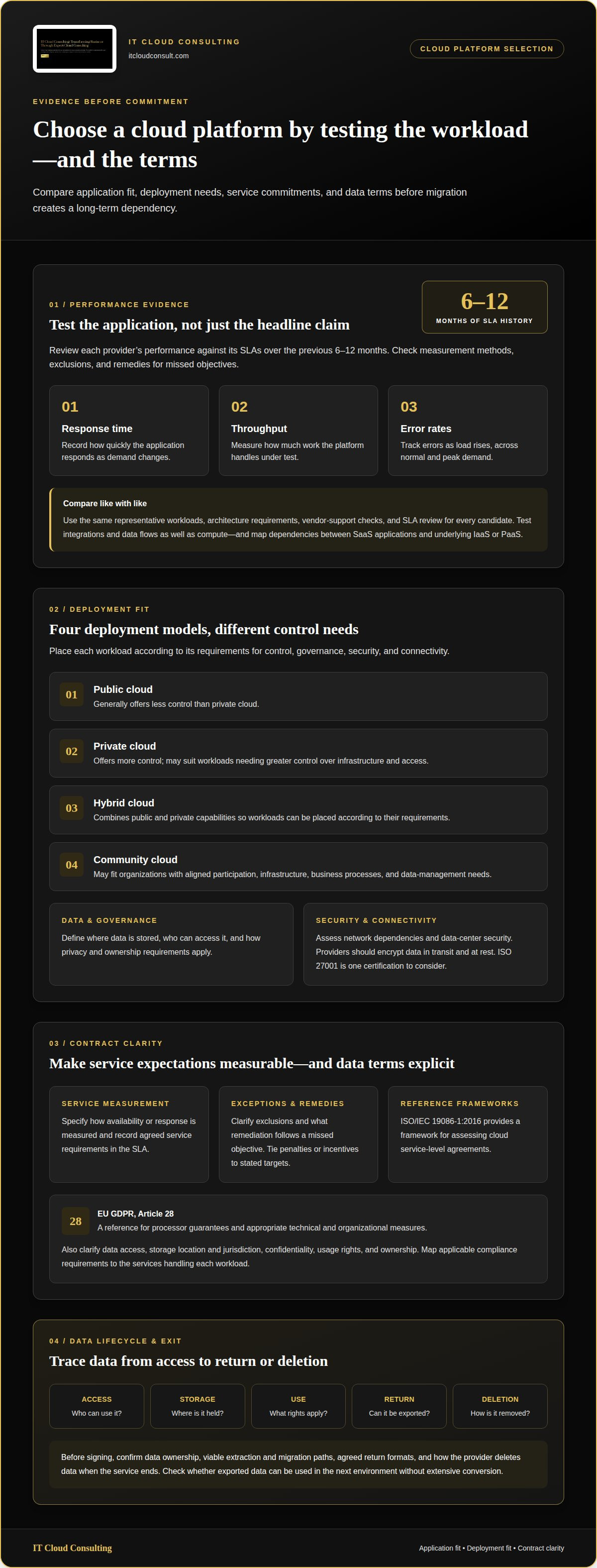
Start with the application, not a provider’s headline availability figure. Identify the software, peak workload, and user response needs, then confirm that the software vendor supports each platform. Business applications commonly run as SaaS, while IaaS and PaaS provide infrastructure and development environments that can support them. The distinction matters: infrastructure cannot make up for poor application performance or missing vendor support. Test representative workloads on candidate architectures under normal and peak demand. Record response time, throughput, and error rates as load rises. These measures show how well a platform fits the application, not just whether it meets a general specification.
How do leading hyperscale providers compare? Apply the same workload tests, architecture requirements, vendor-support checks, and SLA review to all options. When working with IT Cloud Consulting, the best fit depends on your applications and enterprise architecture, not a universal ranking. Compare the service hosting each application, not only a provider-wide availability claim. Review each provider’s performance against its SLAs over the previous 6-12 months, then examine measurement methods, exclusions, and remedies for missed objectives. A SaaS application, for example, may rely on underlying IaaS or PaaS. Map that dependency before assigning responsibility for a slowdown.
Scalability affects performance as well as capacity. Map demand changes to the application architecture, then test how the system responds as workloads grow or contract. A cloud-native application may scale differently from a traditional workload designed to use available hardware performance, so don’t assume one pattern suits every platform. Test integrations and data flows, too: network dependencies or connected services can constrain an otherwise fast compute layer. Include routine transactions and batch workloads where relevant. Assess results at the application level and repeat tests after significant architecture changes. This provides an evidence-based comparison of reliability, growth capacity, and design fit before a provider choice becomes a difficult dependency.
2. Public, private, and hybrid cloud deployment
Choose a deployment model based on each workload’s control, governance, and connectivity needs. The four cloud deployment types are public, private, hybrid, and community clouds. Public cloud generally offers less control, while private cloud offers more. A private environment may suit workloads that require greater control over infrastructure and access. Hybrid cloud combines public and private cloud capabilities, letting organizations place workloads according to their requirements. A community cloud may fit organizations whose participation, infrastructure, business processes, and data management needs align.
Security and governance shape that placement. Define where data will be stored, who can access it, and how privacy and ownership requirements apply. Assess network dependencies, since access to cloud services relies on connectivity between users, applications, and data. Cloud providers should encrypt data while it is transmitted and while it is stored. The International Organization for Standardization identifies ISO 27001 as an example of a certification to consider when security is a priority. Match cybersecurity protections to business needs, then assess whether the chosen data center meets security requirements.
How do cloud platforms compare for data storage, databases, and analytics? Assess each platform against your data volumes, access patterns, integration needs, governance requirements, and analytical workloads. These criteria help establish whether a service fits the workload and how readily its data can connect with other applications.
What tools and skills are needed to migrate workloads to each cloud platform? Begin with an application and data inventory, then map dependencies, access controls, network connections, and migration sequences. Teams need platform-specific knowledge as well as data-transfer, testing, and operational skills. The tools required depend on the source environment and destination architecture.
For a portfolio spanning public and private environments, strategic cloud adoption planning can help align workload placement with security, governance, and operating needs.
3. Contract requirements and service-level agreements
Review the contract before migration, and translate operational needs into measurable service-level objectives. An SLA should define how availability or response is measured, which exclusions apply, and what remediation follows a missed objective. Tie any penalties or incentives to those stated targets, rather than relying on broad assurances. ISO/IEC 19086-1:2016 provides a framework for assessing cloud service-level agreements. Record agreed service requirements in the SLA so technical teams and procurement share the same expectations.
Read data terms as carefully as service commitments. The contract should address data access, storage location and jurisdiction, confidentiality, and usage or ownership rights. The European Union identifies Article 28 of the EU GDPR as a reference for processor guarantees and appropriate technical and organizational measures. Also map applicable federal, state, local, vendor, and customer compliance requirements to the services handling each workload. For example, specify who can access customer records and under what conditions.
Plan your exit before signing. Confirm that data ownership is explicit, extraction and migration paths are viable, and return formats are agreed in advance. The contract should explain how the provider deletes data from its databases when the service ends. Consider whether exported data can be used in the next environment without extensive conversion, since this affects continuity and exit effort. A practical review traces data from access, through storage and use, to return or deletion.
What are typical cloud platform pricing models and costs? Billing may depend on infrastructure usage, network traffic, service choices, and changing demand; some services charge by subscription. Compare total investment, spending variability, potential economies of scale, and how clearly monthly bills explain each charge.
Vendor lock-in can occur when applications rely on provider-specific services or data is difficult to extract. Reduce the risk by documenting dependencies, preserving viable migration paths, and agreeing on export formats and data deletion terms before service begins.
4. Provider business health and company profile
Treat a provider’s business health as an operational dependency, not a branding exercise. A cloud service may meet current technical needs but create risk if its provider cannot sustain investment or support future enterprise requirements. Assess financial stability alongside service history and roadmap alignment. This helps distinguish a platform suited to current workloads from one that supports planned modernization.
Start with continuity. Review how long the provider has delivered the relevant services, its record with comparable workloads, and any changes in service direction. A long operating history alone does not establish future fit, so weigh it against financial position and the provider’s roadmap. For example, if your architecture relies on a managed database, assess whether the provider’s future direction supports that service and its integration needs.
Next, map compatibility across your environment. Identify dependencies on other cloud platforms, management tools, and application architectures. Strong compatibility can support phased adoption, while gaps may add operational complexity. Compare roadmap priorities with enterprise architecture and digital transformation goals. Record affected workloads, required changes, and dependencies to account for transition effort as well as strategic fit.
Support capacity also matters. Assess staffing for the services you use, continuity of expertise, and employee retention. Relate these factors to workload criticality and your internal team’s capacity. For example, a small team managing critical workloads may place greater weight on provider support than a team with sufficient in-house expertise. Include support staffing, track record, financial position, compatibility, and roadmap fit in a documented decision. Assess provider fit for your cloud roadmap as part of strategic cloud planning.
IT Cloud Consulting: Strategic Cloud Adoption
IT Cloud Consulting’s Strategic Cloud Adoption service helps organizations turn cloud platform decisions into a structured adoption path. It is useful when workload requirements, deployment models, and business priorities need to align before migration begins.
As your environment evolves, Cloud Optimization can address changing workloads and efficiency needs. Ongoing Cloud Support provides continued assistance as cloud operations develop. Together, these services connect the initial platform decision with the work of adapting and managing cloud technologies over time.
If you’re preparing for cloud adoption or reassessing your current environment, contact IT Cloud Consulting to discuss your next step.
Build a cloud decision that can evolve
A provider choice should support the business you’re building, not just preserve today’s architecture. Treat cloud platform selection criteria as a decision framework to revisit as products, workloads, and organizational priorities change. Keep the reasoning behind your choice visible so future teams can understand what the platform was selected to enable and which assumptions may need reconsideration.
Make the next step practical: connect cloud decisions to a clear business objective, assign responsibility for reviewing their impact, and identify changes that could prompt a fresh assessment. This turns provider selection into an ongoing part of technology planning rather than a one-time procurement exercise. With this approach, your cloud environment can adapt alongside your strategy.
For support aligning cloud decisions with your organization’s direction, contact IT Cloud Consulting. Move forward with clarity and confidence.
Frequently Asked Questions
When should an organization select a cloud provider?
Select a provider before signing a contract or scheduling a workload migration. This gives technical, security, and business teams time to assess the impact before commitments constrain the design. Revisit the decision when launching a major application, replacing infrastructure, entering a new market, or renewing a cloud agreement. For example, a new customer-facing product may need a different geographic footprint or operating model than an internal system.
What are the key criteria for selecting a cloud platform?
Use cloud platform selection criteria that connect directly to the workload’s business purpose. An application owner can document user needs, dependencies, data sensitivity, operating requirements, and future plans, then use them to compare candidate platforms. For example, a transaction system may prioritize predictable response and recovery, while a development environment may value flexible capacity. Keep the rationale with the decision so teams can revisit it as applications and organizational priorities evolve.
How do cloud providers differ in performance, availability, and regions?
Providers differ in workload performance and where their services can run. Include regional service coverage among your cloud platform selection criteria, alongside network distance to users and connected systems, and application behavior under realistic demand. For a distributed workforce, user location can affect response times. A provider’s broad footprint does not mean every service is available in every region.
What security and compliance certifications should a cloud platform support?
Choose certifications and compliance evidence that match the organization’s obligations, data, and risk profile. ISO 27001 is an example of a certification to consider when security is a priority, according to the International Organization for Standardization. Review the scope of the evidence and whether it applies to the services and locations your workloads use. A certificate alone does not replace assessing access controls, data handling, and internal governance.
How should organizations assess cloud scalability and reliability?
Assess scalability by linking expected demand changes to an operating plan, not just a capacity estimate. Define how teams will detect resource constraints, respond to traffic spikes, and restore service after a disruption. For example, an online service preparing for a product launch might assign owners to monitor capacity and make incident decisions. Reliability also depends on recovery procedures, dependencies, and whether teams can carry them out effectively.
How do support plans and service-level agreements compare across cloud providers?
Compare each provider’s documented support arrangements with your operational needs. Review how to raise an incident, escalation steps, coverage terms, and the responsibilities shared between the provider and your team. For example, identify who coordinates the response when an application depends on both a cloud service and a separate software vendor. Align these arrangements with internal staffing so ownership remains clear during routine operations and service disruptions.


