
Scalability doesn’t start with adding servers. It starts with how the environment is designed. Cloud infrastructure design brings compute, storage, networking, and monitoring together so applications can scale while maintaining availability, security, and performance. The architecture defines how these components connect and respond as workloads change.
Individual cloud services are only as useful as the system they create together. A sound design accounts for business goals, workload demands, operating costs, and security, then uses automation and monitoring to manage resources as conditions change.
This article explains cloud architecture and how its core components work together. You’ll learn how design choices support resilience and performance, where automation helps, and what to consider when building an environment around changing business needs.
Key Takeaways
- Distinguish the infrastructure that delivers cloud resources from the architecture that organizes them around business and workload needs.
- Design for changing demand by balancing scalability, availability, security, and performance rather than optimizing one in isolation.
- Assess compute, storage, networking, and monitoring together to identify bottlenecks and guide resource decisions.
- Use automation and ongoing oversight to manage resource use, strengthen consistency, and adapt the environment as requirements evolve.
What Is Cloud Architecture?
Cloud architecture is the plan for organizing cloud resources, services, and connections around business workloads. Cloud infrastructure design turns that plan into an environment where compute, storage, networking, and monitoring work together.
Cloud Infrastructure and Cloud Architecture
Cloud infrastructure comprises the hardware, software, virtualization, and networking that deliver cloud resources. Cloud architecture defines how those resources fit together. A server, for example, provides computing capacity; the architecture determines how applications use it alongside storage and network services. This distinction helps teams assess both the available components and whether their arrangement meets workload, user, and operational needs.
Cloud Architecture Components
Cloud architecture combines application and service layers with the infrastructure that runs them. Virtualization lets a physical server host multiple virtual machines; storage holds application data, and networks connect users, services, and resources. Management and monitoring tools provide visibility across these components. Mapping a request from user to application to data helps reveal dependencies that affect reliability and cloud security.
Cloud Architecture Models
A public cloud uses provider-operated resources, while a private cloud organizes resources for private use. A hybrid cloud combines public and private environments, allowing workloads to run where they fit best. A multicloud model uses services from multiple public cloud providers. AWS, Google Cloud, and other leading platforms each offer compute, storage, networking, and management services. Compare their capabilities with workload requirements rather than assuming similarly named services are interchangeable.
Architecture Visualization, Monitoring, and Cost
An architecture diagram shows how users, applications, servers, storage, and networks connect, helping teams trace dependencies before making changes. Monitoring compute, storage, and networking can reveal bottlenecks and resource patterns. Cloud infrastructure costs vary with resource use, workload demand, and operating choices, so there is no single cost that fits every environment. To manage spending, audit usage, right-size resources, and match capacity to actual workloads instead of designing every component for peak demand.
Scalability, availability, security, and performance
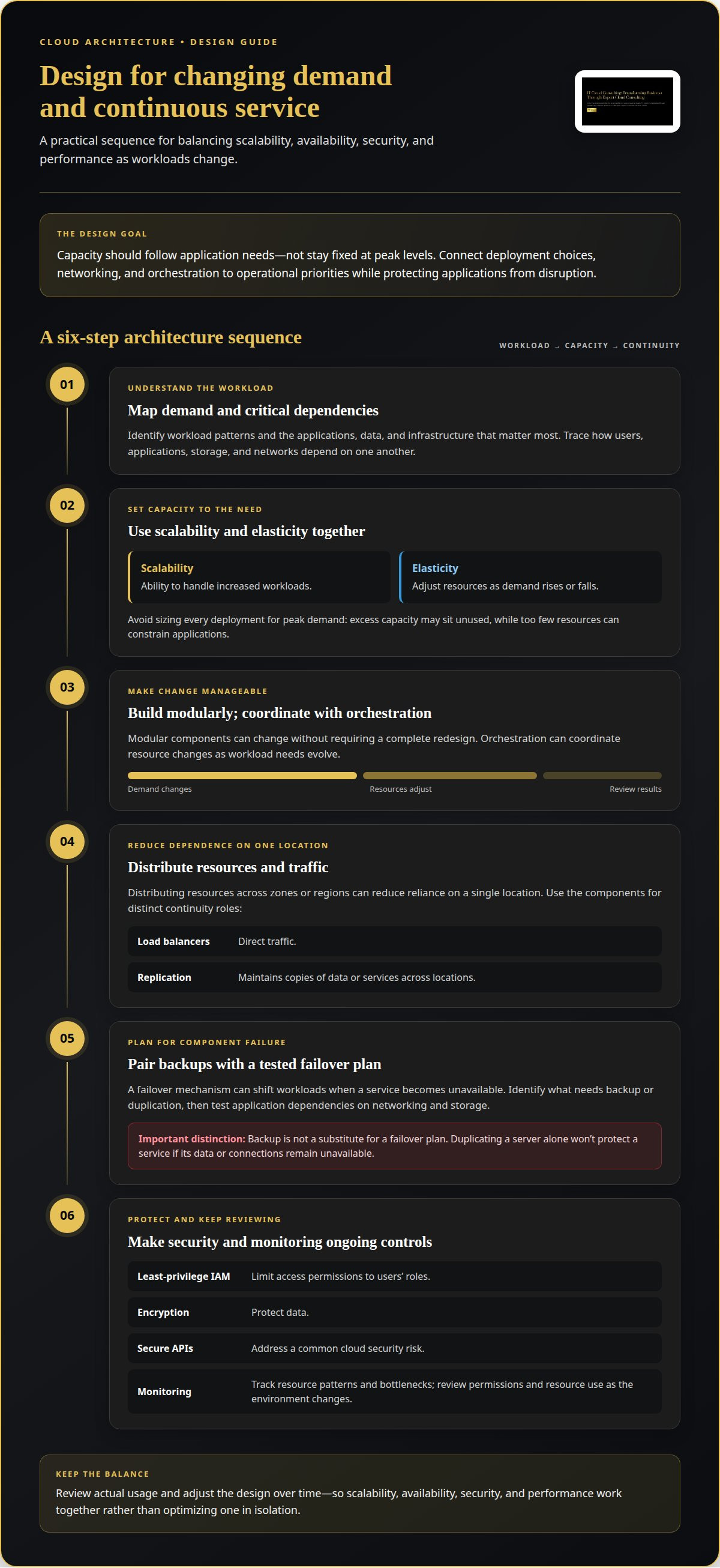
Cloud architecture must adapt to changing demand without weakening protection or disrupting applications. A well-planned design connects deployment choices, networking, and orchestration to operational priorities.
Scalability and Elasticity
Scalability is the ability to handle increased workloads; elasticity adjusts resources as demand rises or falls. Both matter because capacity should follow application needs rather than stay fixed at peak levels. For example, an online service can add resources during a busy period, then release excess capacity as demand eases. Start by identifying workload patterns and choosing cloud services that can respond appropriately.
Modular components make an environment flexible because they can change without requiring a complete redesign. Orchestration can coordinate resource changes, while monitoring shows whether those changes maintain performance. Avoid sizing every deployment for peak demand: excess capacity may sit unused, while too few resources can constrain applications. Review actual usage and adjust the design as workload requirements evolve.
Availability and Fault Tolerance
Availability keeps applications accessible, while fault tolerance helps them continue operating when a component fails. Distributing resources across zones or regions can reduce reliance on a single location. Load balancers direct traffic, and replication maintains copies of data or services across locations. A failover mechanism can shift workloads when a service becomes unavailable, helping maintain continuity for important applications.
First, identify critical applications, data, and infrastructure, then decide what needs backup or duplication. Public and private cloud deployments can use different recovery arrangements, so align the design with each workload’s importance. Test application dependencies on networking and storage: duplicating a server alone won’t protect a service if its data or connections remain unavailable.
Security Risks and Architecture Mistakes
Common risks include overly broad access permissions, unencrypted data, and insecure APIs. These weaknesses can expose cloud services or allow access beyond a user’s role. Make least-privilege IAM policies, encryption, and secure APIs core controls. One frequent design mistake is planning for peak demand across the entire environment, which can leave resources underused and raise operating costs.
Another mistake is treating backup as a substitute for a failover plan. Identify essential applications and data, then establish how they can be restored or kept running during an outage. Review access policies and monitor resource use as the environment changes. Organizations refining resource allocation can explore cloud optimization to align capacity with workload needs.
Processors, storage, networking, and monitoring
Cloud infrastructure brings together computing, storage, networking, software, and management tools. How these components work together shapes the way applications use resources across cloud environments.
Processors and Servers
Server processors execute application instructions, and servers provide the computing resources workloads use. Their capacity affects how quickly applications process requests and complete tasks. A workload with intensive calculations places different demands on a server than one handling routine transactions. Matching processor resources to workload needs supports performance without allocating capacity applications don’t use.
Virtualization also shapes how computing resources are assigned: a hypervisor allocates server capacity to virtual machines. This abstraction lets multiple virtual machines, each with its own operating system, run on one physical server. This matters when planning how applications share underlying resources and how those resources are monitored.
Cloud Storage
Cloud storage gives applications a place to retain and retrieve data. Its role is closely tied to workload behavior: an application that frequently reads or updates data depends on storage access as part of its response process. Consider how applications use stored data when assigning resources and evaluating performance.
Storage also supports continuity when critical data needs backup or replication. For example, duplicating important data across locations can help preserve access during an outage. The right arrangement depends on which applications and datasets are most important to business operations. Monitoring storage performance alongside computing and networking helps identify when data access is constraining an application.
Cloud Networking and Connectivity
Cloud networking connects users, applications, servers, and storage across cloud environments. Its design affects whether requests and data move reliably between the components an application depends on. Evaluate network equipment and services for compatibility, throughput, latency, reliability, and security. These factors help determine whether connectivity meets the workload’s performance needs.
Latency matters when an application exchanges data between services or retrieves information from storage. For example, a slow connection between an application and its data store can delay requests, even when computing capacity is available. Mapping connections reveals dependencies and helps teams decide where workloads and data should run.
Data Movement and Monitoring
Data movement is the transfer of information among users, applications, storage, and connected services. Monitoring compute, storage, and networking helps teams identify bottlenecks along these paths. A delay, for instance, may stem from network throughput, storage access, or limited computing capacity. Examining each component gives a clearer picture than reviewing application performance alone.
Management and monitoring tools show how resources are used and how infrastructure behaves. Teams can use that visibility to spot changes in demand, investigate slow connections, and adjust resources to meet workload needs. Tracking the full path from application request to data response connects infrastructure performance with application availability.
Cloud infrastructure design and automation
A sound design process moves from workload assessment to architecture choices, automation, and ongoing review. It links cloud computing components to business needs, so flexibility supports real workloads instead of adding complexity.
- Assess workloads and goals. Audit applications, where they run, their data, and their operating demands. Identify user needs, cost considerations, security priorities, and critical services. A legacy application may suit a virtual machine, while an application needing portability may fit containers.
- Select suitable models and components. Choose public, private, hybrid, or multicloud environments according to workload needs and business objectives. Map how compute, storage, networking, and applications depend on one another. This view helps teams place workloads appropriately and plan for future changes.
- Build in security and resilience. Apply least-privilege IAM policies, encryption, and secure APIs. Identify critical data and applications, then incorporate backups, redundancy, and failover plans. Include compliance checks in the architecture so operational requirements remain part of deployment, not an afterthought.
- Automate and monitor operations. Use automation for repeatable administrative tasks and resource management. Monitoring helps teams track performance, usage, and costs, while orchestration coordinates changes across components. Review the results and adjust capacity as workload patterns evolve.
Automation makes a design more consistent, but it relies on clear rules. Resource policies, for example, can guide deployment and access, while monitoring can flag unused capacity or bottlenecks. Audit cloud use regularly: designing every component for peak demand can leave resources underused. Right-sizing balances performance needs with efficient resource use.
For a structured assessment of workloads, architecture choices, and adoption priorities, explore Strategic Cloud Adoption with IT Cloud Consulting.
IT Cloud Consulting: Strategic Cloud Adoption
IT Cloud Consulting helps organizations align cloud adoption with business needs through Strategic Cloud Adoption. Consider this service when planning a migration, assessing architecture choices, or setting priorities for a changing environment. A clear strategy connects workload requirements, security considerations, and operational goals before implementation decisions are made.
For an existing environment, Cloud Optimization addresses resource use and performance priorities. Ongoing Cloud Support provides continued assistance as cloud needs evolve. Together, these services support organizations at different stages, from planning a cloud direction to refining and managing environments over time.
To discuss your cloud priorities, contact IT Cloud Consulting or visit itcloudconsult.com.
Shape the Next Stage of Cloud Growth
Cloud infrastructure design works best as an evolving business capability, not a fixed technical blueprint. Record why key decisions were made, which business priorities they support, and what conditions should prompt a review. This gives teams a practical reference when applications, operating needs, or strategic direction change.
Use upcoming changes as opportunities to reassess those decisions. A new workload, changing user demand, or revised business objective can shift which trade-offs matter most. A consistent review process helps decision-makers understand the impact before making changes, align technical work with organizational priorities, and maintain a deliberate path forward. The goal isn’t to prevent change, but to make each change purposeful.
IT Cloud Consulting can help turn cloud priorities into a considered adoption strategy and support ongoing improvement. Contact IT Cloud Consulting to discuss the next step for your organization’s cloud direction.
Frequently Asked Questions
What is cloud IT infrastructure?
Cloud IT infrastructure is the computing foundation that provides access to applications and data through cloud services. It brings together servers or virtual machines, storage, software, and networking, with virtualization enabling resources to be delivered as needed. For example, a business application can run on cloud computing resources while employees access its data from connected devices. Management tools help teams oversee those resources and how they’re used.
What are the core principles of cloud infrastructure design?
Core principles include aligning architecture with business needs, securing access, maintaining reliability, and managing performance and cost. In cloud infrastructure design, these principles become practical review criteria: identify each workload’s importance, assign clear access permissions, and decide how teams will monitor and maintain it. A customer-facing application, for example, may need different availability and recovery priorities from an internal reporting tool.
How do you design a secure and compliant cloud network?
Start by mapping which users, applications, and services need to communicate, then restrict network access to those necessary connections. Apply least-privilege identity policies, encryption, and secure APIs, and monitor network activity for unexpected patterns. For compliance, map applicable requirements to specific workloads, data, and controls, then retain evidence of how those controls operate. This makes security decisions traceable during reviews and operational changes.
How should cloud infrastructure be designed for high availability and disaster recovery?
Design recovery around business-critical applications, their data, and their dependencies. Define which services must return first, where backups or replicated data reside, and how traffic shifts if a location or component fails. Then test recovery procedures, including application startup and data access, rather than assuming a backup alone is sufficient. A recovery plan is useful only if teams can execute and maintain it.
What are cloud infrastructure scalability and performance best practices?
Establish workload patterns and performance requirements before choosing capacity. Use scalable components and adjust resources as demand changes, while monitoring compute, storage, and network behavior for bottlenecks. If application response slows as demand increases, for example, investigate whether processing capacity, data access, or connectivity is the constraint. Right-size resources based on observed usage, then review performance and cost together as workloads evolve.
How do infrastructure as code tools like Terraform and CloudFormation fit into cloud design?
Infrastructure as code describes cloud resources in configuration files, making deployments repeatable and changes easier to review. Terraform supports infrastructure management across cloud environments, while AWS CloudFormation defines and provisions AWS resources. Teams can keep configurations in version control, review proposed changes, and apply consistent patterns across environments. This approach also makes configuration differences easier to spot and helps reduce manual variation during infrastructure updates.


