
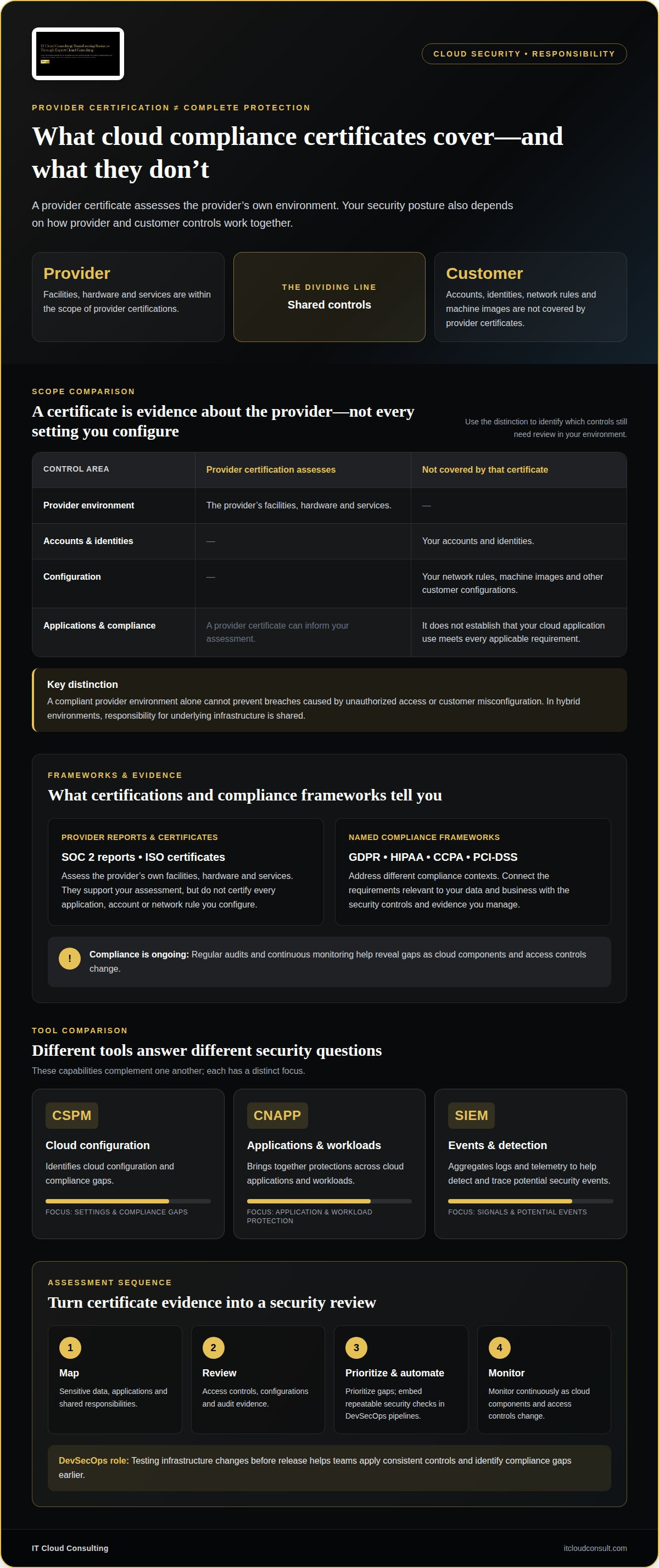
A cloud provider’s compliance certificate does not secure your entire environment. Cloud infrastructure security protects the systems, networks, workloads, and data that support cloud services. Responsibility is shared between the provider and customer, and the division depends on the service model. Provider certifications generally cover the provider’s facilities, hardware, and services, not your accounts, network rules, identities, or machine images.
That distinction matters: even a compliant platform can be exposed by misconfigured settings or excessive access. Strong protection starts with understanding which controls the provider manages and how your organization secures its own cloud resources.
This guide explains how access management controls who can reach cloud systems, which risks can compromise infrastructure, and what provider compliance certifications do and do not cover. It also shows how shared responsibility changes across cloud models, helping you assess your security posture more clearly.
Key Takeaways
- Provider certifications cover the provider’s own services and facilities, but your accounts, identities, and configurations remain part of your security responsibility.
- Encryption, logging, and vulnerability scanning help protect data and reveal weaknesses across cloud environments.
- Use strong authentication and least-privilege access to limit who and what can reach cloud resources.
- Recognize how misconfigurations, breaches, and insider threats can expose systems, then align cloud adoption and ongoing support with your security needs.
Do a Provider’s Compliance Certifications Cover Your Infrastructure?
Provider certifications support compliance, but they do not certify every application, account, or network rule you configure. Your security posture depends on how provider and customer controls work together.
Cloud Security and Regulatory Compliance
Cloud security supports regulatory compliance by protecting sensitive information and producing evidence of how systems are managed. A compliant provider environment alone cannot prevent breaches caused by unauthorized access or customer misconfiguration.
Compliance management connects security controls with the rules relevant to your data and business. The European Union, the U.S. Department of Health and Human Services, and California Privacy identify GDPR, HIPAA, and CCPA as rules intended to support responsible handling of sensitive information.
In hybrid environments, the provider and customer share responsibility for underlying infrastructure. Regular audits and continuous monitoring help reveal gaps as cloud components and access controls change.
Provider Certifications and Compliance Frameworks
Provider certifications, including SOC 2 reports and ISO certificates, assess the provider’s own facilities, hardware, and services. They don’t cover your accounts, network rules, identities, or machine images.
GDPR, HIPAA, and PCI-DSS address different compliance contexts; the European Union, the U.S. Department of Health and Human Services, and PCI Security Stand are relevant sources for these frameworks. A certificate can inform your assessment, but it doesn’t establish that your use of a cloud application meets every applicable requirement. In hybrid deployments, responsibility for the underlying infrastructure is shared.
How do cloud security tools compare? CSPM tools identify cloud configuration and compliance gaps; CNAPP platforms bring together protections across cloud applications and workloads. SIEM systems aggregate logs and telemetry to help detect and trace potential security events.
What do tools and managed services cost? Costs depend on environment size, integrations, coverage, and support needs; pricing is provided after a quote request.
How can you assess and improve security? Start by mapping sensitive data, applications, and shared responsibilities. Review access controls, configurations, and audit evidence; prioritize gaps, automate repeatable checks through DevSecOps pipelines, and monitor continuously.
DevSecOps automation embeds security checks into development and deployment workflows. Testing infrastructure changes before release helps teams apply consistent controls and identify compliance gaps earlier.
What is cloud infrastructure security?
Cloud infrastructure security protects cloud systems, networks, workloads, and data from threats and misconfiguration. Effective practices combine encryption, monitoring, vulnerability scanning, and clear ownership of each environment.
Encryption Across Cloud Data
Encryption converts readable data into protected information, both at rest and in transit. This helps prevent access to stored files or intercepted network traffic from exposing sensitive content.
For stored data, AES-256 is one example of an encryption algorithm. For transfers, Transport Layer Security (TLS) helps protect information from eavesdropping and man-in-the-middle attacks. Apply encryption to backups as well as active databases, then classify data so sensitive records receive appropriate protection. Encryption supports security, but access permissions still determine who can use the data.
Monitoring and Threat Detection
Monitoring records activity and helps identify threats, unusual behavior, and vulnerabilities in cloud environments. A firewall alone cannot reveal every risky action inside an application or account.
Logging and telemetry capture system events, while Security Information and Event Management (SIEM) systems aggregate signals to alert teams and trace potential security events. Regular vulnerability scans can reveal outdated components or unsafe settings for remediation. Monitor inbound and outbound traffic, and use network controls to isolate workloads when appropriate. Regular backups provide recovery options if data is lost or compromised.
Keys, Certificates, and Cloud Security Practices
Key and certificate management controls how encryption keys and digital certificates are protected, used, and maintained. Strong governance is essential because encryption depends on controlling the keys that unlock protected data.
Across AWS, Azure, and Google Cloud, apply consistent practices: restrict access by identity, review permissions, encrypt data at rest and in transit, and monitor configuration changes. AWS’s Well-Architected Framework offers security design guidance, including layered protections and proactive safeguards for AWS workloads. Use the equivalent controls in each environment, assessing them against your architecture rather than assuming one provider’s settings transfer unchanged. In multi-cloud deployments, document responsibility for each component so monitoring and remediation have clear ownership.
Identity and access management
Secure cloud identities by authenticating users and devices, then authorizing only necessary actions. Use multi-factor authentication (MFA), least-privilege permissions, and separate workload identities to reduce unauthorized access.
Authentication and Access Controls
Authentication verifies an identity; authorization determines which cloud resources that identity can use. This distinction matters because a valid login should not automatically grant broad access across an organization.
The National Institute of Standards and Technology (NIST) says authentication and authorization for users and devices happen before an enterprise resource session begins. Implement MFA for accounts that access cloud consoles, administrative tools, and sensitive data. A password plus a second factor makes a stolen password alone less useful.
Assign access through roles that match job functions, such as allowing an analyst to view logs without changing network controls. Keep administrative permissions separate from everyday accounts. These controls limit the impact of compromised credentials and make access decisions easier to review.
Least-Privilege Access
Least privilege gives each identity only the permissions needed for its defined task. Excessive access can let a compromised user or workload reach more systems and data.
For example, give a backup workload permission to read designated files and write backup copies, rather than access to every cloud resource. Give an application separate permissions for its database and monitoring functions. Avoid shared credentials, which make it harder to trace actions to a specific identity.
Review permissions when responsibilities change, and remove access that no longer supports a current task. Check both human accounts and service identities, including those used by automated deployments. NIST SP 800-207 defines zero trust as granting no implicit trust solely because of physical or network location, reinforcing the need to verify each access request.
Workload controls also need clear boundaries. Restrict which services can communicate, and limit access to internal systems according to their purpose. Pair access controls with encryption for sensitive data, since permissions and data protection address different risks. This layered approach helps contain mistakes without blocking legitimate work.
Data breaches, misconfigurations, and insider threats
Cloud attacks exploit exposed data, unsafe settings, stolen credentials, and excessive privilege. Understanding how these risks affect virtual workloads helps organizations prioritize prevention and response.
Common Cloud Infrastructure Threats
A cloud threat is an action or weakness that exposes systems, sensitive data, or service availability. A single misconfigured storage resource, for example, can expose information beyond its intended users.
An unsecured Cognyte cloud database exposed about 5 billion records online. The 2019 Capital One breach exposed around 100 million records in the United States and 6 million in Canada. Insider threats also arise when legitimate access is misused, whether deliberately or through mistakes. Excessive privilege can widen an attack’s reach, while weak policies leave systems exposed. Zero trust limits implicit trust and supports verification of each access request.
Vulnerability Scanning and Threat Intelligence
Vulnerability scanning identifies weaknesses in cloud components, while threat intelligence helps teams interpret potential attack indicators. Together, they help teams prioritize actionable risks rather than treating every finding equally.
Scan virtual workloads and cloud configurations regularly, then assess findings by exposure and sensitivity. For example, an internet-facing application with an unpatched component deserves attention because attackers can reach it directly. Use logs and telemetry to connect suspicious activity with affected accounts or services. Feed relevant threat indicators into monitoring so teams can recognize patterns and investigate promptly.
Responding to Cloud Security Incidents
Incident response is the coordinated process of containing an attack, investigating its scope, and restoring secure operations. A prepared plan, with clear roles and actions, helps reduce confusion during a breach.
When an alert indicates compromise, isolate affected workloads, revoke exposed credentials, and preserve logs for investigation. Identify which systems and sensitive data were accessed, then remove the cause before restoring services from verified backups. After reviewing the incident, update the response plan to address gaps in policies, monitoring, and access controls.
Strengthen readiness through ongoing cloud support that aligns monitoring, response planning, and cloud operations.
IT Cloud Consulting: Strategic Cloud Adoption
IT Cloud Consulting helps organizations shape secure cloud environments through Strategic Cloud Adoption, aligning architecture with operational priorities from the outset. This is a natural next step when planning a migration, expanding workloads, or clarifying how security responsibilities fit into your cloud strategy.
For established environments, Cloud Optimization helps align existing resources with business and security objectives. Ongoing Cloud Support provides continued assistance as cloud environments evolve and operational needs change. Together, these services connect adoption decisions with ongoing improvements, supporting a more deliberate approach to cloud operations.
Contact IT Cloud Consulting to discuss your cloud adoption and security priorities.
Make Security Part of Every Cloud Decision
Cloud environments evolve as applications, teams, and business priorities change. Treat cloud infrastructure security as an ongoing design principle, not a one-time review, so security decisions keep pace with operational change. Clear ownership helps teams make informed choices as architectures develop, while regular reviews keep those choices aligned with organizational priorities.
The next step is to connect security objectives with your cloud roadmap. Consider which business outcomes the environment must support, how responsibilities fit into day-to-day operations, and where expert guidance can shape a durable approach. IT Cloud Consulting helps organizations plan and evolve their cloud environments, turning strategic priorities into a practical path forward.
Contact IT Cloud Consulting for support and take the next step toward a cloud strategy built for sustainable progress.
Frequently Asked Questions
How Does It Work?
Cloud security combines technical safeguards with defined ownership and ongoing oversight. For example, an organization can classify a customer database, restrict which application identities can access it, and record access events for investigation. Automated deployment checks can flag a risky configuration before release. Teams can then prioritize fixes based on monitoring findings, while response plans guide action if suspicious activity appears.
What are the benefits?
Effective cloud security helps organizations protect sensitive information, limit unauthorized access, and maintain visibility across changing workloads. It supports informed decisions by clarifying ownership and highlighting risks that need attention. For example, a team can use audit records to investigate unexpected activity, then adjust access policies or network controls. This connects security operations with business continuity and clearer oversight.
What is cloud infrastructure security and what does it include?
Cloud infrastructure security is the set of safeguards that protect cloud-based systems, networks, workloads, and data. It includes controls for identities, permissions, network traffic, encryption, system configuration, and security monitoring. The specific controls depend on the cloud model and the layers the organization manages. A practical assessment maps each workload to its data, access paths, and responsible security controls.
What are the main cloud security risks and common misconfigurations?
Key risks include data exposure, compromised credentials, insider misuse, vulnerable components, and incorrect cloud settings. A common configuration problem is granting an account broader permissions than its task requires, potentially increasing the impact of a compromised identity. Public cloud customers manage security settings supplied by their provider. Reviewing permissions, network rules, and exposed resources helps identify gaps before they contribute to a breach.
What US laws and compliance frameworks apply to cloud security, such as HIPAA, SOC 2, and FedRAMP?
Which framework matters depends on the information handled, the organization, and the cloud service involved. HIPAA is relevant to sensitive health information, according to the U.S. Department of Health and Human Services. SOC 2 reports address a provider’s controls, but don’t certify a customer’s own accounts or configurations. For FedRAMP-related workloads, assess the applicable requirements for the service and environment rather than relying on a general provider certificate.
What are recent cloud data breach and misconfiguration statistics?
The global average cost of a data breach in 2024 was $4.88 million. These figures illustrate different effects: breach response can carry substantial costs, while a single attack can affect many organizations through connected services and infrastructure.


